Hello,
I'm encountering issues while trying to install and update the nRF Connect SDK (NCS) environment on my macOS system.
[00:07:02] Update available https://nsscprodmedia.blob.core.windows.net/prod/software-and-other-downloads/desktop-software/nrf-command-line-tools/sw/versions-10-x-x/10-24-2/nrf-command-line-tools-10.24.2-darwin.dmg
[00:07:11] Failure (code 1).
[00:07:25] ENOENT: no such file or directory, open '/opt/nordic/ncs/v2.2.0/.west/config' (/opt/nordic/ncs/v2.2.0)
[00:07:25] =========== Toolchain validation report for nRF Connect SDK Toolchain v2.2.0 ===========
[00:07:25] ENOENT: no such file or directory, open '/opt/nordic/ncs/v2.2.0/.west/config' (/opt/nordic/ncs/v2.2.0)
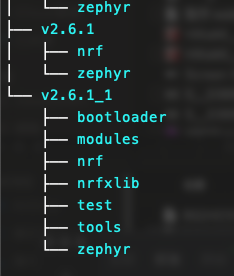
📦 Using the nRF Connect SDK v2.6.1 at /opt/nordic/ncs/v2.6.1
🕒 zephyr-sdk is outdated. Found 0.15.1, but 0.16.5 is required by the SDK.
🕒 cmake is outdated. Found 3.20.5, but 3.21.0 is required by the SDK.
🕒 west is outdated. Found 0.14.0, but 1.2.0 is required by the SDK.
[00:07:46] =========== Toolchain validation report for nRF Connect SDK Toolchain v2.2.0 ===========
[00:07:54] nrfutil-toolchain-manager uninstall v2.2.0: Remove version
[00:07:54] =========== Toolchain validation report for nRF Connect SDK Toolchain v2.6.1 ===========
No issues were detected with the toolchain.
No issues were detected with the toolchain.
[00:08:03] nrfutil-toolchain-manager uninstall v2.5.2: Remove version
[00:08:03] nrfutil-toolchain-manager uninstall v2.5.2: Removed version v2.5.2: success
[00:08:03] nrfutil-toolchain-manager uninstall v2.5.2: Remove toolchain
[00:08:06] nrfutil-toolchain-manager uninstall v2.5.2: Removed toolchain at /opt/nordic/ncs/toolchains/20d68df7e5: success
[00:08:10] nrfutil-toolchain-manager uninstall v2.6.1: Remove version
[00:08:10] nrfutil-toolchain-manager uninstall v2.6.1: Removed version v2.6.1: success
[00:08:10] nrfutil-toolchain-manager uninstall v2.6.1: Remove toolchain
[00:08:14] nrfutil-toolchain-manager uninstall v2.6.1: Removed toolchain at /opt/nordic/ncs/toolchains/580e4ef81c: success
[00:09:11] nrfutil-toolchain-manager install v2.2.0: Download toolchain
[00:10:28] nrfutil-toolchain-manager install v2.2.0: Toolchain downloaded: success
[00:10:28] nrfutil-toolchain-manager install v2.2.0: Unpack toolchain
[00:10:36] nrfutil-toolchain-manager install v2.2.0: Toolchain unpacked to /opt/nordic/ncs/tmp/.tmpikxNNz: success
[00:10:36] nrfutil-toolchain-manager install v2.2.0: Install toolchain
[00:10:36] nrfutil-toolchain-manager install v2.2.0: Toolchain installed at /opt/nordic/ncs/toolchains/v2.2.0: success
[00:10:36] =========== Toolchain validation report for nRF Connect SDK Toolchain v2.2.0 ===========
No issues were detected with the toolchain.

[west]: updating /opt/nordic/ncs/v2.2.0...

[west]: === updating zephyr (zephyr):
[west]: --- zephyr: initializing
[west]: Initialized empty Git repository in /opt/nordic/ncs/v2.2.0/zephyr/.git/
[west]: --- zephyr: fetching, need revision v3.2.99-ncs1
[west]: From https://github.com/nrfconnect/sdk-zephyr
[west]:  * tag                   v3.2.99-ncs1 -> FETCH_HEAD
[west]: error: RPC failed; HTTP 400 curl 22 The requested URL returned error: 400
[west]: fatal: unable to write request to remote: Broken pipe
[west]: Auto packing the repository in background for optimum performance.
[west]: See "git help gc" for manual housekeeping.
[west]: Auto packing the repository in background for optimum performance.
[west]: See "git help gc" for manual housekeeping.
[west]: Auto packing the repository in background for optimum performance.
[west]: See "git help gc" for manual housekeeping.

[west]: updating /opt/nordic/ncs/v2.6.1...

[west]: === updating zephyr (zephyr):
[west]: --- zephyr: initializing
[west]: Initialized empty Git repository in /opt/nordic/ncs/v2.6.1/zephyr/.git/
[west]: --- zephyr: fetching, need revision v3.5.99-ncs1-1
[west]: Auto packing the repository in background for optimum performance.
[west]: See "git help gc" for manual housekeeping.
[west]: From https://github.com/nrfconnect/sdk-zephyr
[west]:  * tag                   v3.5.99-ncs1-1 -> FETCH_HEAD
[west]: error: RPC failed; HTTP 400 curl 22 The requested URL returned error: 400
[west]: fatal: unable to write request to remote: Broken pipe
[west]: Auto packing the repository in background for optimum performance.
[west]: See "git help gc" for manual housekeeping.
[west]: Auto packing the repository in background for optimum performance.
[west]: See "git help gc" for manual housekeeping.
IMPORTANT: The data below could contain sensitive or confidential information about your environment.
If you do not wish this to be seen by others, please make sure to remove it before sharing.

For help and support, visit the Nordic DevZone at https://devzone.nordicsemi.com/.
- NCS versions attempted: 2.2.0, 2.6.1
I'm unsure how to resolve these issues and would appreciate any guidance on how to successfully install and update the NCS environment on macOS.
Thank you in advance for your help!