How to customise Matter Thermostat sample code

Hi All,

We are developing a heater controller using Nordic Matter Thermostat sample code. The sample code has following value.

  1. Off
  2. Heating set point
  3. Cooling set point

For our specific requirement we need only 1 and 2. So my question is how to remove Cooling set point from matter sample code and Apple home app (probably remove from the Google/Alex app too).  My other question is how to modify the Heating set point min and max values since the max value in the sample code is not sufficient for our use case. 

Really appreciate your kind support regarding the above matter.

Regards,

Chamal

Parents
  • Hi,

    So my question is how to remove Cooling set point

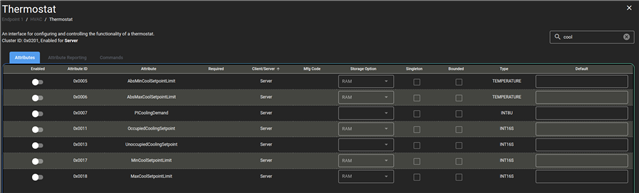
    You must disable the attributes related to cooling set using ZAP tool.

    For instructions on how to use the ZAP tool, see Edit clusters using the ZAP tool in our documentation. Make sure to generate the files after saving the ZAP file.

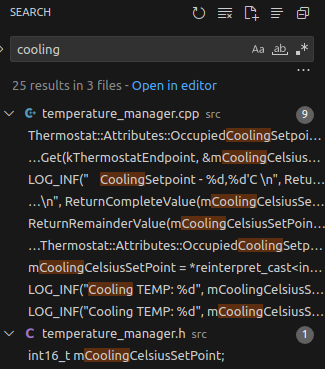
    When you have done this, you can remove everything related to the cooling setpoint from the code. The easiest way is to open the project in VS Code and search for 'cooling':

    My other question is how to modify the Heating set point min and max values since the max value

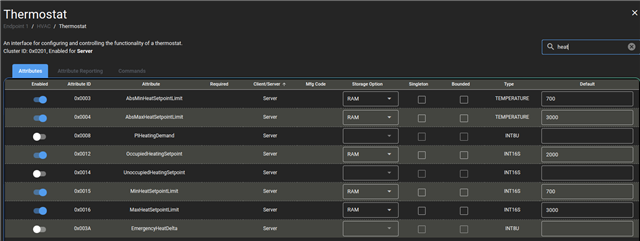
    You can modify this with the ZAP Tool by changing the value in the 'Default' field of the attribute you want to modify.

    Best regards,
    Marte

Reply
  • Hi,

    So my question is how to remove Cooling set point

    You must disable the attributes related to cooling set using ZAP tool.

    For instructions on how to use the ZAP tool, see Edit clusters using the ZAP tool in our documentation. Make sure to generate the files after saving the ZAP file.

    When you have done this, you can remove everything related to the cooling setpoint from the code. The easiest way is to open the project in VS Code and search for 'cooling':

    My other question is how to modify the Heating set point min and max values since the max value

    You can modify this with the ZAP Tool by changing the value in the 'Default' field of the attribute you want to modify.

    Best regards,
    Marte

Children
Related