nRF Connect for Mobile: iOS "erase" command runs "reset" command instead

The image erase button in the iOS version of the app send the OS RESET (Group 0, Command 5) command, instead of the IMG ERASE (Group 1, Command 5) command.
The Android version of the app does not have the same issue.
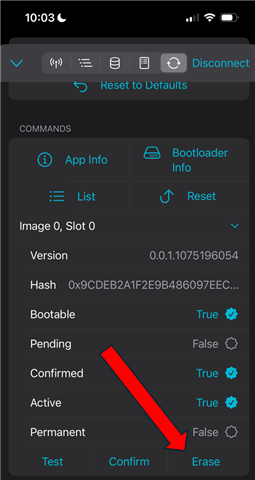
Upon clicking "Erase", the connected device reboots.
After adding additional debug information, it is easy to see why:

SMP CMD: GRP: 0 ID: 5 OP: 2
... Immediately
RC: 0

Compared to the Android app:

SMP CMD: GRP: 1 ID: 5 OP: 2
... Delay of ~2 seconds
RC: 0

iOS app version: 2.7.10
Android app version: 4.28.1

Parents
  • Hello,

    I wanted to let you know that I have been assigned to this and have started looking into it. There is a possible chance that this might be a bug with the iOS version of the app. Could you explain exactly what you are trying to achieve here? Are you attempting a device firmware update, or at what point does the erase option cause it to reboot? Which application is running inside the Nordic device?

    Kind regards,
    Abhijith

Reply
  • Hello,

    I wanted to let you know that I have been assigned to this and have started looking into it. There is a possible chance that this might be a bug with the iOS version of the app. Could you explain exactly what you are trying to achieve here? Are you attempting a device firmware update, or at what point does the erase option cause it to reboot? Which application is running inside the Nordic device?

    Kind regards,
    Abhijith

Children
  • As the button suggests, I am trying to erase the image in the secondary slot.

    The erase option causes the device to reboot when you press it.

    As the debug information I provided shows (I did not change the application firmware between runs), the application is simply sending the wrong command. The application behaves as expected when the action is triggered from the Android version.

    The application is my own.

Related