Power Profiler Kit II not visible on Power Profiler V4.2.0

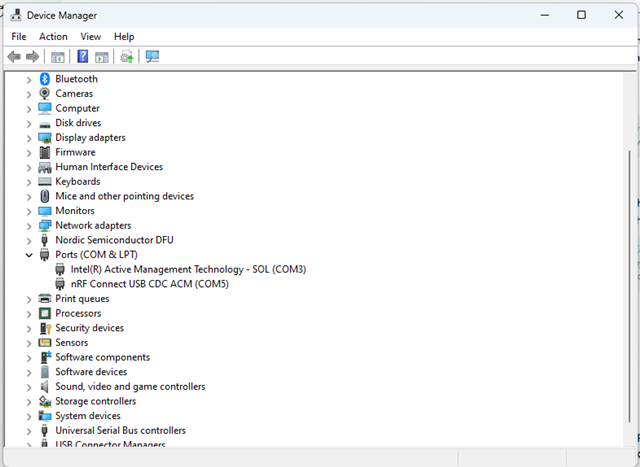
I'm running Windows 11, have the kit connected with a microUSB cable and it shows up as a properly working nRF device on COM5 in device manager. I'm using v5.0.2 of nRF Connect for Desktop and V4.2.0 of Power Profiler. I am getting a pulsating green light on the kit but nothing shows up when I click "Select Device" in the app. Pretty disappointed at this point. I have a small amount of time to get my work done and now I'm having to struggle through connectivity issues. Not good...

Parents Reply
  • Yes, even though not connected to anything it should ideally show up. 

    CaveManZeb said:
    The sticker says 1.1.1 and 2024.24.

    Thank you. This is what I needed.

    Could you verify whether you have connected the microUSB to the USB DATA/POWER port of the PPK2 and not the USB POWER ONLY port? If it's to the power only port, then the PPK2 won't be detected. If this is also not the issue, please make sure that your USB cable also support DATA & POWER.

    -Priyanka

Children
  • I plugged the USB cable into the Data/Power port on the PPK2 and, as far as I can tell, the cable supports data and power. When I plug the cable into the USB port on the laptop, the Device Manager shows an nRF device connected to COM5. That suggests to me that the cable is good and is communicating with the PPK2. It's just that the Desktop App doesn't detect it. Can I manually select COM5 somehow?

  • Hi Jeff,

    It really looks like the Desktop App is the culprit here. Sorry for the trouble, but sometimes some faults or glitches during downloads can cause this. As a final attempt, could you please uninstall and re-install the Desktop app?

    Please make sure you have SEGGER J-Link installed as well as latest versions of nRF Command Line Tools.

    Regards,

    Priyanka

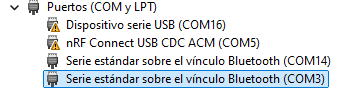
  • Hi, I found this thread looking for a solution for my issue. which is very similar to this. My COM ports on Device Manager look like this:

    PS: sorry for my PC in spanish Slight smile

    My PPK-II does appear on the Power profiler app, but it doesn't connect when I click it, it stays 'Connecting' forever.

    There's something wrong with the COM ports but I have already tried uninstall COM3 and COM14, but when I reconnect my PPK2 they re-appear.

    I also tried on another PC and the PPK2 works perfectly, the COM ports on that other PC shows without the warning icon as it happens in mine Disappointed

    So really frustrated about not knowing what to do...

  • Hi Andy,

    Since your PPKII works well with a different PC, there could be some issue with your USB drivers or COM port conflicting assignments. I am not sure regarding this and would encourage you to ask in a different forum (Maybe that of Windows Support in case your OS is windows) for a quick solution.

    -Priyanka

Related