Hi everyone:
I try to build the project which i create by example bluetooth peripheral_uart in SDK v2.7.0
But it build fail
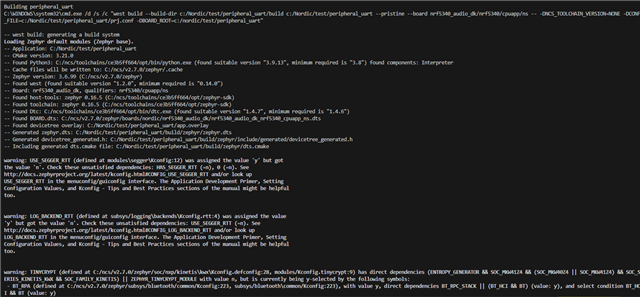
Loading Zephyr default modules (Zephyr base).
-- Application: C:/Nordic/test/peripheral_uart_2
-- CMake version: 3.21.0
-- Using NCS Toolchain 2.6.20240605.885759407716 for building. (C:/ncs/toolchains/ce3b5ff664/cmake)
-- Found Python3: C:/ncs/toolchains/ce3b5ff664/opt/bin/python.exe (found suitable version "3.9.13", minimum required is "3.8") found components: Interpreter
-- Cache files will be written to: C:/ncs/v2.7.0/zephyr/.cache
-- Zephyr version: 3.6.99 (C:/ncs/v2.7.0/zephyr)
-- Found west (found suitable version "1.2.0", minimum required is "0.14.0")
-- Board: nrf21540dk, qualifiers: nrf52840
-- Found host-tools: zephyr 0.16.5 (C:/ncs/toolchains/ce3b5ff664/opt/zephyr-sdk)
-- Found toolchain: zephyr 0.16.5 (C:/ncs/toolchains/ce3b5ff664/opt/zephyr-sdk)
-- Found Dtc: C:/ncs/toolchains/ce3b5ff664/opt/bin/dtc.exe (found suitable version "1.4.7", minimum required is "1.4.6")
-- Found BOARD.dts: C:/ncs/v2.7.0/zephyr/boards/nordic/nrf21540dk/nrf21540dk_nrf52840.dts
-- Found devicetree overlay: C:/Nordic/test/peripheral_uart_2/app.overlay
-- Generated zephyr.dts: C:/Nordic/test/peripheral_uart_2/build/peripheral_uart_2/zephyr/zephyr.dts
-- Generated devicetree_generated.h: C:/Nordic/test/peripheral_uart_2/build/peripheral_uart_2/zephyr/include/generated/devicetree_generated.h
-- Including generated dts.cmake file: C:/Nordic/test/peripheral_uart_2/build/peripheral_uart_2/zephyr/dts.cmake

warning: USE_SEGGER_RTT (defined at modules\segger\Kconfig:12) was assigned the value 'y' but got
the value 'n'. Check these unsatisfied dependencies: HAS_SEGGER_RTT (=n), 0 (=n). See
http://docs.zephyrproject.org/latest/kconfig.html#CONFIG_USE_SEGGER_RTT and/or look up
USE_SEGGER_RTT in the menuconfig/guiconfig interface. The Application Development Primer, Setting
Configuration Values, and Kconfig - Tips and Best Practices sections of the manual might be helpful
too.


warning: LOG_BACKEND_RTT (defined at subsys/logging\backends\Kconfig.rtt:4) was assigned the value
'y' but got the value 'n'. Check these unsatisfied dependencies: USE_SEGGER_RTT (=n). See
http://docs.zephyrproject.org/latest/kconfig.html#CONFIG_LOG_BACKEND_RTT and/or look up
LOG_BACKEND_RTT in the menuconfig/guiconfig interface. The Application Development Primer, Setting
Configuration Values, and Kconfig - Tips and Best Practices sections of the manual might be helpful
too.


Parsing C:/Nordic/test/peripheral_uart_2/Kconfig
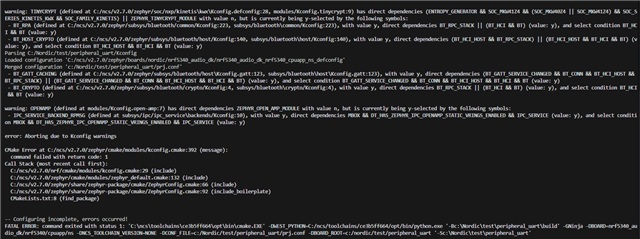
warning: TINYCRYPT (defined at C:/ncs/v2.7.0/zephyr/soc/nxp/kinetis\kwx\Kconfig.defconfig:28, modules/Kconfig.tinycrypt:9) has direct dependencies (ENTROPY_GENERATOR && SOC_MKW41Z4 && (SOC_MKW40Z4 || SOC_MKW41Z4) && SOC_SERIES_KINETIS_KWX && SOC_FAMILY_KINETIS) || ZEPHYR_TINYCRYPT_MODULE with value n, but is currently being y-selected by the following symbols:
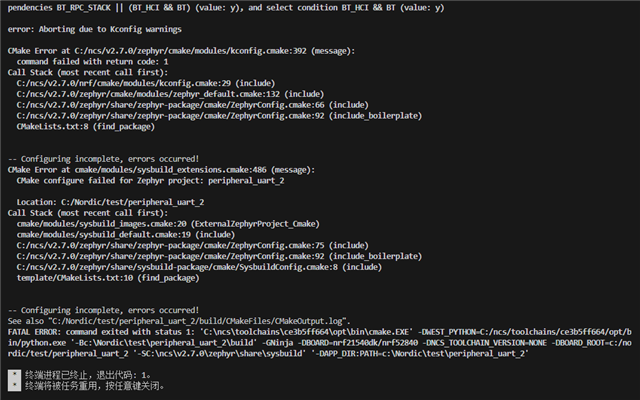
 - BT_RPA (defined at C:/ncs/v2.7.0/zephyr/subsys/bluetooth/common/Kconfig:223, subsys/bluetooth\common/Kconfig:223), with value y, direct dependencies BT_RPC_STACK || (BT_HCI && BT) (value: y), and select condition BT_HCI && BT (value: y)
 - BT_GATT_CACHING (defined at C:/ncs/v2.7.0/zephyr/subsys/bluetooth/host\Kconfig.gatt:123, subsys/bluetooth\host\Kconfig.gatt:123), with value y, direct dependencies (BT_GATT_SERVICE_CHANGED && BT_CONN && BT_HCI_HOST && BT_RPC_STACK) || (BT_GATT_SERVICE_CHANGED && BT_CONN && BT_HCI_HOST && BT_HCI && BT) (value: y), and select condition BT_GATT_SERVICE_CHANGED && BT_CONN && BT_HCI_HOST && BT_HCI && BT (value: y)
 - BT_CRYPTO (defined at C:/ncs/v2.7.0/zephyr/subsys/bluetooth/crypto/Kconfig:4, subsys/bluetooth\crypto/Kconfig:4), with value y, direct dependencies BT_RPC_STACK || (BT_HCI && BT) (value: y), and select condition BT_HCI && BT (value: y)

error: Aborting due to Kconfig warnings

Loaded configuration 'C:/ncs/v2.7.0/zephyr/boards/nordic/nrf21540dk/nrf21540dk_nrf52840_defconfig'
Merged configuration 'C:/Nordic/test/peripheral_uart_2/prj.conf'
Merged configuration 'C:/Nordic/test/peripheral_uart_2/build/peripheral_uart_2/zephyr/.config.sysbuild'
CMake Error at C:/ncs/v2.7.0/zephyr/cmake/modules/kconfig.cmake:392 (message):
  command failed with return code: 1
Call Stack (most recent call first):
  C:/ncs/v2.7.0/nrf/cmake/modules/kconfig.cmake:29 (include)
  C:/ncs/v2.7.0/zephyr/cmake/modules/zephyr_default.cmake:132 (include)
  C:/ncs/v2.7.0/zephyr/share/zephyr-package/cmake/ZephyrConfig.cmake:66 (include)
  C:/ncs/v2.7.0/zephyr/share/zephyr-package/cmake/ZephyrConfig.cmake:92 (include_boilerplate)
  CMakeLists.txt:8 (find_package)


-- Configuring incomplete, errors occurred!
CMake Error at cmake/modules/sysbuild_extensions.cmake:486 (message):
  CMake configure failed for Zephyr project: peripheral_uart_2

  Location: C:/Nordic/test/peripheral_uart_2
Call Stack (most recent call first):
  cmake/modules/sysbuild_images.cmake:20 (ExternalZephyrProject_Cmake)
  cmake/modules/sysbuild_default.cmake:19 (include)
  C:/ncs/v2.7.0/zephyr/share/zephyr-package/cmake/ZephyrConfig.cmake:75 (include)
  C:/ncs/v2.7.0/zephyr/share/zephyr-package/cmake/ZephyrConfig.cmake:92 (include_boilerplate)
  C:/ncs/v2.7.0/zephyr/share/sysbuild-package/cmake/SysbuildConfig.cmake:8 (include)
  template/CMakeLists.txt:10 (find_package)


-- Configuring incomplete, errors occurred!
See also "C:/Nordic/test/peripheral_uart_2/build/CMakeFiles/CMakeOutput.log".
FATAL ERROR: command exited with status 1: 'C:\ncs\toolchains\ce3b5ff664\opt\bin\cmake.EXE' -DWEST_PYTHON=C:/ncs/toolchains/ce3b5ff664/opt/bin/python.exe '-Bc:\Nordic\test\peripheral_uart_2\build' -GNinja -DBOARD=nrf21540dk/nrf52840 -DNCS_TOOLCHAIN_VERSION=NONE -DBOARD_ROOT=c:/nordic/test/peripheral_uart_2 '-SC:\ncs\v2.7.0\zephyr\share\sysbuild' '-DAPP_DIR:PATH=c:\Nordic\test\peripheral_uart_2'

 *  终端进程已终止,退出代码: 1。
 *  终端将被任务重用,按任意键关闭。
Thank you for helping me