nRF Connect for VS Code Plugin - J-Link probe not showing up in "Connected Devices" in latest extension release

Hello,

On nRF Connect for VS Code extension v2024.9.87 and v2024.9.31, a USB connected J-Link probe (Segger Edu Mini) no longer appears under "Connected Devices".

J-link probe under nRF Connect for VS Code extension v2024.7.13 and earlier versions works fine in "Connected Devices".

Environment: Mac OS 11.7.10 (Big Sur), VS Code v1.19.2


What has changed in the Sep 2024 build to break the functionality?  Thank you.

Regards,
Ravi

Parents
  • Hi Ravi,

    I have reported this internally. In the meantime, could you upload your "Support Information" from the VSCode?

    Regards,

    Priyanka

  • Hi,

    Could you try to list the devices on command line? To make sure the same version is installed in the system: nrfutil install device=2.5.0 --force
    The monitor process we start looks like this: nrfutil device --json list --hotplug --traits seggerUsb
    When this is running, try to connect/disconnect the device and see what output is generated.

    Please let us know your J-Link DLL version too.

    Also, have you tried clicking the refresh icon in the connected devices panel.

    -Priyanka

  • Hi Priyanka,

    Thanks.

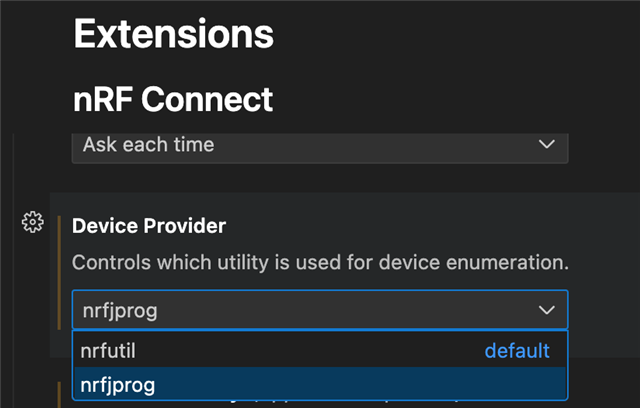
    With the latest "nRF Connect for VS Code" extension v2024.9.87, it looks like I have a workaround if I use nrfprog instead of nrfutil as the device enumerator in the nRF Connect extension settings.

    nrfjprog finds the J-Link Edu Mini under "CONNECTED DEVICES".


    ________________________________________________________________

    I tried again to upgrade to the latest nrfutil b.y using the following

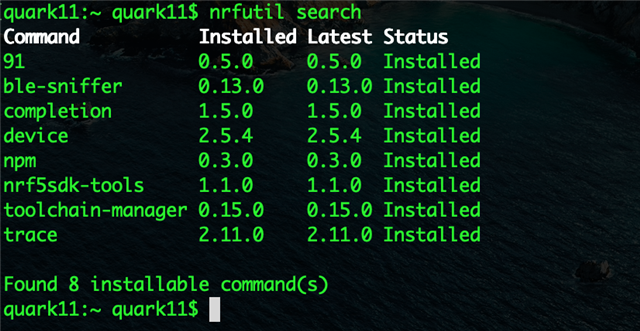
    1. $nrfutil self-upgrade

    2. $nrfutil upgrade

    Successfully upgraded nrfutil device command to 2.5.4 on macOS 11.x.


    Afterwards, switching the device enumerator back to nrfutil the J-Link probe still didn't appear under "CONNECTED DEVICES".

    I get the following error:

    Under macOS 12 (Monterey), the command nrfutil device --json list --hotplug --traits seggerUsb (although built for macOS 13) works.
     

    For now, I'll use nrfjprog as the device enumerator until I hear back from you.


    Regards,
    Ravi

  • Hi Ravi,

    If you can list devices on command line with version 2.3.6, you need to set this setting: https://docs.nordicsemi.com/bundle/nrf-connect-vscode/page/reference/settings.html#nrf-connectnrfutilhome 
    The directory to be set is probably .nrfutil under the user's home directory.

    Upgrading your OS is definitely a wise decision. 

    Also, thank you for letting us know your updates.

    -Priyanka

  • Hi Priyanka,

    Unfortunately, with both nrfutil device 2.3.6 and 2.5.4, setting nrf-connect.nrfutil.home made no difference in getting nrfutil to work as the device enumerator in nRF52840-connect settings.

    I'm unable to upgrade macOS 11..x to a later version on several of our Macs..

    The error, from my earlier response, in running nrfutil device --json list --hotplug --traits seggerUsb seems to be because nrfutil Is now being built with macOS 13. However, this command runs fine under macOS 12 and J-Link device gets enumerated correctly.

    Can you please check if it is possible for dev to build nrfutil for macOS 11? J-Link device enumeration works with nrfjprog but not with nrfutil as the device provider in nrf-connect settings. Thank you.


    Regards,
    Ravi

  • Hi Ravi,

    Unfortunately I don't think there is anything we are able to do at the moment for this because we are slowly moving support to the MacOS13 and in newer version of the SDK this will be the oldest supported version of the OS and hence currently you are building well with the macOS12 but not 11.

    -Priyanka

  • Hi Priyanka,

    It's not a problem. I'm able to use nrfjprog under macOS11 for the time being. Thank you.


    Regards,
    Ravi

Reply Children
No Data
Related