

Hello,
I've been trying to setup the nRF connect & power profiler on some of my co-worker, but downloading the pc-nrfconnect addon was not possible via nRF connect, so I have downloaded it and place it manually in the %USERPROFILE%\.nrfconnect-apps\local
The addon was recognized in the nRF connect but after lunching the app, the window remains blank.
I've been using this tool since a long time, but for testing purposes I have uninstall it on my PC & try to reinstall it to see if I'm encountering the same issue and now I've got the same problem and didn't found a way to solve it.
I have tried different versions of pc-nrfconnect-ppk, but I get the same result.
nrfconnect-setup-4.4.1-x64 / nrfconnect-setup-5.0.2-x64
pc-nrfconnect-ppk-4.0.0 / pc-nrfconnect-ppk-4.1.0 / pc-nrfconnect-ppk-4.1.1 / pc-nrfconnect-ppk-4.1.2 / pc-nrfconnect-ppk-4.1.3 / pc-nrfconnect-ppk-4.2.0
I suspect that the VPN is the problem why downloading the plugin does not work.
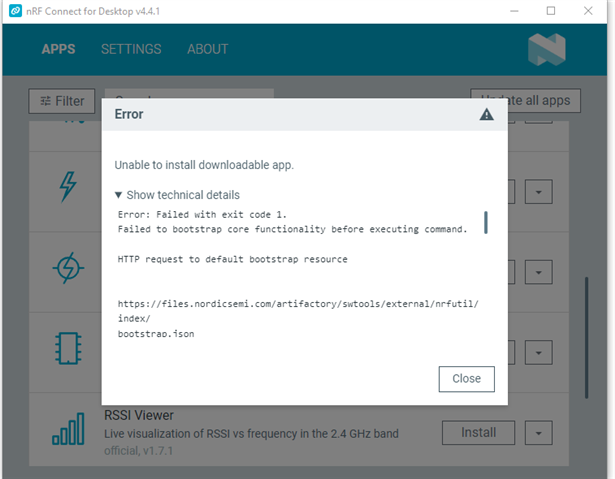
Can the lack of internet access due to VPN cause this issue? Then why isn't working when I'm manually copying?
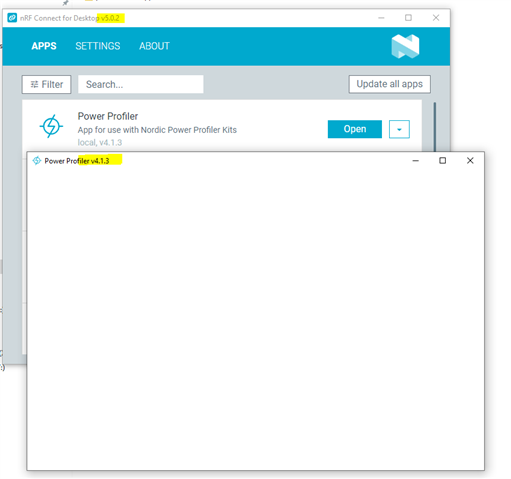
Thank you!
