KCONFIG unable to select softdevice LL controller

I'm working in an workspace application.  The application was forked from the example application at version 2.5.2 and later updated to 2.7.  I've been developing for several months creating our custom boards,  converting custom drivers from our NRF SDK codebase, etc

We have custom boards with nrf52832 and nrf52840.  

I'm recently started working on implementing the custom bluetooth interface.  The existing BLE interface adjusts the MTUs, connection interval, PHY, etc to achieve very fast data transfer.  I'm trying to customize the zephyr bluetooth stack.  It seems my best option is to use the softdevice LL controller.  

Now the problem.  I'm unable to select kconfig settings from the nrf repository.  In the kconfig gui, when I go to the LL controller choice:
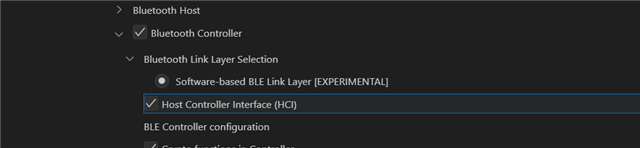
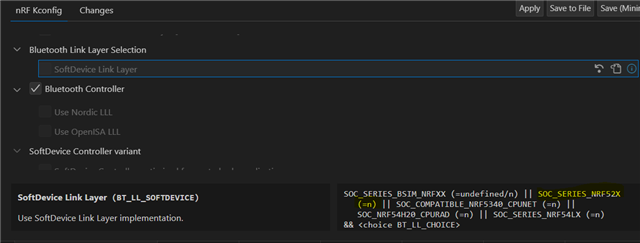
I was eventually able to search and find an option related to the softdevice but it indicates I don't have the necessary dependencies.  Specifically even though I'm using an nrf52840 it doesn't have SOC_SERIES_NRF52X
My custom board has this in the dts:

/dts-v1/;
#include <nordic/nrf52840_qiaa.dtsi>
#include "thomas_b-pinctrl.dtsi"
#include "common_nrf52840_flash_partitions.dtsi"

/ {
model = "Thomas B Training Goggle";
compatible = "ciye,board-thomas-b", "nordic,nrf52840-qiaa", "ciye,board"

And also in the board.yml i have

board:
name: thomas_b
vendor: ciye
socs:
- name: nrf52840

What am I missing?

Parents
  • Hi,

    The first screenshot shows that you are trying to use the SoftDevice BT controller (BT_LL_SW_SPLIT - "Software-based BLE Link Layer [EXPERIMENTAL]"). This is not the same as the SoftDevice controller, and not recommended nor supported. 

    Specifically even though I'm using an nrf52840 it doesn't have SOC_SERIES_NRF52X

    If you have properly speciifed your board and that it is a nRF5 device, the SoftDevice Controller should be used automatically, so I wonder if the issue is with your board definition? This specific config is selected if you also have SOC_NRF52840, which you should have. So I suggest looking at you board files first. (You may also find information about custom board in the documentation here and here in the Developer academy).

    Regarding Kconfig the tools do not fully support nRF Connect SDK 2.7.0 yet, particularily not if using sysbuild. But this is being worked on.

  • NOTE: I'm not using sysbuild.

    Then this seems to be the main issue, since the build/zephyr/.config shows that I am in fact using the softdevice but the nrf kconfig gui indicates I am not. 

    Here is the zephyr/.config output:

    $ grep CONFIG_BT .config | grep -v "is not set" | grep -v "LOG"
    CONFIG_BT_HCI_VS=y
    CONFIG_BT_CTLR=y
    CONFIG_BT_USER_PHY_UPDATE=y
    CONFIG_BT_BUF_EVT_DISCARDABLE_SIZE=43
    CONFIG_BT_FLIPPER_DIS=y
    CONFIG_BT_FLIPPER_DIS_MODEL="Speedo Train Goggle"
    CONFIG_BT_FLIPPER_DIS_MANUF="CIYE"
    CONFIG_BT_FLIPPER_DIS_SERIAL_NUMBER=y
    CONFIG_BT_FLIPPER_DIS_FW_REV=y
    CONFIG_BT_FLIPPER_DIS_HW_REV=y
    CONFIG_BT_FDS=y
    CONFIG_BT_FLIPPER_BLE=y
    CONFIG_BT_BUF_CMD_TX_COUNT=2
    CONFIG_BT_L2CAP_TX_MTU=498
    CONFIG_BT_BUF_ACL_TX_SIZE=502
    CONFIG_BT_BUF_ACL_RX_SIZE=502
    CONFIG_BT_CTLR_DATA_LENGTH_MAX=251
    CONFIG_BT_COMPANY_ID_NORDIC=0x0059
    CONFIG_BT_COMPANY_ID=0x0059
    CONFIG_BT_MAX_CONN=1
    CONFIG_BT_LL_SOFTDEVICE_HEADERS_INCLUDE=y
    CONFIG_BT_LL_SOFTDEVICE=y
    CONFIG_BT_LL_SOFTDEVICE_BUILD_TYPE_LIB=y
    CONFIG_BT_HCI_TX_STACK_SIZE=1536
    CONFIG_BT_RX_STACK_SIZE=1536
    CONFIG_BT_CTLR_SDC_PERIPHERAL_COUNT=1
    CONFIG_BT_CTLR_SDC_MAX_CONN_EVENT_LEN_DEFAULT=4000000
    CONFIG_BT_CTLR_SDC_CONN_EVENT_EXTEND_DEFAULT=y
    CONFIG_BT_CTLR_SDC_CENTRAL_ACL_EVENT_SPACING_DEFAULT=4000000
    CONFIG_BT_CTLR_SDC_PERIODIC_ADV_EVENT_LEN_DEFAULT=7500
    CONFIG_BT_CTLR_SDC_TX_PACKET_COUNT=3
    CONFIG_BT_CTLR_SDC_RX_PACKET_COUNT=2
    CONFIG_BT_CTLR_SDC_SCAN_BUFFER_COUNT=3
    CONFIG_BT_CTLR_SDC_PERIODIC_SYNC_BUFFER_COUNT=3
    CONFIG_BT_CTLR_SDC_RX_PRIO=6
    CONFIG_BT_LL_SOFTDEVICE_MULTIROLE=y
    CONFIG_BT_CTLR_FAL_SIZE=8
    CONFIG_BT_CTLR_ECDH_LIB_OBERON=y
    CONFIG_BT_CTLR_ECDH_STACK_SIZE=900
    CONFIG_BT_CTLR_SDC_BIG_RESERVED_TIME_US=1600
    CONFIG_BT_CTLR_SDC_CIG_RESERVED_TIME_US=1300
    CONFIG_BT_CTLR_SDC_CIS_SUBEVENT_LENGTH_US=0
    CONFIG_BT_GATT_AUTO_SEC_REQ=y
    CONFIG_BT_DRIVERS=y
    CONFIG_BT_PERIPHERAL=y
    CONFIG_BT_BROADCASTER=y
    CONFIG_BT_CONN=y
    CONFIG_BT_PHY_UPDATE=y
    CONFIG_BT_DATA_LEN_UPDATE=y
    CONFIG_BT_BAS=y
    CONFIG_BT_BUF_ACL_TX_COUNT=10
    CONFIG_BT_BUF_ACL_RX_COUNT=6
    CONFIG_BT_BUF_EVT_RX_SIZE=68
    CONFIG_BT_BUF_EVT_RX_COUNT=10
    CONFIG_BT_BUF_EVT_DISCARDABLE_COUNT=3
    CONFIG_BT_BUF_CMD_TX_SIZE=65
    CONFIG_BT_HAS_HCI_VS=y
    CONFIG_BT_RPA=y
    CONFIG_BT_ASSERT=y
    CONFIG_BT_ASSERT_VERBOSE=y
    CONFIG_BT_DEBUG_NONE=y
    CONFIG_BT_LONG_WQ=y
    CONFIG_BT_LONG_WQ_STACK_SIZE=1300
    CONFIG_BT_LONG_WQ_PRIO=10
    CONFIG_BT_LONG_WQ_INIT_PRIO=50
    CONFIG_BT_HCI_HOST=y
    CONFIG_BT_HCI_TX_PRIO=7
    CONFIG_BT_RECV_WORKQ_BT=y
    CONFIG_BT_RX_PRIO=8
    CONFIG_BT_DRIVER_RX_HIGH_PRIO=6
    CONFIG_BT_LIM_ADV_TIMEOUT=30
    CONFIG_BT_CONN_TX_USER_DATA_SIZE=16
    CONFIG_BT_CONN_FRAG_COUNT=1
    CONFIG_BT_CONN_TX_MAX=10
    CONFIG_BT_USER_DATA_LEN_UPDATE=y
    CONFIG_BT_SMP=y
    CONFIG_BT_BONDABLE=y
    CONFIG_BT_SMP_ENFORCE_MITM=y
    CONFIG_BT_SMP_MIN_ENC_KEY_SIZE=7
    CONFIG_BT_L2CAP_TX_BUF_COUNT=10
    CONFIG_BT_L2CAP_TX_FRAG_COUNT=2
    CONFIG_BT_L2CAP_DYNAMIC_CHANNEL=y
    CONFIG_BT_ATT_TX_COUNT=10
    CONFIG_BT_ATT_PREPARE_COUNT=2
    CONFIG_BT_ATT_RETRY_ON_SEC_ERR=y
    CONFIG_BT_GATT_SERVICE_CHANGED=y
    CONFIG_BT_GATT_CACHING=y
    CONFIG_BT_GATT_ENFORCE_SUBSCRIPTION=y
    CONFIG_BT_GATT_READ_MULTIPLE=y
    CONFIG_BT_GATT_READ_MULT_VAR_LEN=y
    CONFIG_BT_GAP_AUTO_UPDATE_CONN_PARAMS=y
    CONFIG_BT_GAP_PERIPHERAL_PREF_PARAMS=y
    CONFIG_BT_PERIPHERAL_PREF_MIN_INT=12
    CONFIG_BT_PERIPHERAL_PREF_MAX_INT=12
    CONFIG_BT_PERIPHERAL_PREF_LATENCY=0
    CONFIG_BT_PERIPHERAL_PREF_TIMEOUT=200
    CONFIG_BT_DEVICE_NAME_GATT_WRITABLE=y
    CONFIG_BT_MAX_PAIRED=1
    CONFIG_BT_CREATE_CONN_TIMEOUT=3
    CONFIG_BT_CONN_PARAM_UPDATE_TIMEOUT=500
    CONFIG_BT_CONN_PARAM_RETRY_COUNT=3
    CONFIG_BT_CONN_PARAM_RETRY_TIMEOUT=1000
    CONFIG_BT_DEVICE_NAME_DYNAMIC=y
    CONFIG_BT_DEVICE_NAME_MAX=28
    CONFIG_BT_DEVICE_NAME="Zephyr"
    CONFIG_BT_DEVICE_APPEARANCE=0
    CONFIG_BT_ID_MAX=1
    CONFIG_BT_ECC=y
    CONFIG_BT_CRYPTO=y
    CONFIG_BT_HCI_INIT_PRIORITY=50
    CONFIG_BT_DRV_TX_STACK_SIZE=256
    CONFIG_BT_DRV_RX_STACK_SIZE=256
    CONFIG_BT=y
    CONFIG_BT_HCI=y
    CONFIG_BT_CONN_TX=y
    CONFIG_BT_CTLR_LE_ENC_SUPPORT=y
    CONFIG_BT_CTLR_EXT_REJ_IND_SUPPORT=y
    CONFIG_BT_CTLR_DATA_LEN_UPDATE_SUPPORT=y
    CONFIG_BT_CTLR_PRIVACY_SUPPORT=y
    CONFIG_BT_CTLR_EXT_SCAN_FP_SUPPORT=y
    CONFIG_BT_CTLR_PHY_UPDATE_SUPPORT=y
    CONFIG_BT_CTLR_PHY_2M_SUPPORT=y
    CONFIG_BT_CTLR_PHY_CODED_SUPPORT=y
    CONFIG_BT_CTLR_ADV_EXT_SUPPORT=y
    CONFIG_BT_CTLR_ADV_PERIODIC_SUPPORT=y
    CONFIG_BT_CTLR_ADV_PERIODIC_RSP_SUPPORT=y
    CONFIG_BT_CTLR_SYNC_PERIODIC_SUPPORT=y
    CONFIG_BT_CTLR_SYNC_PERIODIC_RSP_SUPPORT=y
    CONFIG_BT_CTLR_SYNC_TRANSFER_SENDER_SUPPORT=y
    CONFIG_BT_CTLR_SYNC_TRANSFER_RECEIVER_SUPPORT=y
    CONFIG_BT_CTLR_ADV_ISO_SUPPORT=y
    CONFIG_BT_CTLR_SYNC_ISO_SUPPORT=y
    CONFIG_BT_CTLR_CENTRAL_ISO_SUPPORT=y
    CONFIG_BT_CTLR_PERIPHERAL_ISO_SUPPORT=y
    CONFIG_BT_CTLR_CHAN_SEL_2_SUPPORT=y
    CONFIG_BT_CTLR_SCA_UPDATE_SUPPORT=y
    CONFIG_BT_CTLR_CONN_RSSI_SUPPORT=y
    CONFIG_BT_CTLR_ECDH_SUPPORT=y
    CONFIG_BT_CTLR_LE_POWER_CONTROL_SUPPORT=y
    CONFIG_BT_CTLR_LE_PATH_LOSS_MONITORING_SUPPORT=y
    CONFIG_BT_CTLR_SUBRATING_SUPPORT=y
    CONFIG_BT_CTLR_HCI=y
    CONFIG_BT_CTLR_CRYPTO=y
    CONFIG_BT_CTLR_HCI_VS_BUILD_INFO=""
    CONFIG_BT_CTLR_TX_PWR_0=y
    CONFIG_BT_CTLR_TX_PWR_DBM=0
    CONFIG_BT_CTLR_TX_PWR_ANTENNA=0
    CONFIG_BT_CTLR_LE_ENC=y
    CONFIG_BT_CTLR_ECDH=y
    CONFIG_BT_CTLR_EXT_REJ_IND=y
    CONFIG_BT_CTLR_LE_PING=y
    CONFIG_BT_CTLR_DATA_LENGTH=y
    CONFIG_BT_CTLR_PHY=y
    CONFIG_BT_CTLR_PRIVACY=y
    CONFIG_BT_CTLR_RL_SIZE=8
    CONFIG_BT_CTLR_PHY_2M=y
    CONFIG_BT_CTLR_PHY_CODED=y
    CONFIG_BT_CTLR_CHAN_SEL_2=y
    

    Further the Problems tab shows the same incorrect info as nrf Kconfig GUI, indicating various errors that didn't actually occur during the build. 

    Is there an alternative to nrf kconfig gui that would give valid feedback so I don't waste my dev time chasing imaginary problems?

    Also how do I change/fix the provider of the prj.conf to the problems tab in visual studio code?

    I'm really missing SES these days, it didn't have all these fancy features, but it never lied.

    My last merge from upstread was in June, is it possible some of these issues would be improved if I update to more recent nrf connect sdk?

    Another consideration,  I'm using toolchain 2.6.1, perhaps I should update it?

  • Regarding the short .config... if you noticed the first line... I'm using grep to filter for specific Bluetooth lines.

    I don't have a <project_name> subfolder, i'm not even sure what my project name would be.  I started the project from 2.6, and I don't think the merge step introduced sys build.  At some point I guess I will need a Primer on how to add sys build.  For now considering the lagging tools I think its better to work without sysbuild.

    I noticed the kconfig gui had an update release in September and appears to be on a 6-7 month cycle, so I imagine this will be broken for the entirety of my development time on this project.  

    I did switch to 2.7.0 toolchain which fixed some issues with tooltips but the kconfig gui is still incorrect

  • Hi,

    Anthony Ambuehl said:
    Regarding the short .config... if you noticed the first line... I'm using grep to filter for specific Bluetooth lines.

    Sorry, my bad, I jumped to the end and saw the short file name (which would make sense if using sysbuild based on the explanation in my previous post).

    Anthony Ambuehl said:
    I don't have a <project_name> subfolder, i'm not even sure what my project name would be. 

    It is only relevant when using sysbuild.

    Anthony Ambuehl said:
    I started the project from 2.6, and I don't think the merge step introduced sys build. 

    That is correct. I may have misintrepreted when you wrote "My last merge from upstread was in June", I assumed that ment you were using main or somethign other than a release? If you are using a 2.6 relaese (which?) sysbuild is still introduced but not fully support and never used by default, so it shoudl not be relevant.

  • According to my notes I originally forked at NRF Connect SDK 2.5.2,  I subsequently updated to 2.7.0-rc1 on 6/10/24.  I also must have update nrf later since it now looks like I have 2.7.99 up to about 8/15.  I see my nrf git repo has the latest SHA 5c78866015013608252bfba16c535a542bc05f93.

    I just read the recommendation to switch to the pre-release version of the VSCode extensions from the 2.7.0 release notes, so I will try that to see if it helps..

    https://docs.nordicsemi.com/bundle/nrf-connect-vscode/page/rel_notes_overview.html#switching-to-a-pre-release-version

    I will plan to properly switch to the official 2.7.0 release sometime next week.

    Should I consider going to the 2.7.99-cs branches instead of 2.7.0?


  • Hi,

    I would not recommend that. 2.7.99-cs is for nRF54 development, at the latest tag there 2.7.99-cs2 was only tested on nRF54H20. Generally, unless you have a good reason not to I recomend you stick with tagged releases (and not the special chip support or dev tags unless your device/product is targeted by that tag). So I would suggest that you use 2.7 at this point, and potentially migrate to 2.8 when that is released.

  • Thanks for that info.  I'll switch to 2.7.0 official release.  

Reply Children
No Data
Related