Own snippets in nRF Connect for VS Code

I have created a Zephyr Snippet (derived from the cdc-acm-console sample).

I am unable to select it in the Build Configuration. It is listed in the dropbox where the sample snippets are listed. When I add it via Browse, I can only select files, not a directory. Thus I am selecting the snippet.yml in my directory. This adds the file to the snippets:
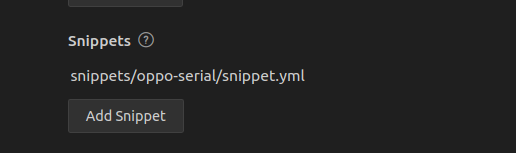
Which is given as is to west:


west build --build-dir /home/markus/ncs/v2.6.1/zephyr/samples/hello_world/build /home/markus/ncs/v2.6.1/zephyr/samples/hello_world --pristine --board nrf52840dk_nrf52840 -- -DNCS_TOOLCHAIN_VERSION=NONE -DSNIPPET=snippets/oppo-serial/snippet.yml
[...]
CMake Error at /home/markus/ncs/v2.6.1/zephyr/cmake/modules/snippets.cmake:93 (message):
snippets: error: snippets not found: snippets/oppo-serial/snippet.yml
Please choose from among the following snippets:
cdc-acm-console
nordic-ppr
nordic-ppr-ram
nrf70-debug
nrf70-fw-patch-ext-flash
nrf91-modem-trace-ext-flash
nrf91-modem-trace-uart
oppo-serial
tfm-enable-share-uart
xen_dom0

West ist able to see the snippet under its name, but complains that it is given as snippet.yml

I am unable to change this via the pen:

Since that is not editable.

Custom snippets are thus broken currently.

Options:

* List custom snippets in application directory.

* Allow selecting the snippet directory and strip snippets/ from it

* Allow editing in the dropbox so that it can be manually selected

Work-arounds:
* build manually

* copy snippet into global directory and restart extension, then it is listed.

Are snippets in the application supposed to be supported?

Parents
  • Hello,

    Yes, I see what you are seeing. I will ask our developers how this is supposed to work, and how you can add snippets outside the NCS folder. 

    Q1: Where are you currently storing your snippet? In a folder inside NCS or outside?

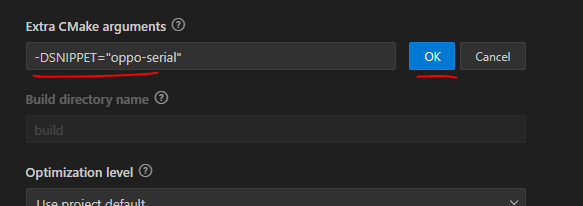
    Q2: Can you try storing it either in ncs\nrf\snippets, or in ncs\zephyr\snippets, and then use the the additional "Extra CMake argument":

    -DSNIPPET="oppo-serial"

    Like this:

    Does that work with your snippet?

    I know it is not ideal, but in the meantime I will try to figure out if it is possible to add snippets from outside the SDK folder, and how to do it in VS Code.

    Best regards,

    Edvin

  • Just putting the snippet into ncs\zephyr\snippets makes it available in the selection box. Might require a restart of VScode. Did not verify.

  • Hello,

    Monkeytronics said:
    After I get it working, mysnippet appears from that point on in the drop down! Which is just priceless.

    Can you please describe what exactly you needed to get working in order to do this? I agree that it shouldn't be that troublesome to add this, but if you can guide me to get this working locally, it would be easier to point our developers in the right direction. 

    Is it possible to upload an application with a custom snippet that appears in the drop down? And some guide to hhow you got it to work? (I have not tried this since the last time there was activity in this ticket, which was back in October 2024).

    Best regards,

    Edvin

  • Just have a go replicating what I describe. I'm sure a zephyr expert could get this working in 5 minutes. If there is an issue in how the nordic sdk handles the build process, it should become apparent for you as it has for me. Equally, if I've missed an obvious step, it might be worth documenting it for future. 

  • Ok, so I tested now, copied a snippet (used the hw-flow-control found in NCS\nrf\snippets), created a folder named "snippets" in my application folder, and pasted the snippet in there. I renamed the folder "my-hw-flow-control" (from hw-flow-control), and changed the name of the snippet inside snippet.yml from:

    name: hw-flow-control
    to
    name: my-hw-flow-control

    After this, you need to restart VS Code for it to reload the snippets in your applications (or you can use the reload window option by pressing ctrl+shift+p, and enter the command "reload window" and hit enter).

    Then the custom snippet "my-hw-flow-control" should appear in the list.

    Best regards,

    Edvin

  • OK. Must be the reload window that was missing... Couldn't you make it so that this step is not necessary. In my frustration to make progress, I spent time figuring out how to bring in conf files directly through cmake instead. Which works fine as it happens. I think I 'll stick with that as it does not require that I remember any magic steps or incantations to work. 

  • I will report it to our VS Code team. 

    Best regards,

    Edvin

Reply Children
No Data
Related