Hi folks, thanks in advance for your support.
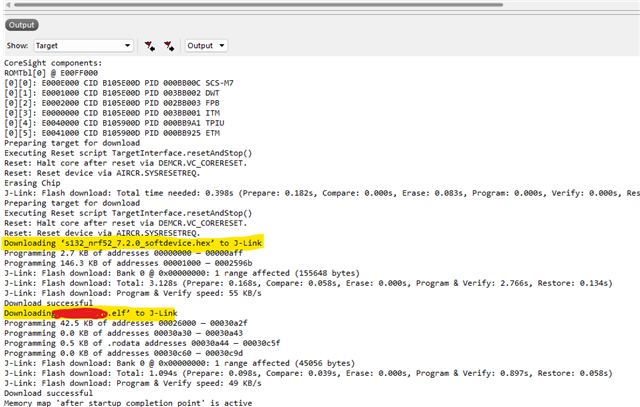
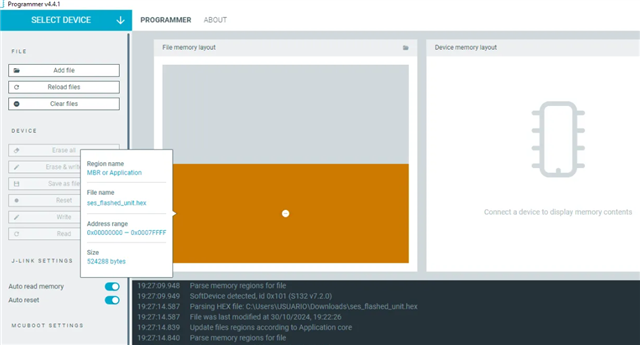
The thing is that in my SEGGER project I didn't have explicitly linked a bootloader to be flashed in the device (nRF52832), thus I don't know if the device has no bootloader, or it runs a standard bootloader that the softdevice chose. To add more fun I don't have physical connection to the device. (attached compilation's output from SEGGER)
Building ‘my_project_fw’ from solution ‘my_project_fw’ in configuration ‘Release’
1> Output/Release/Obj/my_project_fw/thumb_crt0.o does not exist.
1> Assembling ‘thumb_crt0.s’
1> "C:/Program Files/SEGGER/SEGGER Embedded Studio for ARM 5.32/gcc/arm-none-eabi/bin/cc1" -fmessage-length=0 -fno-diagnostics-show-caret -E -mcpu=cortex-m4 -mlittle-endian -mfloat-abi=hard -mfpu=fpv4-sp-d16 -mthumb -nostdinc "-isystemC:/Program Files/SEGGER/SEGGER Embedded Studio for ARM 5.32/include" -I../../nordic/nRF5_SDK_17.1.0_ddde560/components/ -I../../nordic/nRF5_SDK_17.1.0_ddde560/components/ble/ble_advertising -I../../nordic/nRF5_SDK_17.1.0_ddde560/components/ble/ble_services/ble_dfu -I../../nordic/nRF5_SDK_17.1.0_ddde560/components/ble/common -I../../nordic/nRF5_SDK_17.1.0_ddde560/components/ble/nrf_ble_gatt -I../../nordic/nRF5_SDK_17.1.0_ddde560/components/ble/nrf_ble_qwr -I../../nordic/nRF5_SDK_17.1.0_ddde560/components/ble/peer_manager -I../../nordic/nRF5_SDK_17.1.0_ddde560/components/libraries/atomic -I../../nordic/nRF5_SDK_17.1.0_ddde560/components/libraries/atomic_fifo -I../../nordic/nRF5_SDK_17.1.0_ddde560/components/libraries/atomic_flags -I../../nordic/nRF5_SDK_17.1.0_ddde560/components/libraries/balloc -I../../nordic/nRF5_SDK_17.1.0_ddde560/components/libraries/bootloader -I../../nordic/nRF5_SDK_17.1.0_ddde560/components/libraries/bootloader/ble_dfu -I../../nordic/nRF5_SDK_17.1.0_ddde560/components/libraries/bootloader/dfu -I../../nordic/nRF5_SDK_17.1.0_ddde560/components/libraries/delay -I../../nordic/nRF5_SDK_17.1.0_ddde560/components/libraries/experimental_section_vars -I../../nordic/nRF5_SDK_17.1.0_ddde560/components/libraries/fds -I../../nordic/nRF5_SDK_17.1.0_ddde560/components/libraries/fstorage -I../../nordic/nRF5_SDK_17.1.0_ddde560/components/libraries/log -I../../nordic/nRF5_SDK_17.1.0_ddde560/components/libraries/log/src -I../../nordic/nRF5_SDK_17.1.0_ddde560/components/libraries/mutex -I../../nordic/nRF5_SDK_17.1.0_ddde560/components/libraries/pwm -I../../nordic/nRF5_SDK_17.1.0_ddde560/components/libraries/pwr_mgmt -I../../nordic/nRF5_SDK_17.1.0_ddde560/components/libraries/strerror -I../../nordic/nRF5_SDK_17.1.0_ddde560/components/libraries/svc -I../../nordic/nRF5_SDK_17.1.0_ddde560/components/libraries/timer -I../../nordic/nRF5_SDK_17.1.0_ddde560/components/libraries/util -I../../nordic/nRF5_SDK_17.1.0_ddde560/components/softdevice/s132/headers -I../../nordic/nRF5_SDK_17.1.0_ddde560/components/toolchain/cmsis/include -I../../nordic/nRF5_SDK_17.1.0_ddde560/components/softdevice/common -I../../nordic/nRF5_SDK_17.1.0_ddde560/components/softdevice/s132/headers/nrf52 -I../../nordic/nRF5_SDK_17.1.0_ddde560/integration/nrfx -I../../nordic/nRF5_SDK_17.1.0_ddde560/integration/nrfx/legacy -I../../nordic/nRF5_SDK_17.1.0_ddde560/modules/nrfx -I../../nordic/nRF5_SDK_17.1.0_ddde560/modules/nrfx/drivers/include -I../../nordic/nRF5_SDK_17.1.0_ddde560/modules/nrfx/hal -I../../nordic/nRF5_SDK_17.1.0_ddde560/modules/nrfx/drivers/src -I../../nordic/nRF5_SDK_17.1.0_ddde560/modules/nrfx/drivers/src/prs -I../../nordic/nRF5_SDK_17.1.0_ddde560/modules/nrfx/mdk -Iconfig -I../src -I../src/my_project_apps -I../src/my_project_config -I../src/my_project_controllers -I../src/my_project_drivers -I../src/my_project_libraries -I../src/my_project_system -D__SIZEOF_WCHAR_T=4 -D__ARM_ARCH_7EM__ -D__SES_ARM -D__ARM_ARCH_FPV4_SP_D16__ -D__HEAP_SIZE__=8192 -D__SES_VERSION=53200 -D__GNU_LINKER -DNDEBUG -DBOARD_PCA10056 -DBSP_DEFINES_ONLY -DCONFIG_GPIO_AS_PINRESET -DFLOAT_ABI_HARD -DINITIALIZE_USER_SECTIONS -DNO_VTOR_CONFIG -DNRF52 -DNRF52832_XXAA -DNRF52_PAN_74 -DNRF_DFU_SVCI_ENABLED -DNRF_DFU_TRANSPORT_BLE=1 -DNRF_SD_BLE_API_VERSION=7 -DS132 -DSOFTDEVICE_PRESENT -DSWI_DISABLE0 -MD C:/Users/JKPina_my_project/Desktop/git/my_project-Electrical-FirmwareCH02/project/Output/Release/Obj/my_project_fw/thumb_crt0.d -MQ Output/Release/Obj/my_project_fw/thumb_crt0.o -quiet -lang-asm "C:/Program Files/SEGGER/SEGGER Embedded Studio for ARM 5.32/source/thumb_crt0.s" -o C:/Users/JKPina_my_project/Desktop/git/my_project-Electrical-FirmwareCH02/project/Output/Release/Obj/my_project_fw/thumb_crt0_PP.sMy goal is to update the application's firmware wirelessly to the device. After first flashed through Segger, I run :
nrfutil dfu ble -ic NRF52 -pkg .\app_valid_setting_apply_nRF52832_plus_softdevice.zip -a D0:5F:98:41:EF:CE -p COM6[------------------------------------] 0%
and the output is:
Traceback (most recent call last):
File "nordicsemi\__main__.py", line 1555, in <module>
File "click\core.py", line 1137, in __call__
File "click\core.py", line 1062, in main
File "click\core.py", line 1668, in invoke
File "click\core.py", line 1668, in invoke
File "click\core.py", line 1404, in invoke
File "click\core.py", line 763, in invoke
File "nordicsemi\__main__.py", line 1215, in ble
File "nordicsemi\dfu\dfu.py", line 127, in dfu_send_images
File "nordicsemi\dfu\dfu.py", line 88, in _dfu_send_image
File "nordicsemi\dfu\dfu_transport_ble.py", line 475, in open
File "nordicsemi\dfu\dfu_transport_ble.py", line 162, in connect
File "nordicsemi\dfu\dfu_transport_ble.py", line 224, in jump_from_buttonless_mode_to_bootloader
File "nordicsemi\dfu\dfu_transport_ble.py", line 264, in verify_stable_connection
Exception: Connection Failure - Device not found!
[18804] Failed to execute script '__main__' due to unhandled exception!