Clarification on Bootloader on nRF52840

Hi,

I have working with Bootloader development on nrf52840 controller, for that i followed devacedemy course for firmware update using Uart and able to update firmware using those mcumgr commands.

In that I have one clarification like where the bootloader related code or APIs has been usen because i have checked in the project no code related to bootloader but only in the prj.conf file have some configurations on that. How the bootloader here working here like these i want to know the clarity.

Another thing is How can we check the mcumgr commands are running, how it is taking via uart.

Thank you in advance

Parents
  • When you configure your project to use a bootloader (or two if you use an upgradable bootlaoder), these bootloader(s) are added as child image(s). (Techincally this terminologi is used up to sysbuild which is the default from nRF Connect SDK 2.7.0, but the over al principle remains the same). If you look at the build process and the build output you will see that it is not just your application that is built, but also MCUboot, which is a separate project, but the build systsem handles it for you. The code for MCUboot is located under bootloader/mcuboot/.

    Another thing is How can we check the mcumgr commands are running, how it is taking via uart.

    Can you elaborate on this question?

  • Hi,

     The code for MCUboot is located under bootloader/mcuboot/.

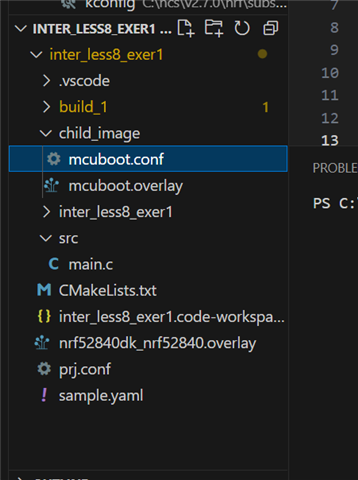
    This file will cannot see at project workspace.

    I have shared file here, in that only can see child image cofiguration, here how it is linked to bootloader code.

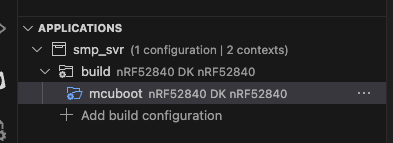
  • If you build a proejct with a bootloader, and look in the build folder, you will see that you have an MCUboot project as well as your application. From nRF Connect for VS Code, you can expand on the project, and you should see something like this (exactly how it looks depend a bit on SDK version and if you are using sysbuild or not, this screenshot is without sysbuild):

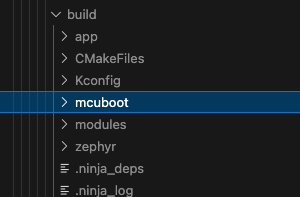
    And in the same way, you can use the file explorer to look at it in the build folder, where you see MCUboot in addition to the application you are buildng where you included the bootloader to the project:

Reply
  • If you build a proejct with a bootloader, and look in the build folder, you will see that you have an MCUboot project as well as your application. From nRF Connect for VS Code, you can expand on the project, and you should see something like this (exactly how it looks depend a bit on SDK version and if you are using sysbuild or not, this screenshot is without sysbuild):

    And in the same way, you can use the file explorer to look at it in the build folder, where you see MCUboot in addition to the application you are buildng where you included the bootloader to the project:

Children
No Data
Related