Running "nRF Connect" outside of VS Code

Hi,

If I launch "nRF Connect" inside of VS Code, it uses PowerShell by default.
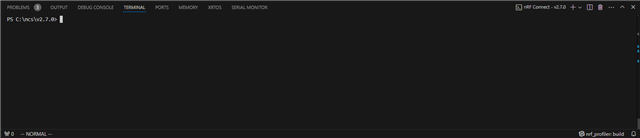
But if I use the Toolchain Manager, it will open the Command Prompt terminal instead.
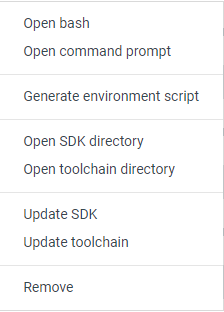
How do I launch "nRF Connect" with PowerShell outside of VS Code?

Alternatively, using PowerShell, how do I configure everything that "nRF Connect" is using inside of VS Code? There must be some type of script it's calling to setup the environment.

Parents
  • Hi Tyler,

    How do I launch "nRF Connect" with PowerShell outside of VS Code?

    You should be able to do this by entering the following in Powershell:

    nrfutil toolchain-manager launch --terminal

    Alternatively, using PowerShell, how do I configure everything that "nRF Connect" is using inside of VS Code? There must be some type of script it's calling to setup the environment.
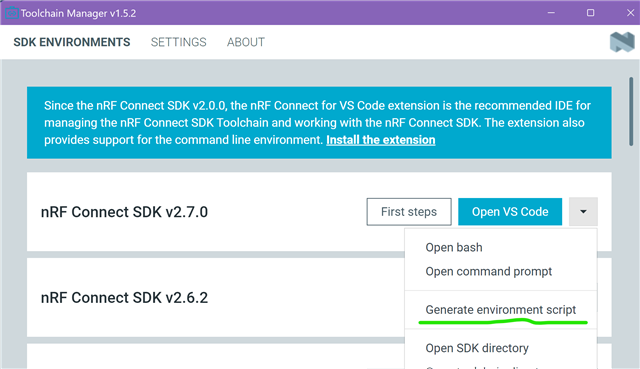
    I have not tried this myself, but there is this feature in the Toolchain Manager that allows you to generate an environment script as shown below. This script can be used to set up the environment variables needed for nRF Connect SDK. This will create a script that you can use to set up the environment. You can rename this script and place it somewhere in your system's PATH and then maybe you can use this script to set up the same environment that VS Code uses.

    -Priyanka

  • Hi Priyanka,

    Thanks for the help. In this case, if I use `nrfutil toolchain-manager launch --terminal`, then it opens `cmd` outside of PowerShell, unfortunately.

    However, some good news. If I launch a terminal, either in the GUI toolchain manager or in the `nrfutil toolchain-manager` command, and then run the command `powershell.exe`, then it looks like it does what I need, which is PowerShell configured with the right environment variables. This is probably what VS Code is doing underneath.

    The "Generate environment script" is good, but it can't be interpreted by PowerShell, only cmd, which is the same as before. I'm guessing that VS Code simply generates everything using cmd and then opens PowerShell immediately afterwards.

Reply
  • Hi Priyanka,

    Thanks for the help. In this case, if I use `nrfutil toolchain-manager launch --terminal`, then it opens `cmd` outside of PowerShell, unfortunately.

    However, some good news. If I launch a terminal, either in the GUI toolchain manager or in the `nrfutil toolchain-manager` command, and then run the command `powershell.exe`, then it looks like it does what I need, which is PowerShell configured with the right environment variables. This is probably what VS Code is doing underneath.

    The "Generate environment script" is good, but it can't be interpreted by PowerShell, only cmd, which is the same as before. I'm guessing that VS Code simply generates everything using cmd and then opens PowerShell immediately afterwards.

Children
No Data
Related