New board extensions not supported by VSCode nRF extension?

Hello

When following the guidline of a new way to extend boards, VSCode "Add Build Configuration" is blank. Am I doing something wrong or this is not yet supported by nRF VSCode extension?

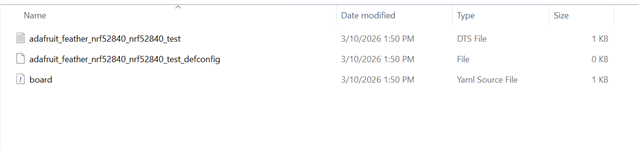
Attached is a sample project with the following "board.yaml":

board:
  extend: nrf52840dk
  variants:
    - name: test
      qualifier: nrf52840

extended_board_test.zip

Parents
  • Hello,

    I have looked at your application folder and also run the sample on NCS V3.2.0. Your board file is incomplete.

    It does not look like a proper board file.

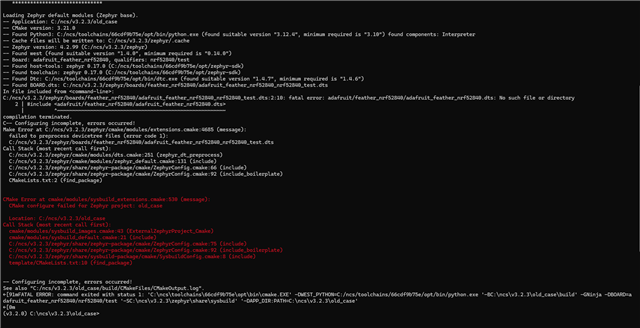
    The error shows

    You mentioned earlier that ''It's not the build that fails. It's the VSCode nRF Extension that cannot start debug session. And it cannot show graphical representation of DeviceTree either.'' Can you send me the application folder which you were able to build?

  • Well, yeah, That is the problem still not solved, that was discussed earlier in this thread. A quick and simple work-around is to add the line:

    list(APPEND DTS_EXTRA_CPPFLAGS "-isystem$ENV{ZEPHYR_BASE}/boards/")

    ...to the original board "pre_dt_board.cmake" file, in Zephyr source tree.

  • Unbelievable but I managed to fix everything with AI that made patched to the VSCode nRF Connect Extension minified *.js files. I asked her to to write a small report about the problems and solutions:

    # HWMv2 extended-board issues in VS Code: three final fixes

    Environment:

    - NCS `v3.2.1`
    - `nordic-semiconductor.nrf-connect-2026.3.1585`
    - `nordic-semiconductor.nrf-devicetree-2026.3.617`
    - correct HWMv2 board-extension syntax, for example:

    ```yaml
    board:
      extend: nrf9160dk
      variants:
        - name: overseer
          qualifier: nrf9160/ns
    ```

    We had three extension-side problems with correctly defined HWMv2 extended boards such as `nrf9160dk/nrf9160/ns/overseer` and `nrf9151dk/nrf9151/ns/overseer`.

    ## 1. `Add Build Configuration` hung when the extended board used the correct multi-segment qualifier

    Root cause:
    `nrf-connect` did not merge HWMv2 board extensions correctly when the variant was defined as `name: overseer` and the qualifier was a multi-segment path such as `nrf9160/ns` or `nrf9151/ns`.

    What had to be changed in the Nordic extension source:

    - In `nrf-connect`, the HWMv2 board-extension merge routine had to be changed so the existing qualifier chain is matched first, and only then the new variant name is appended.
    - In practice, that means `qualifier: nrf9160/ns` + `name: overseer` must resolve as `nrf9160/ns/overseer`, instead of being treated like an unmatched or flattened variant.
    - The same board-resolution path also had to stop assuming a single base-board `directory`; merged HWMv2 metadata had to respect all board directories exposed by the resolved board.

    After that change, `Add Build Configuration` opened normally and could create valid build configs for the extended board.

    ## 2. Debug session could not be started for the extended board

    Root cause:
    The debug flow in `nrf-connect` depended on the same incorrect HWMv2 board resolution path as the build-config UI. When the board extension was not resolved correctly, the active build/debug context for the extended board was also wrong.

    What had to be changed in the Nordic extension source:

    - The same `nrf-connect` HWMv2 merge fix from issue 1 had to be applied to the board-resolution path used by build target activation and debug actions.
    - Once the extension resolved the board as the real extended target, the debug session could bind to the correct build context instead of failing on the unresolved board variant.

    Note:
    In our project, debug also required project-side `board.cmake` files for the `*_OVERSEER` board symbols so Zephyr generated `runners.yaml`. That part is outside the extension, but the extension-side board-resolution fix was still required before debug worked reliably.

    ## 3. DeviceTree Visual Editor could not be opened or had the wrong/empty context

    Root cause:
    This was a combination of command registration, board identification, include-path handling, and file-to-context matching problems between `nrf-connect` and `nrf-devicetree`.

    What had to be changed in the Nordic extension source:

    - In `nrf-devicetree`, activation had to continue even when `nrf-connect` is installed. Otherwise `devicetree.showVisualEditor` was never registered.
    - In `nrf-connect`, the Devicetree context passed to `nrf-devicetree` had to include the resolved `boardInfo` from the build, instead of forcing `nrf-devicetree` to derive the HWMv2 board identity again from the base-board path.
    - In `nrf-connect`, the include-path list for the Devicetree context had to be extended with both the resolved board directories and their parent `boards` roots. Without that, includes such as `#include <nordic/nrf9160dk/nrf9160dk_nrf9160_ns.dts>` were not resolved correctly in the Visual Editor.
    - In `nrf-devicetree`, file/context matching had to use canonical-path comparison (`realpath`) and parser lookup by file URI. This was required because the workspace is opened through a junction path, while build metadata resolves the real path.

    After those changes, the Visual Editor could be opened, it recognized the file as part of the active build context, and it loaded both the custom-board and base-board DTS content correctly.
  • And, with the help of AI, I also managed to solve the problem how to include base board DTS files from extended board conf without needing to patch Zephyr source tree. The key here is to create the following file with the following content. I'm not sure how it works but it works! Now sysbuild with MCUBoot and application target builds fine. Put your app target name in place of [main target name].

    [project root]/sysbuild/CMakeLists.txt


    cmake_minimum_required(VERSION 3.20.0)

    get_filename_component(APP_ROOT "${CMAKE_CURRENT_LIST_DIR}/.." REALPATH)
    file(TO_CMAKE_PATH "$ENV{ZEPHYR_BASE}/boards" ZEPHYR_BOARDS_DIR)

    list(APPEND BOARD_ROOT ${APP_ROOT})

    # Extended boards in this project include upstream board DTS files directly.
    # Export the extra include path through the main target image cache so the
    # flag reaches the image configure step, not just sysbuild's own scope.
    set([main target name]_DTS_EXTRA_CPPFLAGS
    "-isystem${ZEPHYR_BOARDS_DIR}"
    CACHE INTERNAL "Extra DTS preprocessor flags for the main target image"
    )

    find_package(Sysbuild REQUIRED HINTS $ENV{ZEPHYR_BASE})
    project(sysbuild LANGUAGES)

Reply
  • And, with the help of AI, I also managed to solve the problem how to include base board DTS files from extended board conf without needing to patch Zephyr source tree. The key here is to create the following file with the following content. I'm not sure how it works but it works! Now sysbuild with MCUBoot and application target builds fine. Put your app target name in place of [main target name].

    [project root]/sysbuild/CMakeLists.txt


    cmake_minimum_required(VERSION 3.20.0)

    get_filename_component(APP_ROOT "${CMAKE_CURRENT_LIST_DIR}/.." REALPATH)
    file(TO_CMAKE_PATH "$ENV{ZEPHYR_BASE}/boards" ZEPHYR_BOARDS_DIR)

    list(APPEND BOARD_ROOT ${APP_ROOT})

    # Extended boards in this project include upstream board DTS files directly.
    # Export the extra include path through the main target image cache so the
    # flag reaches the image configure step, not just sysbuild's own scope.
    set([main target name]_DTS_EXTRA_CPPFLAGS
    "-isystem${ZEPHYR_BOARDS_DIR}"
    CACHE INTERNAL "Extra DTS preprocessor flags for the main target image"
    )

    find_package(Sysbuild REQUIRED HINTS $ENV{ZEPHYR_BASE})
    project(sysbuild LANGUAGES)

Children
No Data
Related