NRF Connect in Visual Studio code stopped working

Greetings,

in Visual Studio code the project workspace looks ok. However NRF Connect is not able to see the application. The error message is of no help:
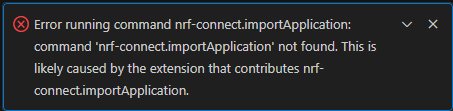
This did work earlier ok.

Parents
  • Created a new empty application and moved all the stuff there - now back in business. Luckily the project was not too big or complicated at this stage.

  • Hi,

    Great to hear that it works now.

    If you see this problem again, please provide support information from the VS Code extension and I will share it with the VS Code team.

    To generate support information:

    1. Open the command palette (Ctrl + Shift + P or View > Command Palette).
    2. Write "nRF Connect: Generate support information" and press enter.
    3. Copy the entire support information output.
    4. Upload it here using Insert > Code or upload a .txt file with Insert > Image/video/file.

    Make sure to remove confidential information you do not want to be shared in a public case.

    Best regards,
    Marte

Reply
  • Hi,

    Great to hear that it works now.

    If you see this problem again, please provide support information from the VS Code extension and I will share it with the VS Code team.

    To generate support information:

    1. Open the command palette (Ctrl + Shift + P or View > Command Palette).
    2. Write "nRF Connect: Generate support information" and press enter.
    3. Copy the entire support information output.
    4. Upload it here using Insert > Code or upload a .txt file with Insert > Image/video/file.

    Make sure to remove confidential information you do not want to be shared in a public case.

    Best regards,
    Marte

Children
No Data
Related