Toolchain manager cannot download nRF Connect SDK v2.8.0

Hi,

I am currently using nRF Connect SDK v2.5.3 and want to update to a newer version, because I want to create a board definition and I want to do it in HWMv2.

Even though the toolchain manager worked flawlessly before (I have older SDK's on my PC), when downloading the SDK v2.8.0, I get the following error:
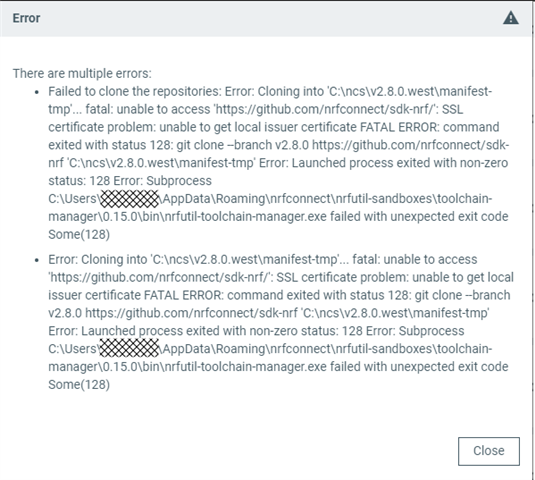
Seems like the certificates for the servers are invalid? Can you fix it?

I'm working within my company's network which probably uses some protection framework, if this might be related to the problem.
I could bring my notebook home and try from my private internet connection if you think this helps. Although I think downloading a SDK from within a company network should be possible...

Update: It seems like the toolchain repository can be downloaded without any problem, but the SDK fails.

Best regards,
Michael

PS: I've noticed that there are some new devzone tickets with developers having trouble creating board definitions on the nRF Connect SDK v2.8.0. Is this release still a bit unstable? Would you suggest using 2.7.0 for migration and HWMv2 board definitions at the moment? Or better switch over to 2.8.0 as planned?

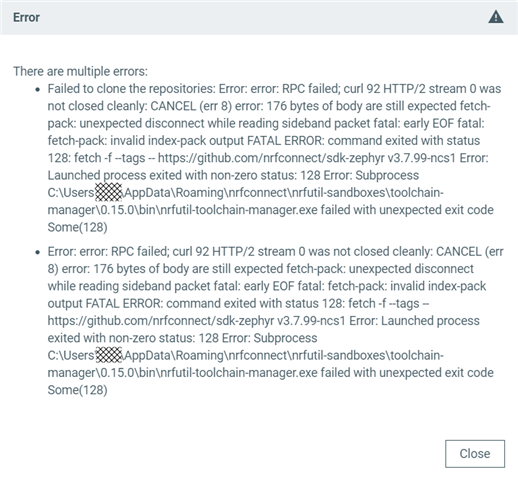
  • Update: I tried it at home on my private PC last night, there I got this error message which is a bit different:

    I have a feeling that the install process proceeded further than in the office (more of the SDK was downloaded/installed, but then removed again as the install process failed).

    A similar error message was triggered when installing v2.7.0, but v2.5.3 installed without any problem.

  • Hi Michael,

    Thanks for reaching out for this issue. I have not get similar reprot by far.

    Could you try to uninstall and reinstall the whole nRF Connect for Desktop and Toolchain manager app? Try to deletect the following folders

    C:\Users\xxx\.nrfconnect-apps

    C:\Users\xxx\.nrfutil

    C:\Users\xxx\AppData\Roaming\nRF Connect

    If the problem still exist, try to share Toolchain Manager v1.5.3->About->Create system report and installing log after enabled Toolchain Manager v1.5.3->About->Verbose Logging.

    Support for HWMv2 started from NCS 2.7.0 nRF Connect SDK v2.7.0 Release Notes, so it is better to use NCS 2.8.0 direclty.

    Best regards,

    Charlie

  • Hi Charlie,

    unfortunately, deleting the directories and re-installing the software did not help. I even performed a reboot before re-installation.

    System report is: [removed]

    The log with verbose on: [removed]

    Update: I succeeded in cloning the nRF COnnect SDK v2.8.0 now: I switched over to Wifi and used the Guest Network connection. It appears our security software was forging the Github certificate (replaced it with their own certificate / man-in-the-middle), which caused the installer to fail. It seems like the nRF Connect SDK installer does not consider trusted root certificates installed on the PC by my company. (Although the toolchain was downloaded correctly.) It would be nice if you could add this feature to future versions of the toolchain manager (accept locally installed certificates).

    The issue on my private PC seems to be different, as there is a different error message (see above, something about RPC). I'll try again with deleting directories and re-installing the toolchain manager PC tonight and give one more update with the results later.

    Best regards,
    Michael

  • Hi Michael,

    It seems the issue stems from a conflict between GitHub and your company's proxy at a lower network level. Unfortunately, there’s not much improvement that can be made with the Toolchain Manager itself in this scenario.

    For reference, you can check this discussion: Request Error: unable to get local issuer certificate · community · Discussion #36894 · GitHub

    Best regards,
    Charlie

  • Hi Charlie,

    like I mentioned before, there seems to be some security software running which manipulates Github's SSL certificates, using a root of trust that is my own company. If certificate checks are not implemented within the Toolchain Manager, the invoked command line tools that connect to GIT could be updated to accept local certificates / roots of trust.

    But I can understand if support for "man in the middle" safety solutions is not wanted in the official releases because of risks to security and code authenticity.

    My private PC also installed SDK v2.8.0 without any problems this morning. The error message posted above with failing RPC must have been some random issue or just bad luck that it appeared at the same time.

    Conclusion: In my case, using an internet connection which is not connected to the company's intranet (Guest Wifi, private internet connection at home) solved the problem.

    Thanks for your feedback so far!

    Best regards,
    Michael

    PS: Your link points forwards to a "drivers/clock_control: stm32: Fixes around LSE clock #36894" discussion which does not help... (it is forwarded to https://github.com/zephyrproject-rtos/zephyr/pull/36894).

Related