Sample project "Peripheral_lbs" does not build on SDK nrf52840

I am a complete newby to Nordic parts and the VB design environment so please bear with my ignorance. I have just purchased a nrf52840 development kit and have successfully set everything up to run the Peripheral_lbs demo code. When I compile, it exits with a fatal error:  "region `RAM' overflowed by 1028 bytes". I looked in the Kconfig section and found a function that allows me to change the size of the assigned stacks, but since I have no idea what stack sizes are needed for the app, just tweaking these values arbitrarily seems a bit dangerous. Have I missed a critical step somewhere?

Parents
  • Assuming you have the nrf52840-DK - when you created the build configuration - did you make sure to choose the nrf52840dk/nrf52840 board?
    I got a similar error by selecting the nrf52840DK/ nrf52811.

    These builds should just work, you shouldn't need to adjust stacks until you start adding code.

  • That was it, thank you! I had set the configuration as nrf52840/nrf52811 because I wanted to use the 52811 in my project. Now it looks like I will have some work to do to make the app fit into the smaller device :-(

  • Well, if its 1028 byte, like it says, there is probably something that is just a bit too big.... like the amount of heap space, or some kind of parameter that allows for better ram usage at the expense of some kind of performance.

    The nrf52811 is supposed to be 192K bytes or RAM, with the nrf52840 having a lot more than that. It seems like just a hair over. 

    ARRGGG! - just realized I was looking at the wrong row in the chip comparison table. soo....24K is what you have to work with.

  • You can look at prj_minimal.conf as it has configuration adjustments to make it fit into smaller memory devices.

    It is included in the project directory, and you can select it in the build GUI under the "Base configuration files" section by selecting "Add configuration file" and choosing prj_minimal.conf. You can also peruse the file to view the optimizations made to minimize the project.


    Below is my successful build output for the 52811. 

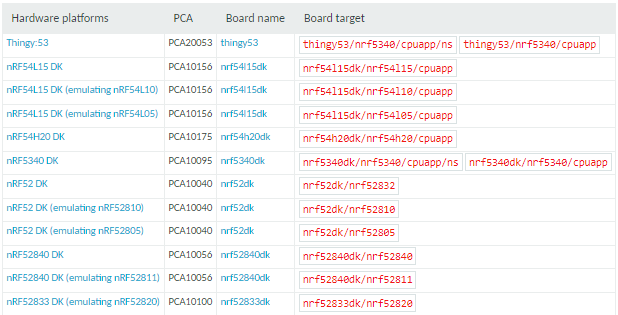
    For reference, this sample supports the following devkits:

Reply
  • You can look at prj_minimal.conf as it has configuration adjustments to make it fit into smaller memory devices.

    It is included in the project directory, and you can select it in the build GUI under the "Base configuration files" section by selecting "Add configuration file" and choosing prj_minimal.conf. You can also peruse the file to view the optimizations made to minimize the project.


    Below is my successful build output for the 52811. 

    For reference, this sample supports the following devkits:

Children
Related