nrf Connect Terminal LD_LIBRARY_PATH problem

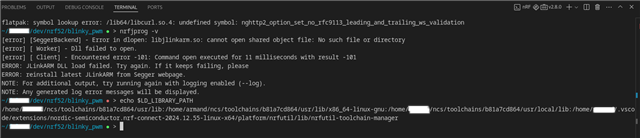
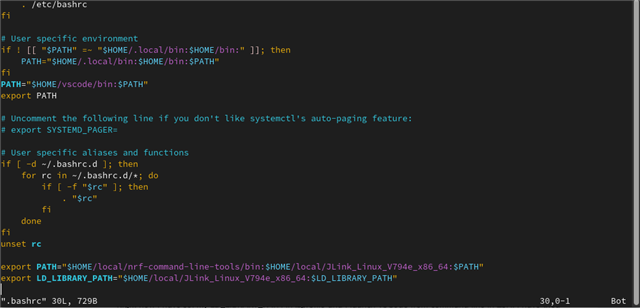
nrf Connect Terminal overwrites LD_LIBRARY_PATH. I have added SEGGER JLink path to it so nrfjprog and JLink can dynamically link to the JLink dot so files. This works on Bash and ZSH outside nrf Connect terminal. 

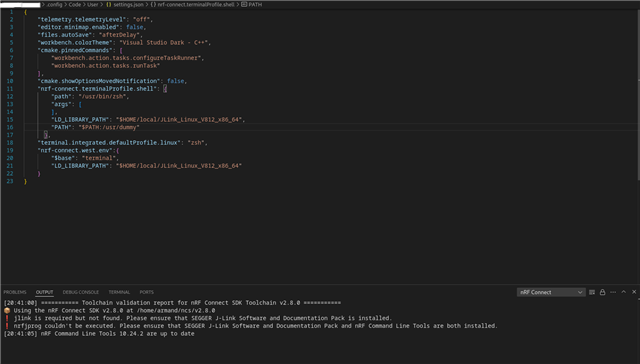
Please see the screenshots below from the terminal window in VSCode:

I have found below template hoping that I can somehow insert JLink library path:

"nrf-connect.terminalProfile.shell": {
"path": "/usr/bin/zsh",
"args": []
},
however I'm not sure whether LD_LIBRARY_PATH is append-able for nrf Connect Terminal. How can I fix this problem ? 
Parents Reply
  • Our devs say that "As of now we don't have a solution for this". Luckily the normal JLink install method works, so this is kindof a corner case.

    Devs also suggest a possible workaround:

    "
    Alternatively there's a hack, it might be possible to manipulate the toolchain itself: /PATHTO/ncs/toolchains/b81a7cd864/environment.json, but be aware this must be done with care and for each toolchain used. Also the change won't be kept when reinstalling the tarmandoolchain, so this will be a temporary workaround.
    "

Children
No Data
Related