Bluetooth Mesh Light CTL (color tuned light) sample

Is there a sample app that uses the Zephyr Light CTL Bluetooth Mesh model?  I've tried to add that model to the light_ctrl sample app, but get a crash during configuration so I must be doing something wrong. 

The onoff_level_lighting_vnd app claims to support that model but it doesn't seem to be using the Zephyr lighting models. 

Thanks

Parents
  • Hi Jack, 
    I think you are right. There isn't a sample for that model right now. Please let us know the issue you are seeing we can try to take a look. 
    We have limited capacity in the holidays period but will be back to full staff by beginning of the year. 

  • Thanks, here goes.

    I started with the VSCode plugin light_ctrl sample using version 2.8.0 of the toolchain and libraries. Build machines with Windows and Linux tried.  Target is nRF52840DK. 

    The unmodified sample builds, runs, and provisions and functions correctly with the nRF Mesh Android app. 

    After the modifications below, the code compiles and runs, but during initialization I get an assert showing on the console (see below), and an "Initial Configuration Failed" message from the app.  

    Note that the assert states that temp srv wasn't properly initialized.  On debugging, however, it appeared that the tmp srv model was properly initialized and the light CTL model was not, however I have a low degree of confidence in this assessment. 

    model_handler.c was modified from the sample as follows:

    Add headers

    #include <bluetooth/mesh/light_ctrl_srv.h>
    #include <bluetooth/mesh/light_ctl_srv.h>

    Add placeholder handlers

    static void temp_srv_set(struct bt_mesh_light_temp_srv *srv,
                             struct bt_mesh_msg_ctx *ctx,
                             const struct bt_mesh_light_temp_set *set,
                             struct bt_mesh_light_temp_status *status)
    {
        // Implement setting the temperature on your hardware
    }

    static void temp_srv_get(struct bt_mesh_light_temp_srv *srv,
                             struct bt_mesh_msg_ctx *ctx,
                             struct bt_mesh_light_temp_status *status)
    {
        // Implement reading the current temperature state from your hardware
    }

    static const struct bt_mesh_light_temp_srv_handlers temp_srv_handlers = {
        .set = temp_srv_set,
        .get = temp_srv_get,
    };

    static struct bt_mesh_light_temp_srv light_temp_srv =
        BT_MESH_LIGHT_TEMP_SRV_INIT(&temp_srv_handlers);

    static struct bt_mesh_light_ctl_srv light_ctl_srv =

        BT_MESH_LIGHT_CTL_SRV_INIT(&lightness_srv_handlers, &temp_srv_handlers);

    Add light ctl and light temp srv models:

    static struct bt_mesh_elem elements[] = {
        BT_MESH_ELEM(1,
                     BT_MESH_MODEL_LIST(
                         BT_MESH_MODEL_CFG_SRV,
                         BT_MESH_MODEL_HEALTH_SRV(&health_srv, &health_pub),
                         BT_MESH_MODEL_LIGHTNESS_SRV(&my_ctx.lightness_srv),
                         BT_MESH_MODEL_SCENE_SRV(&scene_srv),
                         BT_MESH_MODEL_SENSOR_SRV(&sensor_srv),
                         BT_MESH_MODEL_LIGHT_CTL_SRV(&light_ctl_srv)
                                        ),
                     BT_MESH_MODEL_NONE),
        BT_MESH_ELEM(2,
                     BT_MESH_MODEL_LIST(
                         BT_MESH_MODEL_LIGHT_TEMP_SRV(&light_ctl_srv.temp_srv)
                     ),
                     BT_MESH_MODEL_NONE),
        BT_MESH_ELEM(3,
                     BT_MESH_MODEL_LIST(
                         BT_MESH_MODEL_LIGHT_CTRL_SRV(&light_ctrl_srv)
                                       ),
                    BT_MESH_MODEL_NONE)
    };

    prj.conf changes


    CONFIG_BT_MESH_MODEL_EXTENSION_LIST_SIZE=33

    CONFIG_BT_MESH_LIGHT_CTL_SRV=y

    CONFIG_CORTEX_M_DEBUG_MONITOR_HOOK=y

    CONFIG_SEGGER_DEBUGMON=y

    Console output:

    *** Booting Mesh Light Fixture v2.8.0-c57f55d0686e ***
    *** Using nRF Connect SDK v2.8.0-a2386bfc8401 ***
    *** Using Zephyr OS v3.7.99-0bc3393fb112 ***
    Initializing...
    [00:00:00.008,941] <inf> fs_nvs: 8 Sectors of 4096 bytes
    [00:00:00.008,972] <inf> fs_nvs: alloc wra: 0, fb0
    [00:00:00.008,972] <inf> fs_nvs: data wra: 0, 44
    [00:00:00.009,124] <inf> bt_sdc_hci_driver: SoftDevice Controller build revision:
    fe 2c f9 6a 7f 36 22 2e a0 79 c0 40 be 2c 03 20 |.,.j.6". .y.@.,.
    40 c2 f3 32 |@..2
    [00:00:00.013,305] <inf> bt_hci_core: HW Platform: Nordic Semiconductor (0x0002)
    [00:00:00.013,336] <inf> bt_hci_core: HW Variant: nRF52x (0x0002)
    [00:00:00.013,366] <inf> bt_hci_core: Firmware: Standard Bluetooth controller (0x00) Version 254.63788 Build 573996906
    [00:00:00.013,763] <inf> bt_hci_core: No ID address. App must call settings_load()
    Bluetooth initialized
    [00:00:00.439,453] <inf> bt_hci_core: Identity: EC:2C:E8:3F:5C:0E (random)
    [00:00:00.439,514] <inf> bt_hci_core: HCI: version 6.0 (0x0e) revision 0x104e, manufacturer 0x0059
    [00:00:00.439,544] <inf> bt_hci_core: LMP: version 6.0 (0x0e) subver 0x104e
    [00:00:00.442,474] <inf> bt_mesh_provisionee: Device UUID: 5c0b7b01-159d-4da6-a3f4-84feea62c259
    Mesh initialized
    Successfully enabled LC server
    [00:02:35.433,380] <inf> bt_mesh_main: Primary Element: 0x0020
    New light transition-> Lvl: 0, Time: 0, Delay: 0
    [00:02:35.443,359] <err> bt_mesh_light_ctl_srv: Light CTL srv[32]: Temp. srv not properly initialized
    ASSERTION FAIL @ WEST_TOPDIR/zephyr/kernel/work.c:687
    [00:02:35.443,878] <err> os: r0/a1: 0x00000004 r1/a2: 0x000002af r2/a3: 0x00000003
    [00:02:35.443,908] <err> os: r3/a4: 0x00000004 r12/ip: 0x0001b4a4 r14/lr: 0x0004443b
    [00:02:35.443,908] <err> os: xpsr: 0x01000000
    [00:02:35.443,939] <err> os: s[ 0]: 0x00000000 s[ 1]: 0x0004c9d3 s[ 2]: 0x00000000 s[ 3]: 0x00000000
    [00:02:35.443,969] <err> os: s[ 4]: 0x0005e348 s[ 5]: 0x2000dd34 s[ 6]: 0x00000000 s[ 7]: 0x0004bc3d
    [00:02:35.443,969] <err> os: s[ 8]: 0x20006ea8 s[ 9]: 0x0004bc7f s[10]: 0xffffffff s[11]: 0x2000dd34
    [00:02:35.444,030] <err> os: s[12]: 0x00000000 s[13]: 0x00044431 s[14]: 0x0005e348 s[15]: 0x00066cdc
    [00:02:35.444,030] <err> os: fpscr: 0x000002af
    [00:02:35.444,030] <err> os: Faulting instruction address (r15/pc): 0x0004bc6a
    [00:02:35.444,091] <err> os: >>> ZEPHYR FATAL ERROR 4: Kernel panic on CPU 0
    [00:02:35.444,122] <err> os: Current thread: 0x20006ea8 (sysworkq)
    [00:00:00.000,427] <err> qspi_nor: JEDEC id [ff ff ff] expect [c2 28 17]

  • Hi Jack, 

    That's okay, we can keep it here.

    I'll look into it, but I might have to get back to you on this next week.

    Regards,

    Elfving

  • Hi again, and thanks for the patience on this one.

    I bet the issue is related to how you are addressing the light fixture, and the fact that Light CTL happens to be on another element than the ones related to lightness on the light fixture node. I haven't gotten around to get properly tested yet, but I figured it was better to get to you on this sooner rather than even later. Your code looks ok.

    I realize it's been a while since you asked. Any update on this one from your side? How are you configuring the addressing?

    Regards,

    Elfving

  • Funny you should post this, last night it started working and I was puzzled as to why.

    I had originally been using no subscription address for the servers and 0xFFFF (all nodes) publish address for the clients. Recently, I switched from the Android app to iOS, which is much easier to configure, and I used a group for both publish and subscribe.  It seems that CTL started to work when configured this way.

    So my conclusion is that something in the CTL server and client doesn't work with 0xFFFF addresses.  I don't know if the issue is that the CTL client won't send to all nodes, or if the CTL server doesn't respond to those messages.

    Would you expect all of the servers to work when an appropriate client message is sent to 0xFFFF even if no subscribe address is set on the server?

    This is great progress.

    Thanks,

    Jack

  • ji_584 said:
    I had originally been using no subscription address for the servers and 0xFFFF (all nodes) publish address for the clients. Recently, I switched from the Android app to iOS, which is much easier to configure, and I used a group for both publish and subscribe.  It seems that CTL started to work when configured this way.

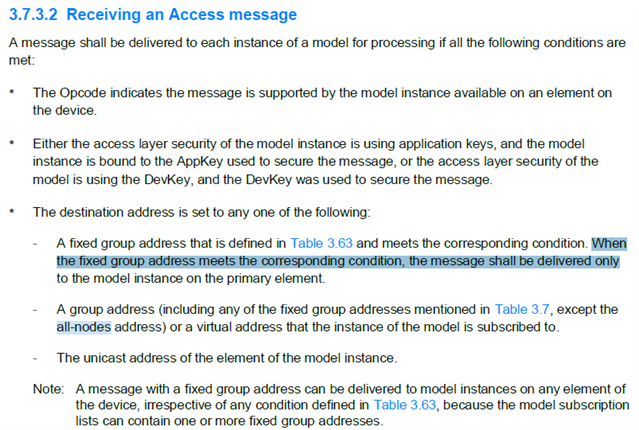
    That does make some sense; the address of the node is its primary/first element address. So I wonder if the 0xFFFF address wouldn't target secondary elements. I typically use group addresses for quick tests like these.

    For this reason 0xFFFF is eg. not recommended for a DFU. I've handled a case where that was a problem before.

    ji_584 said:

    Would you expect all of the servers to work when an appropriate client message is sent to 0xFFFF even if no subscribe address is set on the server?

    Yeah, I believe that is generally true: the node doesn't need to subscribe to anything to receive a message to 0xFFFF, though once again: that might just be the primary element. 

    Regards,

    Elfving

  • Ok, so that mystery is solved thank you!.  I'm still doing some testing, will let you know when I close it out.

    Jack

Reply Children
Related