Correct place to set Kconfig parameter CONFIG_GPIO=y using nRF Connect SDK v2.9.0?

Hi,

What file or files should contain CONFIG_GPIO=y for a simple application developed with nRF Connect SDK v2.9.0 such that VS Code does not show squiggles under #include <zephyr/drivers/gpio.h>  indicating error:  The GPIO drivers must be enabled by CONFIG_GPIO to be included in build (missing_kconfig_param).

I have a similar problem with CONFIG_PWM.  I have tried setting it in prj.conf and also my custom_board_defconfig file without solving the problem.

Thanks,

Ken

Parents
  • I have the same issue.  In the blinky example I get a build message  "The GPIO drivers must be enabled by CONFIG_GPIO to be included in the build".  Also sometimes there is a build message saying the active build context does not use prj.conf.

    File prj.conf exists and is in the build configuration.
    CONFIG_GPIO=y is in prj.conf.
    CONFIG_GPIO is also set in the board definition kconfig file:       C:\ncs\v3.3.0\zephyr\boards\nordic\nrf54l15dk\nrf54l15dk_nrf54l15_cpuapp_defconfig

    Yet it builds and flashes Ok.
    Since CONFIG_GPIO=y is set in two places I comment it out in prj.conf.  Same build problems reported, but still builds and flashes.

    I created my own kconfig options in a kconfig file in the project root folder.  I set their values in prj.conf.
    I still get the build message saying the active build context does not use prj.conf.
    However these options are being used in my main.c, so clearly prj.conf is being included in the active build context.

    I've been using nRF for 7 years, with SDK 11.0 and SDK 15.3.  This is my first time using nRF Connect with Zephyr and I find this very confusing.  Is it a build error or not?

  • Hi Phil,

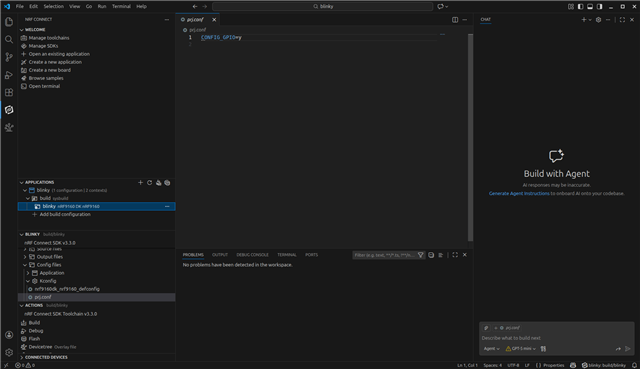
    Are you certain you selected the correct build configuration? Notice which line I have selected under Applications in the screenshot:

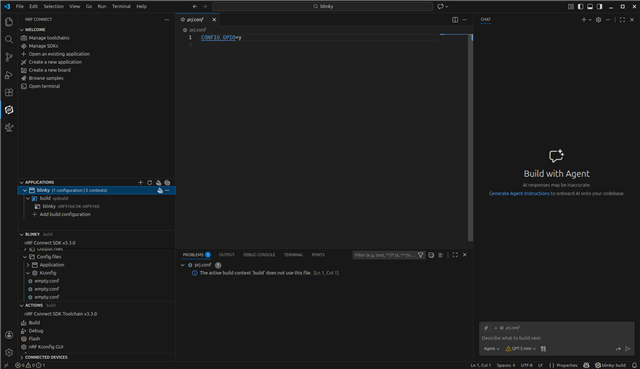
    Now notice what Problems show up if I select a different line under Applications

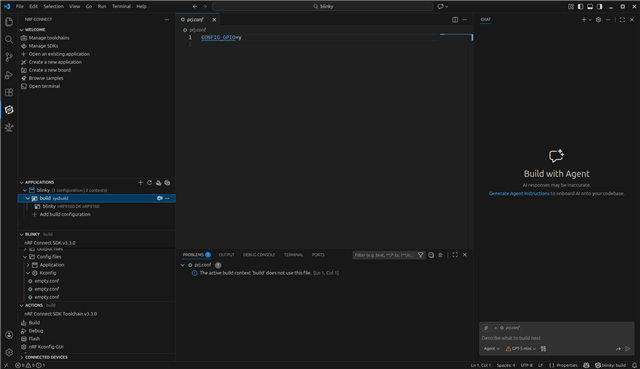
    Or likewise:

    You see how I need to select blinky underneath build. My example was done with nRF9160dk/nrf9160 and SDK v3.3.0.

    It's kind of neat, even if you go to the Explorer outside of the nrf Connect extension, it remembers your build context you selected when last in nRF Connect.

    Burt

  • I use the build selection in your first screenshot and I get the build problem "The GPIO drivers must be enabled by CONFIG_GPIO to be included in the build".

Reply Children
Related