DFU issue - bt_mesh_cli: dropping

Dear,

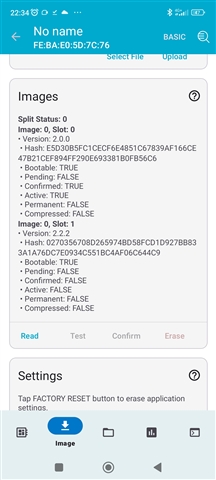
I’m experiencing an issue with performing DFU over BLE Mesh. I have a setup with one node acting as provisioner and distributor. This node has a new image loaded (with a modified advertising name and updated imgtool_sign_version). Additionally, there is one target node (node 3) added in ble mesh. 

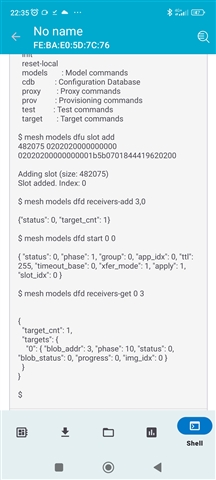
I’ve uploaded the image to the distributor, added a slot, and registered the receiver. However, when I start the distribution and check the status, I receive a response indicating phase 10 and status 0.

This setup used to work occasionally when using SDK v2.6.2. However, after migrating to SDK v2.7.0, the issue consistently appears.

Do you have any idea what might be causing this?

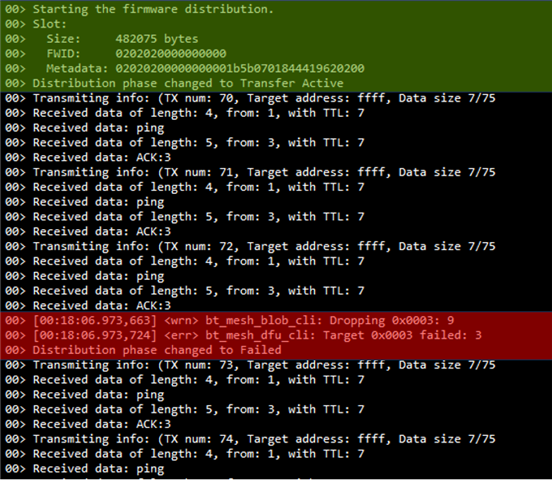
Here is Seggers rtt output:
And commands from app:
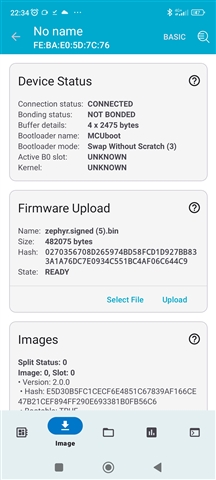
I have also tried with image index 1, but nothing...
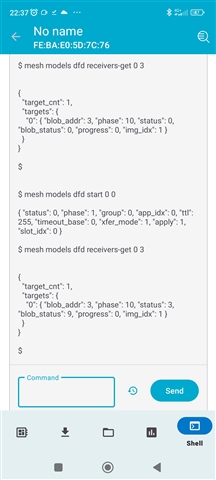
Any idea, inputs?

Thank you 

Best regards,
Matej

  • Probably end of August, but I cannot promise any schedule. 

  • Matej said:

    I've cherry-picked all the changes, and everything is working as expected now. I initially assumed the other changes weren't necessary since they were located in the test folder, and it was mentioned that this is a one-line fix. However, it looks like the provisioning info is now retained correctly.

    The provisioner is still showing some errors, even though the firmware update was successfully applied to the nodes.

    Please note, distributor communicates with the Firmware Update Server model, and BLOB Transfer Server model on the target nodes. Since they are using 0xFFFF as a group address, and since this group address is used to refer to only the 'primary element address' on all nodes, the Firmware Update Server model and BLOB Transfer Server model (both together) serving the firmware update capability must be present on the primary element of the target node. 

    Alternatively, I would ask you to try to use 0xC000 as group address, and subscribe the firmware update related models.

    Additionally, please use latest iOS app, it now support firmware distribution via Mesh, so you won't have to type many commands and do manual subscription configuration of the node.


    Matej said:
    What is the recommended procedure for updating the firmware on the provisioner itself? I initially assumed that once the firmware will be distributed to the nodes, the provisioner would also be updated automatically.

    Assuming provisioner is also the distributor - To update firmware on distributor itself, this could be done using Mesh DFU flow. However, in such a case, the only target node that should be present in the list of target nodes is the primary element address of the distributor itself. No other nodes should be present. Once you start the distribution, the distributor will recognize its own address in the target list, and immediately quickly reboot itself to apply the new image.

Related