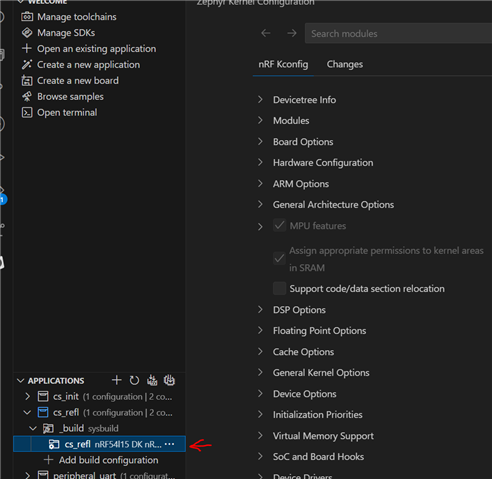
nRF Kconfig GUI mostly doesnt work

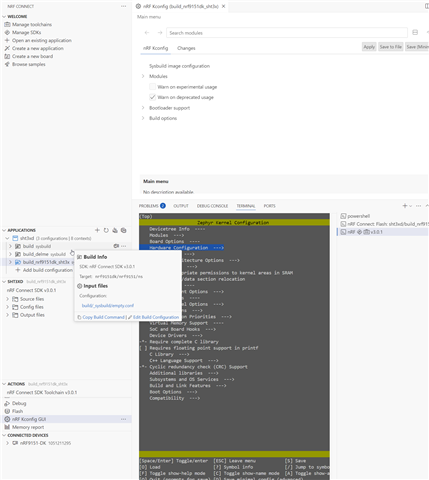
Using latest SDK and toolchain 3.0.1, VSCode and nRF Connection Pack on Windows 11 I nearly never see a working nRF Kconfig GUI - only the first time directly after I had started VSCode and created a new App by copying a sample, creating a new build config, generate and build - and then I get a fully functional Kconfig GUI. After that its briken and either only shows some bootloader settings or doesn't startup at all. west build -t menuconfig always shows a richer menu - see the screenshot below showing both menuconfig and nRF Kcconfig GUI at the same time.
So whats the recommended way of configuring nRF connect in VScode?
Parents
  • That broken Kconfig GUI annoyed me - so I took a screenshot and saw, that its calling:
    "west build -t sysbuild_menuconfig" - which in fact shows the broken Kconfig menu.
    So I searched my HDD for the string and found it here:
    C:\Users\xyz\.vscode\extensions\nordic-semiconductor.nrf-connect-2025.5.152-win32-x64\dist\extension.js

    I replaced <r=e.sysbuild?"sysbuild_menuconfig":"menuconfig"> with <r=e.sysbuild?"menuconfig":"menuconfig">, restarted vscode - an now I get at least a working menuconfig.

    So maybe you guys could fix this in the next release?

  • Hi,
    could you please double-check with the team if they already got this information? The latest nRF Connect release (end of August 2025) still shows the same bug — I had to patch it again.

  • Hello,

    Let me ping my internal ticket! I will get back to you when I hear from them!

    Best regards,

    Edvin

  • A quick chat with one the developers revealed something for me:

    If you make sure that you have selected your correct build domain before you click nRF Kconfig GUI:

    Then it should open the Kconfig GUI with all the options. The issue is that when you close this window, then the domain is un-selected, and it selects the sysbuild folder (one step up in your build). And if you then open the nRF Kconfig GUI again, it tries to open the Kconfig GUI for this folder, which doesn't contain much. 

    They agree that it was a bug, so they will look into it. But in the meantime, you can make sure to select the domain that you want to open the GUI tool for before clicking "nRF Kconfig GUI".

    Best regards,

    Edvin

Reply
  • A quick chat with one the developers revealed something for me:

    If you make sure that you have selected your correct build domain before you click nRF Kconfig GUI:

    Then it should open the Kconfig GUI with all the options. The issue is that when you close this window, then the domain is un-selected, and it selects the sysbuild folder (one step up in your build). And if you then open the nRF Kconfig GUI again, it tries to open the Kconfig GUI for this folder, which doesn't contain much. 

    They agree that it was a bug, so they will look into it. But in the meantime, you can make sure to select the domain that you want to open the GUI tool for before clicking "nRF Kconfig GUI".

    Best regards,

    Edvin

Children
Related