What is the compatitble SoftDevice version for nRF52840 Dongle? My aim is to configure the nRF52840 Dongle and to advertise the packets.
What is the compatitble SoftDevice version for nRF52840 Dongle? My aim is to configure the nRF52840 Dongle and to advertise the packets.  

Parents
  • Hi,

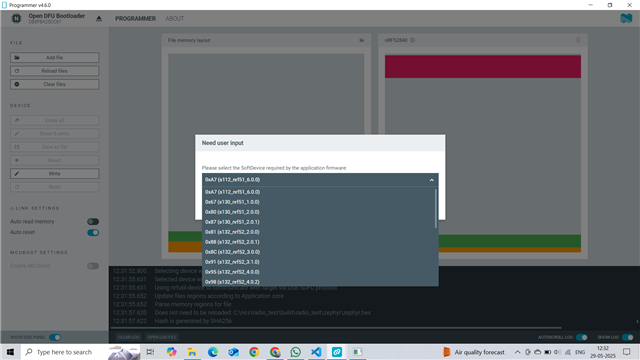
    Any SoftDevice that is compatible with the nRF52840 can be used with the nRF52840 dongle. The key is that you use a SoftDevice that is compatible with your firmware (when you build bluetooth firmware using the osl nRF5 SDK, that includes header files for a specific SoftDevice version).

    PS: If you add the accompanying SoftDevice hex to the programmer app, you will not have to specify the SoftDevice version

    PSS: Note that this is only relevant for the old nRF5 SDK, the nRF Connect SDK does not use the SoftDevice (the SoftDevice Controller used there is different and included in the application binary once the application ins built).

  • Can you elaborate? The merged.hex produced by nrf-connect-sdk(3.1.1) when building the nRF Desktop sample with board nrf52840dongle is not writable with the Programmer(4.6.2).

    Trying to program the merged.hex results in the popup shown by  above. It's not clear what the "correct" SDev even is, or why it's asking.

  • Hi,

    That is a special case, as with nRF Connect SDK there is no SoftDevice. Moreover, as the nRF52840 Dongle has an nRF5 SDK USB bootloader, the application needs to start at address 0x1000, and be built with CONFIG_BOARD_HAS_NRF5_BOOTLOADER=y and CONFIG_FLASH_LOAD_OFFSET=0x1000. That is not the case if you build nrf_desktop even with dongle as target by default, so the firmware generated is not compatibler with being programmed like this (it would requier attaching an external debugger). So you need to modify the configuration to add the mentionned configurations, but this is also a bigger task as it affects the bootloader etc, and there is a reason this choise was made for nRF desktop.

    So in short, if you want to use the dongle for nRF destkop, program it with an external programmer (you can solder on programming header on the back side of the dongle). For other nRF Connect SDK projects this will work out of the box with the nRF52840 dongle using the Programmer app.

Reply
  • Hi,

    That is a special case, as with nRF Connect SDK there is no SoftDevice. Moreover, as the nRF52840 Dongle has an nRF5 SDK USB bootloader, the application needs to start at address 0x1000, and be built with CONFIG_BOARD_HAS_NRF5_BOOTLOADER=y and CONFIG_FLASH_LOAD_OFFSET=0x1000. That is not the case if you build nrf_desktop even with dongle as target by default, so the firmware generated is not compatibler with being programmed like this (it would requier attaching an external debugger). So you need to modify the configuration to add the mentionned configurations, but this is also a bigger task as it affects the bootloader etc, and there is a reason this choise was made for nRF desktop.

    So in short, if you want to use the dongle for nRF destkop, program it with an external programmer (you can solder on programming header on the back side of the dongle). For other nRF Connect SDK projects this will work out of the box with the nRF52840 dongle using the Programmer app.

Children
Related