Change Installation Path of Power Profiler

I´m trying to change the installation path of the Nordic Power Profiler as I´m running out of space.
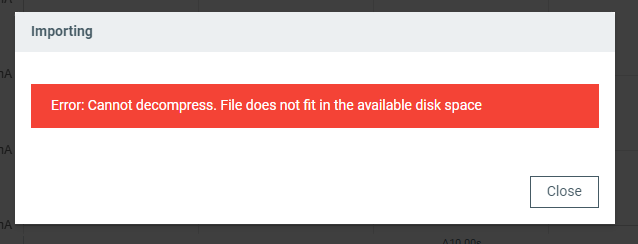
I have about 9GB left, but when trying to open a captured file, Power Proflier says that the file does not fit in the available disk space.
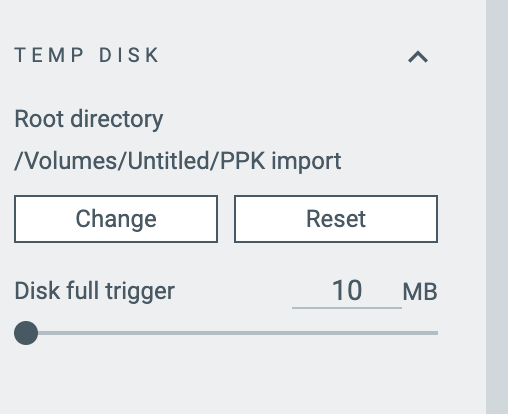
I´ve already change the temp directory but it seems like the Software still relies on space on my C drive.
Is there a way to install the Software on another disk?
Thank you
Parents
  • Hello, 

    what OS are you running on you computer? 

    Kind regards,
    Øyvind

  • Hello JonasD27,

    Our sincere apologies. Look like there was some communication mistakes and the progress was stuck for a long time.

    Unfortunately, changing the install directory is not possible.

    Our developers have a few questions:

    • What is the size of the ppk2 file you are trying to load?
    • What is the disk space available on the disk you installed nRF Connect for Desktop?
    • What is the disk space available on the disk where your temp folder is?
    • When is the error happening? A screenshot or record would be very helpful.

    The .ppk2 file contains compressed data, so the application might need a lot more space to load a file. The space requires could easily be more than x5.5 times the file size.

    Best regards,

    Hieu

  • Hi, Thank you for the questions.

    The ppk2 file is 684KB.

    I´ve installed Power Profiler on C-Drive. There´s about 8.3GB space available.

    I´ve chosen my D-Drive as a temporary directory, there´s about 167GB available.

    As soon as I try to load the ppk2 file, an error occurs (see screenshot).

    Here´s the log dump:

    2025-07-26T12:31:47.674Z INFO Initialising the bundled nrfutil device
    2025-07-26T12:31:47.991Z DEBUG Application data folder: C:\Users\Jonas\AppData\Roaming\nrfconnect\pc-nrfconnect-ppk
    2025-07-26T12:31:48.282Z DEBUG Sending event "ppk: running nrfutil device"
    2025-07-26T12:31:48.290Z DEBUG App pc-nrfconnect-ppk v4.2.2 (official)
    2025-07-26T12:31:48.290Z DEBUG App path: C:\Users\Jonas\.nrfconnect-apps\node_modules\pc-nrfconnect-ppk
    2025-07-26T12:31:48.290Z DEBUG nRFConnect 5.2.0, required by the app is (>=5.2.0)
    2025-07-26T12:31:48.290Z DEBUG nRFConnect path: C:\Users\Jonas\AppData\Local\Programs\nrfconnect\resources\app.asar
    2025-07-26T12:31:48.291Z DEBUG HomeDir: C:\Users\Jonas
    2025-07-26T12:31:48.291Z DEBUG TmpDir: C:\Users\Jonas\AppData\Local\Temp
    2025-07-26T12:31:50.178Z DEBUG Sending event "ppk: running nrfutil device"
    2025-07-26T12:31:51.301Z DEBUG Sending event "ppk: running nrfutil device"
    2025-07-26T12:31:51.302Z DEBUG Sending event "ppk: running nrfutil device"
    2025-07-26T12:31:51.311Z DEBUG Sending event "ppk: running nrfutil device"
    2025-07-26T12:31:51.473Z INFO Using the bundled core version for nrfutil device: 8.0.0
    2025-07-26T12:31:51.530Z INFO Using nrfutil-device version: 2.10.2
    2025-07-26T12:31:51.531Z INFO Using nrf-device-lib version: 0.17.71
    2025-07-26T12:31:51.531Z INFO Using nrf-probe version: 0.38.0
    2025-07-26T12:31:51.531Z INFO Using JLink version: JLink_V8.18
    2025-07-26T12:32:02.914Z INFO Restoring state from C:\Users\Jonas\Documents\Studium\MSD\Semester_2\Forschung\Bericht\PPK2_Messungen\aps1604_test.ppk2

  • Hello JonasD27,

    Thank you for the details. 

    To confirm, is this the .ppk2 file you are trying to open?

    JonasD27 said:
    C:\Users\Jonas\Documents\Studium\MSD\Semester_2\Forschung\Bericht\PPK2_Messungen\aps1604_test.ppk2

    Could you please also share what is the Disk full trigger set to at the moment/when the issue occurs?

  • Yes, that is the file I´m trying to open.

    Disk Full Trigger was set to the maximum of 10240 MB.

    I´ve discovered the following: As soon as I set the Disk Full Trigger to a smaller value (e.g. 3000 MB), I can open the file without a problem. Is this behavior intended?

  • JonasD27 said:
    I´ve discovered the following: As soon as I set the Disk Full Trigger to a smaller value (e.g. 3000 MB), I can open the file without a problem. Is this behavior intended?

    It is a bug. The Disk Full Trigger is checked against a different drive. That will get fixed soon.

    Thank you for the report and helping us getting to the bottom of it.

Reply
  • JonasD27 said:
    I´ve discovered the following: As soon as I set the Disk Full Trigger to a smaller value (e.g. 3000 MB), I can open the file without a problem. Is this behavior intended?

    It is a bug. The Disk Full Trigger is checked against a different drive. That will get fixed soon.

    Thank you for the report and helping us getting to the bottom of it.

Children
No Data
Related