Debugging TFM application on nrf9151

I'm not able to debug any of example applications that uses non secure build. Non ns versions works fine. I have added CONFIG_TFM_CMAKE_BUILD_TYPE_RELWITHDEBINFO=y  to my prj.conf. Debugger connects but I'm not able to pause it, place breakpoints or checking any of program variables. I'm using nrf connect with vscode.

Thank you for your help.

  • Hi,
    There was someone with a similar issue you could check out. In short you could try to set debug level in the .config file under build/{app_name}/zephyr/

    This exercise is also great to check if you are new to debugging in NCS on VSCode.

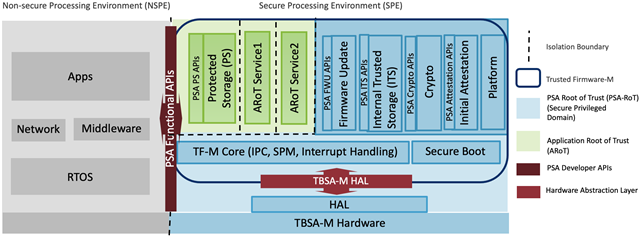
    The CONFIG_TFM_CMAKE_BUILD_TYPE_RELWITHDEBINFO symbol is for debugging the code in the Secure Processing Environment. Applications are running in the Non-secure Processing Environment and this Kconfig symbol should not matter.

  • Hi, just to bump this thread, because my experience is the same as  With an _ns application, I don't seem to be able to debug anything at all. When I run the debugger, it gets stuck either inside cmsis_gcc_m.h or at reset_handler(). If I continue, it never triggers again, and never reaches my main (which has breakpoints waiting for it). I've tried all the suggestions I could unearth from this forum (CONFIG settings; -exec mon reset ... ) , but nothing appears to work. 

    I'm working on a recent install of the nRF Connect environment in VS Code. My application is running on an nRF9151 on a custom board, and I'm using my 9151 DK as a programmer with the DEBUG OUT port (if that is relevant). 

    If I just flash the code, it seems to work fine by the way. I can capture I2C transfers on my oscilloscope and fiddle with PWM outputs. 

  • Good question! I did an experiment to explore. I created a blinky application as a sandpit. Then I created a build configuration for the nRF9151_DK and one for my custom board (adding in SPI, PWM, I2C nodes).

    1. Everything worked perfectly on the DK - debugging logs and stepping through code.

    2. With the exact same setup, I could step through the debugger on the Custom board (external debugger from DK) but I could not get any console logs of any sort, either through COM port or RTT. I tried printk & logger. Nothing. 

    3. Custom board, but with custom board files = random behaviour! Including exactly what OP describes. I isolated the problem to my SPI flash memory device tree node, which is (apparently) malformed. So, even though I'm only running a blinky app, nRF Connect is clearly compiling and running some initialisation code for the SPI peripheral. And getting stuck. Why this only takes effect with debugging enabled - No idea! But I need to fix the device tree code! It's a pity there isn't some sort of tree-shaking in place to avoid this - if only because it's so counterintuitive to fault find... 

    TLDR -

    1. External debugging doesn't appear capable of console logging. Do I need to get a dedicated debugging dongle??? 

    2. Errors in device tree can break debugging sessions even if peripheral isn't used! 

  • Thanks for the additional details and apologies for the slow reply. Just to confirm, does everything work as expected if you do these tests without building with TF-M?

    Regards,
    Benjamin

Related