We are currently working through Exercise 5 – FOTA over Bluetooth Low Energy using the nRF5340 DK and encountering an issue where the mobile application (nRF Connect for Mobile) displays a “Device not supported” message upon connecting to the board.
Details:
Device Name: Nordic_LBS
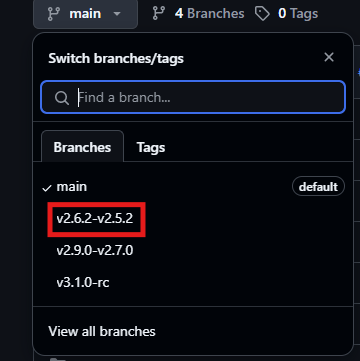
Exercise Used : I9/I9_e5sol
Bluetooth Address: C7:01:13:DD:1E:93
App Used: nRF Connect for Mobile (Android)
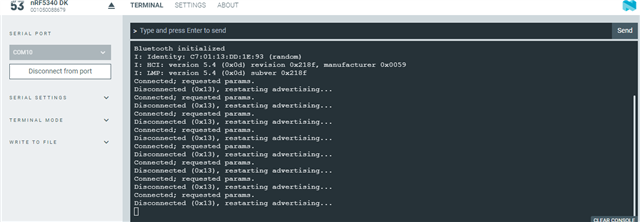
nRF5340 DK Terminal Output: The board repeatedly connects and disconnects (0x13 error), which causes it to restart advertising.
Attachments:
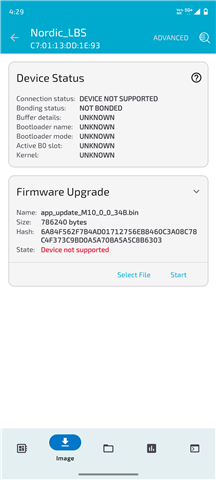
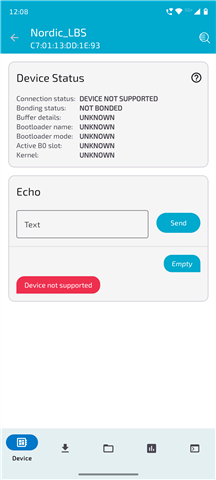
Screenshot of the nRF Connect app with error
Terminal output from the nRF5340 DK (via serial terminal)
Could you please advise on what might be causing the “Device not supported” issue and how it can be resolved?
Details:
Device Name: Nordic_LBS
Exercise Used : I9/I9_e5sol
Bluetooth Address: C7:01:13:DD:1E:93
App Used: nRF Connect for Mobile (Android)
nRF5340 DK Terminal Output: The board repeatedly connects and disconnects (0x13 error), which causes it to restart advertising.
Attachments:
Screenshot of the nRF Connect app with error
Terminal output from the nRF5340 DK (via serial terminal)
Could you please advise on what might be causing the “Device not supported” issue and how it can be resolved?