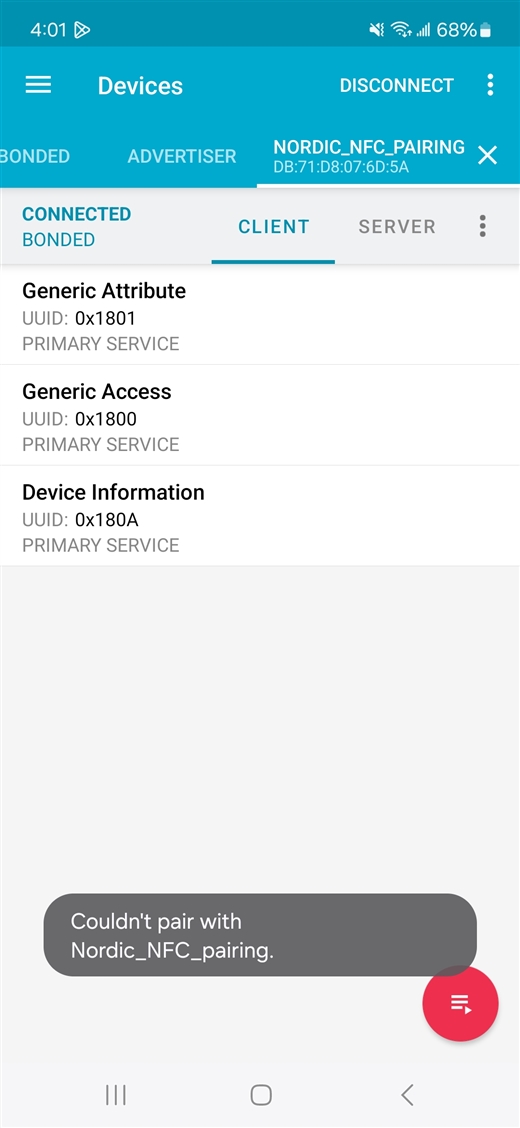
I have been trying to use the `nrf\samples\bluetooth\peripheral_nfc_pairing` sample code on the nRF Connect SDK v3.0.2 to connect to a Samsung Galaxy A16 5G phone.
The NFC pairing seems to work, and the connection is working. However, every time the pairing is done, after 20 seconds, I get a message pop-up toast from the Android OS saying "Couldn't pair with Nordic_NFC_pairing". See the screenshot below that shows the pop-up and the bonded connected state of the nRF Connect app. I have also tried clearing the bonded devices on both the nrf5340dk and the phone, but it looks the same.
I have seen people reporting a similar issue before:
- NFC Android Pairing warning "Could not connect"
- NFC pairing failed!!! ble_nfc_pairing_reference test failed!
Given that the items above are all very old. I was wondering if there are any updates on this.
How do you suggest that I hide the pop-up toast message?