The peripheral_nfc_pairing sample code pairs and connects, but Android shows a "Couldn't pair" message

I have been trying to use the `nrf\samples\bluetooth\peripheral_nfc_pairing` sample code on the nRF Connect SDK v3.0.2 to connect to a Samsung Galaxy A16 5G phone.

The NFC pairing seems to work, and the connection is working. However, every time the pairing is done, after 20 seconds, I get a message pop-up toast from the Android OS saying "Couldn't pair with Nordic_NFC_pairing". See the screenshot below that shows the pop-up and the bonded connected state of the nRF Connect app. I have also tried clearing the bonded devices on both the nrf5340dk and the phone, but it looks the same.

I have seen people reporting a similar issue before:

Given that the items above are all very old. I was wondering if there are any updates on this.

How do you suggest that I hide the pop-up toast message?
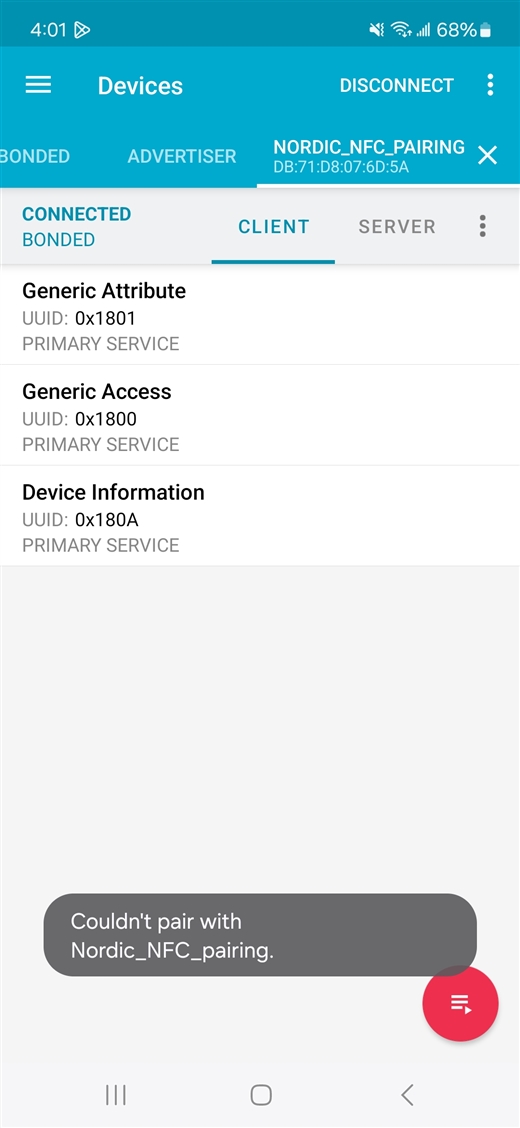
Parents Reply Children
  • It never terminates. The connection is stable. I mentioned earlier that if the error doesn't appear, we would never sense that something is wrong.

    It seems like even though the whole bonding and connection is complete, the Android phone still has more procedures that are not handled.

    We may be able to go faster if you would try the sample code (on nrf5340) yourself on any Android phone and tell me if you can reproduce it, and you would be able to try different configurations.

  • Hi Matin, 

    I couldn't reproduce the issue with the peripheral_nfc_pairing. I tried with an A16 and a S22. 
    I attached a screen recording here. 

    Did you do any modification to the sample ? 

    I did see a pop up say "could not connect " but I don't think it's related to the issue we are looking at here. I only see it when I delete bond and then bond again (also reset the target board ), my assumption is the phone tried to connect to the old address but couldn't. 

  • I did not modify the sample. I think you are not waiting long enough to see the pop-up, and you would see it when you are disconnecting or unbonding. The pop-up shows up after 30 seconds of successful connection; you just need to wait for it to show up. See my video recording.

  • Hi Martin, 
    Was it "couldn't pair" or "couldn't connect" pop up that you saw ? 


    I think the "couldn't connect" was from our nRF Connect app. I think it's the result of the "connecting to... " pop up. They may not be the same problem. 

    Do you see the "couldn't connect" when you don't use nRF Connect app ?

  • Copying from my earlier comment: All Samsung phones use the message "Couldn't pair with Nordic_NFC_pairing" and other phones use the message "Could not connect Nordic_NFC_pairing"

    Yes, I do see the pop-up when I don't have any apps open, meaning that it is coming directly from the Android OS.

Related