ABOUT ZIGBEE OF NRF54L15

Hi Nordic:

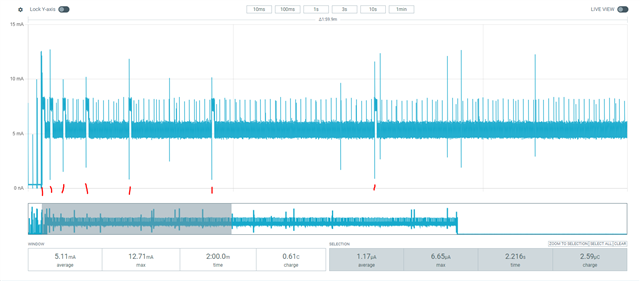
    We are currently testing Zigbee on the nRF54L15 platform using the Zigbee R23-add-on-V1.0.0 SDK. It has been observed that when a low-power node disconnects from the gateway, it cannot enter low-power mode until it successfully rejoins the network. Are there any solutions to address this issue?

Regard Best

Jermi

Parents
  • If it is not called already, you should call stop_network_rejoin() after a given amount of time. That amount of time is something you decide in your application.

    I thought this would be called automatically, after CONFIG_ZIGBEE_DEV_REJOIN_TIMEOUT_MS (default 200 seconds).

    If start_network_rejoin() is called, then it will start this timer. This iystem is a bit confusing, since it tries to send a beacon every 2^n seconds. So first after 1 second, 2 seconds, 4 seconds, 8 seconds, etc. and all of these will restart the timer. 

    But when this reaches 200 seconds, you will see in the log:

    "TC Rejoin was not successful (status: -1)". You will see that line being printed in ncs-zigbee\subsys\lib\zigbee_app_utils\zigbee_app_utils.c, in the zigbee_default_signal_handler(), in the ZB_BDB_SIGNAL_TC_REJOIN_DONE event.

    You can use this event to enter system off mode, if that is what you prefer. In this mode, it can be woken up by a button press. 

    You can use sys_poweroff() to enter system off mode, and you need to include:

    #include <zephyr/sys/poweroff.h>

    And CONFIG_POWEROFF=y

    Best regards,

    Edvin

  • Thank you very much—system off mode does indeed solve my problem. At the same time, could you please provide sample code that wakes up periodically from system off mode?

Reply Children
  • You can use the GRTC to wake up from system off, then keep trying for a while, then go back to system off. Please note that this is only possible on the nRF54L series, not the nRF52 series or the nRF53. When using these, you need to use system on (a lighter sleep).

    But since you are using the nRF54L platform, you can enter System off, and use a timer to wake up. For this check out the NCS\zephyr\samples\boards\nordic\system_off sample, and add 

    CONFIG_GRTC_WAKEUP_ENABLE=y

    to that application's prj.conf. Then you should see it waking up every 2 seconds.

    What it does is enabling this snippet in main.c:

    #if defined(CONFIG_GRTC_WAKEUP_ENABLE)
    	int err = z_nrf_grtc_wakeup_prepare(DEEP_SLEEP_TIME_S * USEC_PER_SEC);
    
    	if (err < 0) {
    		printk("Unable to prepare GRTC as a wake up source (err = %d).\n", err);
    	} else {
    		printk("Entering system off; wait %u seconds to restart\n", DEEP_SLEEP_TIME_S);
    	}
    #endif

    So in your application, include this file:

    #include <zephyr/drivers/timer/nrf_grtc_timer.h>

    and use z_nrf_grtc_wakeup_prepare() to set the amount of time you want it to be in system_off.

    Best regards,

    Edvin

  • 1、The compilation fails with the error "CONFIG_GRTC_WAKEUP_ENABLE is not defined."

    2、If I use the code below directly, it still won't wake up.

    	LOG_INF("Starting system...");
    // #if defined(CONFIG_GRTC_WAKEUP_ENABLE)
    #if 1
    	int err = z_nrf_grtc_wakeup_prepare(10 * USEC_PER_SEC);
    
    	if (err < 0) {
    		printk("Unable to prepare GRTC as a wake up source (err = %d).\n", err);
    	} else {
    		printk("Entering system off; wait %u seconds to restart\n", 10);
    	}
    #endif
    	k_msleep(5000);
    	sys_poweroff();

  • Sorry that I didn't specify. CONFIG_GRTC_WAKEUP_ENABLE is specific for the sample NCS\zephyr\samples\boards\nordic\system_off. 

    You can test that sample and see if it wakes up. Add this in your main file to keep track of the uptime:

    printk("Uptime: %d\n", k_uptime_get_32());

    sg3 said:
    2、If I use the code below directly, it still won't wake up.

    Does it build? What does it print? "Entering system off..." or "Unable to prepare GRTC..."?

    BR,
    Edvin

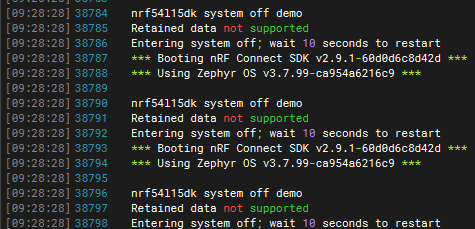
  • This is the log. It is not waking up every 10 second as expected; instead, it keeps restarting continually.

    This is my test project code.

    3124.system_off.zip

  • Then there is something else waking the system up. Try the attached project:

    system_off_mod.zip

    This will also print the reset reason. I tried the application that you sent me, and it only woke up every 10 seconds, so perhaps you have connected something to the kit that keeps waking it up?

    Best regards,

    Edvin

Related