NRF connect for VS code missing welcome window

I recently found my NRF connect for vscode is missing multiple windows.   the welcome window and connected device window is missing here. I have looked through the settings but couldn't find an option to reopen them. Is there a way i can reopen those windows?

Parents
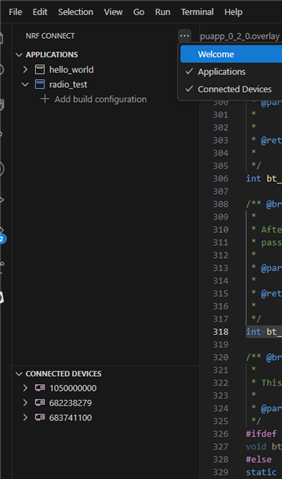
  • Try clicking the tree dots on the right hand side of "NRF CONNECT", and check the "Welcome" option:

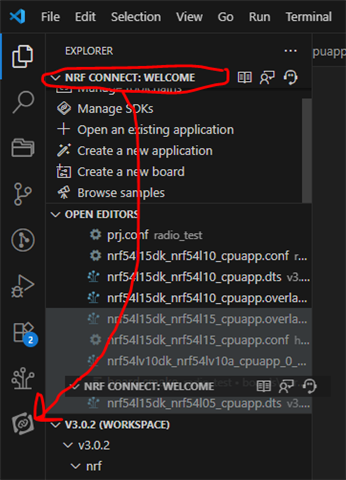
    If the "Welcome" option is not there, you may have moved it into on of the other tabs in the activity bar. If so, you can either look for it, and drag it back into the nRF Connect for VS Code actitivy menu:

    This screenshot isn't that good, but click and drag it from whatever tab you found it, and drag it into the nRF Connect for VS Code extension activity bar. 

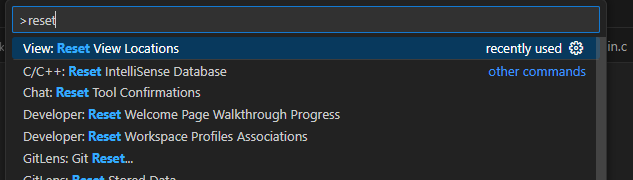
    Alternatively, you can run the command (hit ctrl + shift + p) "Reset View Locations":

    And everything (not only the nRF Connect for VS Code extension) will move back to it's default positions. 

    Best regards,

    Edvin

Reply
  • Try clicking the tree dots on the right hand side of "NRF CONNECT", and check the "Welcome" option:

    If the "Welcome" option is not there, you may have moved it into on of the other tabs in the activity bar. If so, you can either look for it, and drag it back into the nRF Connect for VS Code actitivy menu:

    This screenshot isn't that good, but click and drag it from whatever tab you found it, and drag it into the nRF Connect for VS Code extension activity bar. 

    Alternatively, you can run the command (hit ctrl + shift + p) "Reset View Locations":

    And everything (not only the nRF Connect for VS Code extension) will move back to it's default positions. 

    Best regards,

    Edvin

Children
No Data
Related