Processes created by nrfutil.py blocked by group policy, and nRF Connect unable to install/update apps (Error spawn: UNKNOWN)

I recently switched from evaluating an nRF52805 (Fanstel BC805M) to an nRF54L15 (using the nRF54L15-DK), and after I updated the toolchain and tried to flash the kit (using nRF Connect extension in VSCode on Windows 11), I got the following error from nrfutil.py:

File "c:\ncs\v3.0.2\zephyr\scripts/west_commands\runners\nrfutil.py", line 70, in _exec
    with subprocess.Popen(cmd, stdout=subprocess.PIPE) as p:
         ^^^^^^^^^^^^^^^^^^^^^^^^^^^^^^^^^^^^^^^^^^^^^
  File "subprocess.py", line 1026, in __init__
    self._execute_child(args, executable, preexec_fn, close_fds,
  File "subprocess.py", line 1538, in _execute_child
    hp, ht, pid, tid = _winapi.CreateProcess(executable, args,
                       ^^^^^^^^^^^^^^^^^^^^^^^^^^^^^^^^^^^^^^^
OSError: [WinError 1260] This program is blocked by group policy. For more information, contact your system administrator

I didn't encounter this problem with the nRF52805, and I think it's because I had installed the nRF Command Line tools instead of nrfutil, and didn't install the latter until I started working with the nRF54L15.

It appears my group policy doesn't allow Python to create processes, so I am following up with our IT person to try to fix that.

However, additionally, every time I try to update apps in nRF Connect for Desktop, I get the following error (happened before and after I installed nrfutil):
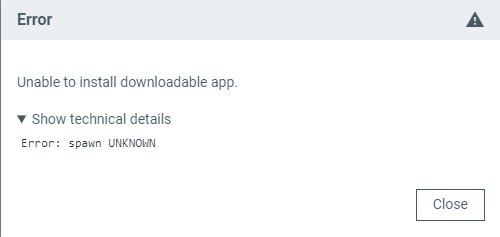
I came across another ticket with the same issue with nRF Connect for Desktop, and I'll try the things suggested, but I'm wondering if these two errors are related.  Does nRF Connect for Desktop use nrfutil.py?

Parents
  • Hi,

    I came across another ticket with the same issue with nRF Connect for Desktop, and I'll try the things suggested, but I'm wondering if these two errors are related.

    It seems that 2 issues might be related. The suggestions in another ticket may still be relevant. Specifically the solution with alternative file path might be worth trying.

    Best regards,
    Dejan

  • Thanks Dejan.  I got the flash command working, the errors seem to be caused by nrfutil.exe being stored in a location where my group policy wouldn't allow exe files to run from (AppData/Roaming).

    I fixed it by downloading nrfutil.exe from the Nordic website and placing it in a different location added to my environment PATH (successfully tested both C:/nordic_tools/nrfutil.exe and C:/Users/<me>/AppData/Local/nrf/nrfutil.exe), and I don't get the errors from nrfutil.py anymore.

    I haven't tried installing nRF Connect for Desktop in a different location yet, but my guess is it also had problems because of the install location.

Reply
  • Thanks Dejan.  I got the flash command working, the errors seem to be caused by nrfutil.exe being stored in a location where my group policy wouldn't allow exe files to run from (AppData/Roaming).

    I fixed it by downloading nrfutil.exe from the Nordic website and placing it in a different location added to my environment PATH (successfully tested both C:/nordic_tools/nrfutil.exe and C:/Users/<me>/AppData/Local/nrf/nrfutil.exe), and I don't get the errors from nrfutil.py anymore.

    I haven't tried installing nRF Connect for Desktop in a different location yet, but my guess is it also had problems because of the install location.

Children
Related