Max TX power for channel sounding

Hi,

In the example ras_initiator for channel sounding, there is a macro set for maximum TxPower:

const struct bt_le_cs_set_default_settings_param default_settings = {
		.enable_initiator_role = true,
		.enable_reflector_role = false,
		.cs_sync_antenna_selection = BT_LE_CS_ANTENNA_SELECTION_OPT_REPETITIVE,
		.max_tx_power = BT_HCI_OP_LE_CS_MAX_MAX_TX_POWER,
	};

where
#define BT_HCI_OP_LE_CS_MAX_MAX_TX_POWER 20

In the datasheet for nRF54L15, I see that the maximum possible TX power is +8 dBm.

But when I run the example, the log shows TX power: 0 dBm

[00:00:02.301,953] <inf> app_main: CS config creation complete. ID: 0
[00:00:02.501,909] <inf> app_main: CS security enabled.
[00:00:02.752,027] <inf> app_main: CS procedures enabled:
 - config ID: 0
 - antenna configuration index: 0
 - TX power: 0 dbm
 - subevent length: 28198 us
 - subevents per event: 1
 - subevent interval: 0
 - event interval: 2
 - procedure interval: 10
 - procedure count: 0
 - maximum procedure length: 1000

So what is really valid?
What TX power is really used for CS procedures?
How can I set the highest possible TX power for channel sounding on nRF54L15?

Thank you.

Parents
  • Hi, 

    Could you share you bt_le_cs_set_procedure_parameters_param values? While the .max_tx_power shows the maximum power possible, it is the combination of  tx_power_delta and phy in the bt_le_cs_set_procedure_parameters_param that decides the tx_power. To get +8 dB, setting the power delta to 0x7F will generally transmit at maximum TX power as long as the PHY value is equal to the current ACL PHY.

    Regards,
    Amanda H.

Reply
  • Hi, 

    Could you share you bt_le_cs_set_procedure_parameters_param values? While the .max_tx_power shows the maximum power possible, it is the combination of  tx_power_delta and phy in the bt_le_cs_set_procedure_parameters_param that decides the tx_power. To get +8 dB, setting the power delta to 0x7F will generally transmit at maximum TX power as long as the PHY value is equal to the current ACL PHY.

    Regards,
    Amanda H.

Children
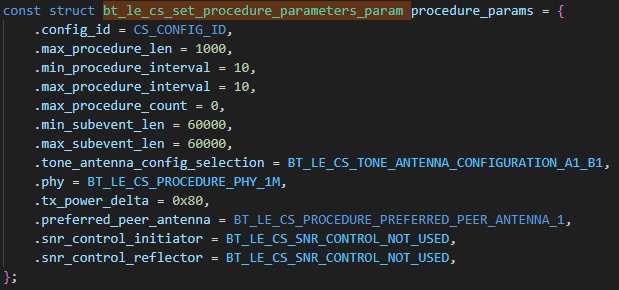
  • Hello, 

    By default, it is set like this :


    If we want do decrease (or increase for this case) the Tx power to lower the consumption, how can we do that ? Is there a table of values to change the tx_power_delta so we can set the Tx power accordingly ? 

    Best regards, 

    Patrick

  • Hi,

    as Patrcik49 wrote... 
    However, if I set tx_power_delta = 0x7F, I get this output:

    [00:00:01.444,976] <inf> app_main: MTU exchange success (498)
    
    [00:00:01.844,982] <inf> app_main: The discovery procedure succeeded
    
    [00:00:02.095,128] <inf> app_main: CS capability exchange completed.
    
    [00:00:02.245,029] <inf> app_main: CS config creation complete. ID: 0
    
    [00:00:02.444,987] <inf> app_main: CS security enabled.
    
    [00:00:02.594,921] <wrn> bt_cs: Procedure Enable failed with status 0x20
    
    [00:00:02.602,175] <wrn> app_main: CS procedures enable failed. (HCI status 0x20)

    <wrn> app_main: CS procedures enable failed. (HCI status 0x20)

    settings:

    struct bt_le_cs_create_config_params config_params = {
            .id = CS_CONFIG_ID,
            .main_mode_type = BT_CONN_LE_CS_MAIN_MODE_2,
            .sub_mode_type = BT_CONN_LE_CS_SUB_MODE_1,
            .min_main_mode_steps = 2,
            .max_main_mode_steps = 5,
            .main_mode_repetition = 0,
            .mode_0_steps = NUM_MODE_0_STEPS,
            .role = BT_CONN_LE_CS_ROLE_INITIATOR,
            .rtt_type = BT_CONN_LE_CS_RTT_TYPE_AA_ONLY,
            .cs_sync_phy = BT_CONN_LE_CS_SYNC_1M_PHY,
            .channel_map_repetition = 3,
            .channel_selection_type = BT_CONN_LE_CS_CHSEL_TYPE_3B,
            .ch3c_shape = BT_CONN_LE_CS_CH3C_SHAPE_HAT,
            .ch3c_jump = 2,
        };
        
        const struct bt_le_cs_set_procedure_parameters_param procedure_params = {
    		.config_id = CS_CONFIG_ID,
    		.max_procedure_len = 1000,
    		.min_procedure_interval = 10,
    		.max_procedure_interval = 10,
    		.max_procedure_count = 0,
    		.min_subevent_len = 60000,
    		.max_subevent_len = 60000,
    		.tone_antenna_config_selection = BT_LE_CS_TONE_ANTENNA_CONFIGURATION_A1_B1,
    		.phy = BT_LE_CS_PROCEDURE_PHY_1M,
    		.tx_power_delta = 0x7F,  
    		.preferred_peer_antenna = BT_LE_CS_PROCEDURE_PREFERRED_PEER_ANTENNA_1,
    		.snr_control_initiator = BT_LE_CS_SNR_CONTROL_NOT_USED,
    		.snr_control_reflector = BT_LE_CS_SNR_CONTROL_NOT_USED,
    	};


    Thank you.

    Jan

  • Hi, 

    Zephyr prefers to use 2M whenever it can, so it carries out the PHY update procedure as soon as a connection is established. You get CS procedures enable failed. (HCI status 0x20) because the link is using 2M PHY, whereas you've tried to control the TX power on 1M PHY. To get it to work, here are some possible solutions:

    • set BT_LE_CS_PROCEDURE_PHY_2M in bt_le_cs_set_procedure_parameters_param 
    • call bt_le_set_phy() to change the connection PHY to 1M when appropriate
    • set CONFIG_BT_AUTO_PHY_UPDATE=n to disable automatic switching to 2M 

    -Amanda H.

  • Patrick49 said:
    If we want do decrease (or increase for this case) the Tx power to lower the consumption, how can we do that ? Is there a table of values to change the tx_power_delta so we can set the Tx power accordingly ? 

    You can change the TX power of the ACL or use the tx power delta parameter, which only affects the CS activity.

    1. Set the TX power statically through Kconfig options in your project configuration file (prj.conf) to change  the TX power of a Bluetooth connection:

    CONFIG_BT_CTLR_TX_PWR_PLUS_3=y

    The available power levels depend on your specific Nordic device: nRF54L15: -40 to +8 dBm (note: max TX power depends on package variant)

    See Changing TX power for Bluetooth LE provides a comprehensive reference for the available power levels.

    2. Changing the tx power delta parameter: https://github.com/nrfconnect/sdk-nrf/blob/main/samples/bluetooth/channel_sounding_ras_initiator/src/main.c#L615 API documentation: https://github.com/nrfconnect/sdk-zephyr/blob/63c239c946d1686c51ee0f0d2c2f05badcdc67fb/include/zephyr/bluetooth/cs.h#L790

  • I am very sorry, but I do not understand how to do this.
    I took the clean code from the example channel_sounding_ras_initiator and changed:

    • .cs_sync_phy = BT_CONN_LE_CS_SYNC_2M_PHY in config_params

    • .phy = BT_LE_CS_PROCEDURE_PHY_2M in procedure_params

    • .tx_power_delta = 0x7f

    It is great that the error CS procedure enable failed no longer happens, but the TX power is still 0 dBm - nothing has changed:

    [00:00:02.755,636] <inf> app_main: CS procedures enabled:
     - config ID: 0
     - antenna configuration index: 0
     - TX power: 0 dBm
     - subevent length: 25282 us
     - subevents per event: 1
     - subevent interval: 0
     - event interval: 2
     - procedure interval: 10
     - procedure count: 0
     - maximum procedure length: 1000


    Also I have tried to call bt_le_set_phy after connecting to change the PHY to 1M with CONFIG_BT_AUTO_PHY_UPDATE=n, but even this did not help.

Related