

I am experiencing issues programming my newly purchased nRF52840 DK, which has never been successfully flashed. After following the official starting guide on nordicsemi.com/start52840dk, I downloaded nRF Connect for Desktop and entered the Quick Start application. My board was correctly detected, and I selected the "Hello World" sample. However, programming failed with the error "Failed to erase device" (see attached screenshot).
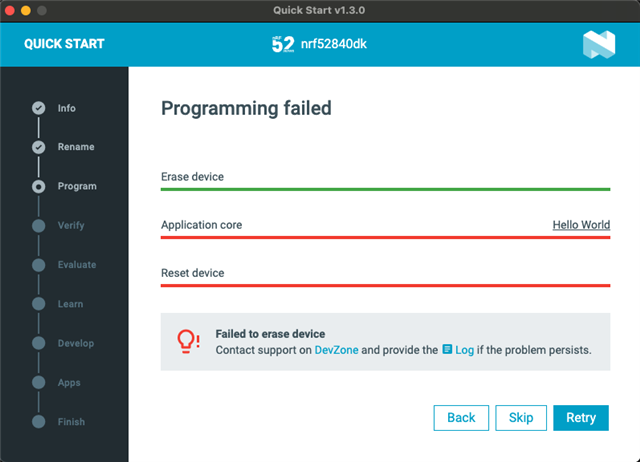
Here are the logs from the desktop application:
2025-08-08T16:25:16.388Z INFO Initialising the bundled nrfutil device
2025-08-08T16:25:16.390Z DEBUG Started watching devices
2025-08-08T16:25:16.785Z INFO Using the bundled core version for nrfutil device: 8.1.0
2025-08-08T16:25:16.891Z INFO Using nrfutil-device version: 2.10.2
2025-08-08T16:25:16.891Z INFO Using nrf-device-lib version: 0.17.71
2025-08-08T16:25:16.891Z INFO Using nrf-probe version: 0.38.0
2025-08-08T16:25:16.891Z INFO Using JLink version: JLink_V8.52
2025-08-08T16:25:16.892Z INFO Your version of SEGGER J-Link (8.52) is newer than the one this app was tested with (8.18). The tested version is not required, and your J-Link version will most likely work fine. If you get issues related to J-Link with your devices, use the tested version.
2025-08-08T16:25:19.401Z DEBUG Selected device: nRF52840 DK
2025-08-08T16:25:19.419Z DEBUG Changed step: Info
2025-08-08T16:25:27.961Z DEBUG Changed step: Rename
2025-08-08T16:25:41.365Z DEBUG Changed step: Program
2025-08-08T16:26:01.135Z ERROR [ProbeLib] [2025-08-08 16:26:01.134760Z] {jlink_usb_001050213957} J-Link: Timeout while erasing sectors  @0x10001000, RAMCode did not respond in time!
Failed to erase sectors.

2025-08-08T16:26:21.608Z ERROR [ProbeLib] [2025-08-08 16:26:21.608285Z] {jlink_usb_001050213957} J-Link: Timeout while erasing sectors  @0x00000000, RAMCode did not respond in time!
Failed to erase sectors.
Timeout while calculating CRC, RAMCode did not respond in time!Timeout while calculating CRC, RAMCode did not respond in time!
2025-08-08T16:26:24.050Z ERROR [ProbeLib] [2025-08-08 16:26:24.049676Z] Worker terminated by signal 9.
2025-08-08T16:26:24.050Z ERROR [ProbeLib] [2025-08-08 16:26:24.049774Z] Error output of terminated worker:
When I try to flash any sample using VS Code Extension - flash button - I get following error:
 *  Executing task: nRF Connect: Flash: l2_e1_sol/build (active)

Flashing build to nrf52840dk
west flash -d /Users/mkepka/nrf/ncs-fund/l2/l2_e1_sol/build --dev-id 1050213957

-- west flash: rebuilding
[0/5] Performing build step for 'l2_e1_sol'
ninja: no work to do.
[2/5] No install step for 'l2_e1_sol'
[3/5] Completed 'l2_e1_sol'
[4/5] cd /Users/mkepka/nrf/ncs-fund/l2/l2_e1_sol/build/_sysbuild && /opt/nordic/ncs/toolchains/ef4fc6722e/Cellar/cmake/3.21.0/bin/cmake -E true
-- west flash: using runner nrfutil
-- runners.nrfutil: reset after flashing requested
-- runners.nrfutil: Flashing file: /Users/mkepka/nrf/ncs-fund/l2/l2_e1_sol/build/merged.hex
-- runners.nrfutil: Erasing address ranges touched by firmware
-- runners.nrfutil: Programming image
Error: One or more batch tasks failed:
 * 1050213957: Timed out waiting for response from worker. (Generic)

FATAL ERROR: command exited with status 1: nrfutil --json device --x-ext-mem-config-file /opt/nordic/ncs/v3.0.1/zephyr/boards/nordic/nrf52840dk/support/nrf52840dk_qspi_nrfutil_config.json x-execute-batch --batch-path /Users/mkepka/nrf/ncs-fund/l2/l2_e1_sol/build/generated_nrfutil_batch.json --serial-number 1050213957

 *  The terminal process terminated with exit code: 1.
 *  Terminal will be reused by tasks, press any key to close it.
I tried solution from this thread: Can't flash or erase - "Error: Timeout while checking target RAM, RAMCode did not respond in time." . I executed:
nrfjprog --program build/merged.hex --sectorerase -f nrf52
With result:
[ #################### ]   0.773s | Erase file - Done erasing
[ #################### ]   0.156s | Program file - Done programming
WARNING: A programming operation has been performed without --verify.
WARNING: Programming can fail without error.
It didn't help.
I also tried using this command:
➜  l2_e1_sol git:(main) ✗ nrfjprog --recover
Recovering device. This operation might take 30s.
Erasing user code and UICR flash areas.
Writing image to disable ap protect.
After that I still cannot flash any firmware to the devkit.
I also tried entering J-Link Commander CLI and executed:
exec EnableEraseAllFlashBanks
erase
As you can guess, It didn't help.
Setup:
- Operating System: macOS 15.5 (24F74)
- nRF Connect SDK Version: v3.0.1
- nRF Connect for Desktop Version: 1.3.0
- J-Link Version: 8.52
- Board: nRF52840 DK

