Unable to program in VSCode (SDK installation failed)

Hello everyone,

Having previously programmed the nRF52840 in the Arduino IDE, I decided to switch to an environment supported by Nordic for more complex projects.

Unfortunately, after weeks of struggling, I still can't get anything to work.

In particular, I am trying to install the SDK in VSCode as indicated in the official Nordic documentation and Nordic videos.

Unfortunately, I'm encountering a major bug that prevents me from installing the SDK (the toolchain installs fine).

The first step goes well :


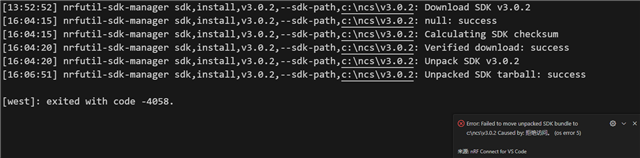
But fails after:

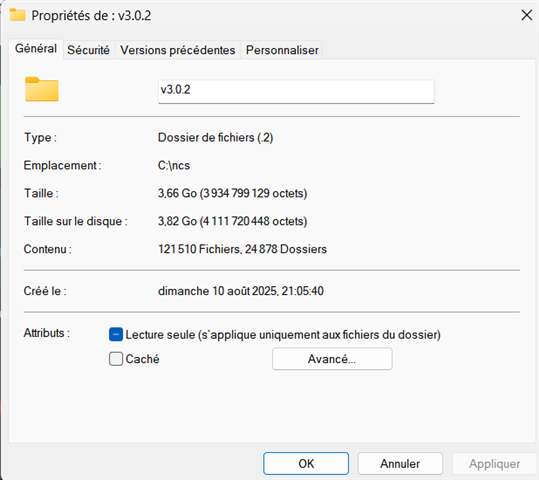
An ncs folder installs fine on the computer, but it is quite large ().

Here is the OUTPUT:

[21:01:03] nrfutil-sdk-manager sdk,install,v3.0.2,--sdk-path,c:\ncs\v3.0.2: Download SDK v3.0.2
[21:05:16] nrfutil-sdk-manager sdk,install,v3.0.2,--sdk-path,c:\ncs\v3.0.2: null: success
[21:05:16] nrfutil-sdk-manager sdk,install,v3.0.2,--sdk-path,c:\ncs\v3.0.2: Calculating SDK checksum
[21:05:40] nrfutil-sdk-manager sdk,install,v3.0.2,--sdk-path,c:\ncs\v3.0.2: Verified download: success
[21:05:40] nrfutil-sdk-manager sdk,install,v3.0.2,--sdk-path,c:\ncs\v3.0.2: Unpack SDK v3.0.2
[21:17:36] nrfutil-sdk-manager sdk,install,v3.0.2,--sdk-path,c:\ncs\v3.0.2: Unpacked SDK tarball: success

[west]: exited with code 1.


I'm using Windows 11.

I have read previous responses to the same problem on this forum, but have not found a solution. I have tried the following:

- Changing the Wi-Fi network

- Reinstalling VSCode from scratch (including extensions)

- Trying to do part of it via the command line

- Trying to install the GitHub version instead of the pre-packaged version

- I installed the extension pack, not just nRFConnect

- Trying to install an SDK via the nRFConnect for Desktop toolchain manager (failed, error message)

Thank you in advance for your help.

Have a good evening,

Ulysse

  • I'm using Windows 10.

    I have the same issue, but the difference is that the log shows 'west' exited and returned -4058. What can i do?

  • Hello,

    From the shared logs, it appears that the SDK has been installed. Could you check whether you were able to generate the support information from VS Code? This might provide more details about the issue. Within VS Code, navigate to tab Help-->Show all commands-->nRF connect: Generate support information.

    Kind Regards,

    Abhijith

  • Thank you for your help!

    It is quite possible that the SDK has been installed. However, from what I can see, it cannot be used directly. In particular, when I click on Browse samples, I cannot select any SDK. But perhaps there is a simple way to get around this?

    Please find the support information attached.

    Kind regards,
    Ulysse

    // IMPORTANT: The following data can contain sensitive or confidential information about your environment.
    // If you do not want others to see this information, make sure to remove it before sharing the data.
    
    // For help and support, visit Nordic Semiconductor's DevZone at https://devzone.nordicsemi.com/.
    
    {
      "platform": {
        "os": "win32",
        "osVersion": "Windows 11 Home",
        "osKernel": "10.0.26100",
        "vscode": "1.103.0",
        "electron": "37.2.3",
        "node": "v22.17.0"
      },
      "system": {
        "date": "2025-08-12T10:38:51.708Z",
        "vscodeRoot": "c:\\Users\\ulyss\\AppData\\Local\\Programs\\Microsoft VS Code\\resources\\app",
        "nrfConnectForDesktopInstalled": true,
        "vscodeUptime": "00:00:55",
        "osUptime": "68:14:49",
        "cpu": "11th Gen Intel(R) Core(TM) i7-1165G7 @ 2.80GHz"
      },
      "workspace": {
        "name": null,
        "workspaceFile": null,
        "folders": []
      },
      "sdks": [],
      "apps": [],
      "toolchains": [
        {
          "version": "3.0.2",
          "path": "c:\\ncs\\toolchains\\0b393f9e1b"
        }
      ],
      "connectedDevices": [],
      "tools": {
        "C:\\ncs\\toolchains\\0b393f9e1b\\opt\\zephyr-sdk\\arm-zephyr-eabi\\bin\\arm-zephyr-eabi-gcc.exe": "0.17.0",
        "C:\\Program Files\\SEGGER\\JLink_V818\\JLink.exe": "8.18",
        "C:\\Program Files\\Nordic Semiconductor\\nrf-command-line-tools\\bin\\nrfjprog.exe": "10.24.2",
        "C:\\nordic_tools\\nrfutil.exe": "8.1.0",
        "C:\\ncs\\toolchains\\0b393f9e1b\\cmake": "3.21.0",
        "C:\\ncs\\toolchains\\0b393f9e1b\\opt\\bin\\Scripts\\west.exe": null,
        "C:\\ncs\\toolchains\\0b393f9e1b\\opt\\bin\\python.exe": "3.12.4",
        "C:\\ncs\\toolchains\\0b393f9e1b\\opt\\bin\\ninja.exe": "1.10.2",
        "C:\\ncs\\toolchains\\0b393f9e1b\\opt\\bin\\gperf.exe": "3.1",
        "C:\\ncs\\toolchains\\0b393f9e1b\\opt\\bin\\dtc.exe": "1.4.7",
        "C:\\ncs\\toolchains\\0b393f9e1b\\opt\\bin\\gn.exe": "2223",
        "C:\\ncs\\toolchains\\0b393f9e1b\\mingw64\\bin\\git.exe": "2.37.3.windows.1",
        "arm-gdbPath": "c:\\ncs\\toolchains\\0b393f9e1b\\opt\\zephyr-sdk\\arm-zephyr-eabi\\bin\\arm-zephyr-eabi-gdb.exe",
        "riscv-gdbPath": "C:\\ncs\\toolchains\\0b393f9e1b\\opt\\zephyr-sdk\\riscv64-zephyr-elf\\bin\\riscv64-zephyr-elf-gdb.exe"
      },
      "nrfutil": {
        "nrfutil-device": {
          "version": "2.8.8",
          "binPath": "c:\\Users\\ulyss\\.vscode\\extensions\\nordic-semiconductor.nrf-connect-2025.5.152-win32-x64\\platform\\nrfutil\\bin\\nrfutil-device",
          "jlinkInfo": {
            "name": "JlinkARM",
            "version": "JLink_V8.18",
            "versionFormat": "string"
          }
        },
        "nrfutil-sdk-manager": {
          "version": "1.3.0",
          "binPath": "c:\\Users\\ulyss\\.vscode\\extensions\\nordic-semiconductor.nrf-connect-2025.5.152-win32-x64\\platform\\nrfutil\\bin\\nrfutil-sdk-manager"
        }
      },
      "environment": {
        "westEnv": {
          "HOME": "C:\\Users\\ulyss",
          "HOMEDRIVE": "C:",
          "HOMEPATH": "\\Users\\ulyss",
          "PATH": "C:\\ncs\\toolchains\\0b393f9e1b;C:\\ncs\\toolchains\\0b393f9e1b\\mingw64\\bin;C:\\ncs\\toolchains\\0b393f9e1b\\bin;C:\\ncs\\toolchains\\0b393f9e1b\\opt\\bin;C:\\ncs\\toolchains\\0b393f9e1b\\opt\\bin\\Scripts;C:\\ncs\\toolchains\\0b393f9e1b\\opt\\nanopb\\generator-bin;C:\\ncs\\toolchains\\0b393f9e1b\\opt\\zephyr-sdk\\arm-zephyr-eabi\\bin;C:\\ncs\\toolchains\\0b393f9e1b\\opt\\zephyr-sdk\\riscv64-zephyr-elf\\bin;c:\\Users\\ulyss\\.vscode\\extensions\\nordic-semiconductor.nrf-connect-2025.5.152-win32-x64\\platform\\nrfutil\\lib\\nrfutil-sdk-manager;C:\\Program Files (x86)\\Common Files\\Oracle\\Java\\java8path;C:\\Program Files (x86)\\Common Files\\Oracle\\Java\\javapath;C:\\ffmpeg\\ffmpeg-2024-03-20-git-e04c638f5f-full_build\\bin;C:\\Windows\\system32;C:\\Windows;C:\\Windows\\System32\\Wbem;C:\\Windows\\System32\\WindowsPowerShell\\v1.0\\;C:\\Windows\\System32\\OpenSSH\\;C:\\Program Files (x86)\\STMicroelectronics\\STM32 ST-LINK Utility\\ST-LINK Utility;C:\\Users\\ulyss\\AppData\\Local\\Microsoft\\WindowsApps;C:\\Program Files\\Filestar;C:\\ProgramData\\Filestar\\aliases;C:\\WINDOWS\\system32;C:\\WINDOWS;C:\\WINDOWS\\System32\\Wbem;C:\\WINDOWS\\System32\\WindowsPowerShell\\v1.0\\;C:\\WINDOWS\\System32\\OpenSSH\\;C:\\Program Files\\dotnet\\;C:\\Program Files\\Git\\cmd;C:\\Program Files\\Nordic Semiconductor\\nrf-command-line-tools\\bin\\;C:\\Users\\ulyss\\AppData\\Local\\Programs\\Python\\Launcher\\;C:\\flutter\\bin;C:\\Users\\ulyss\\Downloads\\flutter_windows_3.32.4-stable\\flutter\\bin;C:\\nordic_tools;C:\\Users\\ulyss\\AppData\\Local\\Programs\\Microsoft VS Code\\bin;",
          "ZEPHYR_TOOLCHAIN_VARIANT": "zephyr",
          "ZEPHYR_SDK_INSTALL_DIR": "C:\\ncs\\toolchains\\0b393f9e1b\\opt\\zephyr-sdk",
          "PYTHONPATH": "C:\\ncs\\toolchains\\0b393f9e1b\\opt\\bin;C:\\ncs\\toolchains\\0b393f9e1b\\opt\\bin\\Lib;C:\\ncs\\toolchains\\0b393f9e1b\\opt\\bin\\Lib\\site-packages"
        },
        "inherited": {
          "HOME": "C:\\Users\\ulyss",
          "HOMEDRIVE": "C:",
          "HOMEPATH": "\\Users\\ulyss",
          "Path": "C:\\Program Files (x86)\\Common Files\\Oracle\\Java\\java8path;C:\\Program Files (x86)\\Common Files\\Oracle\\Java\\javapath;C:\\ffmpeg\\ffmpeg-2024-03-20-git-e04c638f5f-full_build\\bin;C:\\Windows\\system32;C:\\Windows;C:\\Windows\\System32\\Wbem;C:\\Windows\\System32\\WindowsPowerShell\\v1.0\\;C:\\Windows\\System32\\OpenSSH\\;C:\\Program Files (x86)\\STMicroelectronics\\STM32 ST-LINK Utility\\ST-LINK Utility;C:\\Users\\ulyss\\AppData\\Local\\Microsoft\\WindowsApps;C:\\Program Files\\Filestar;C:\\ProgramData\\Filestar\\aliases;C:\\WINDOWS\\system32;C:\\WINDOWS;C:\\WINDOWS\\System32\\Wbem;C:\\WINDOWS\\System32\\WindowsPowerShell\\v1.0\\;C:\\WINDOWS\\System32\\OpenSSH\\;C:\\Program Files\\dotnet\\;C:\\Program Files\\Git\\cmd;C:\\Program Files\\Nordic Semiconductor\\nrf-command-line-tools\\bin\\;C:\\Users\\ulyss\\AppData\\Local\\Programs\\Python\\Launcher\\;C:\\flutter\\bin;C:\\Users\\ulyss\\Downloads\\flutter_windows_3.32.4-stable\\flutter\\bin;C:\\ncs\\toolchains\\0b393f9e1b\\opt\\bin;C:\\nordic_tools;C:\\Users\\ulyss\\AppData\\Local\\Programs\\Microsoft VS Code\\bin;",
          "PATH": "C:\\Program Files (x86)\\Common Files\\Oracle\\Java\\java8path;C:\\Program Files (x86)\\Common Files\\Oracle\\Java\\javapath;C:\\ffmpeg\\ffmpeg-2024-03-20-git-e04c638f5f-full_build\\bin;C:\\Windows\\system32;C:\\Windows;C:\\Windows\\System32\\Wbem;C:\\Windows\\System32\\WindowsPowerShell\\v1.0\\;C:\\Windows\\System32\\OpenSSH\\;C:\\Program Files (x86)\\STMicroelectronics\\STM32 ST-LINK Utility\\ST-LINK Utility;C:\\Users\\ulyss\\AppData\\Local\\Microsoft\\WindowsApps;C:\\Program Files\\Filestar;C:\\ProgramData\\Filestar\\aliases;C:\\WINDOWS\\system32;C:\\WINDOWS;C:\\WINDOWS\\System32\\Wbem;C:\\WINDOWS\\System32\\WindowsPowerShell\\v1.0\\;C:\\WINDOWS\\System32\\OpenSSH\\;C:\\Program Files\\dotnet\\;C:\\Program Files\\Git\\cmd;C:\\Program Files\\Nordic Semiconductor\\nrf-command-line-tools\\bin\\;C:\\Users\\ulyss\\AppData\\Local\\Programs\\Python\\Launcher\\;C:\\flutter\\bin;C:\\Users\\ulyss\\Downloads\\flutter_windows_3.32.4-stable\\flutter\\bin;C:\\ncs\\toolchains\\0b393f9e1b\\opt\\bin;C:\\nordic_tools;C:\\Users\\ulyss\\AppData\\Local\\Programs\\Microsoft VS Code\\bin;",
          "ZEPHYR_BASE": "C:\\ncs\\zephyr"
        }
      },
      "terminal": {
        "defaultProfile": "nRF Toolchain v3.0.2"
      },
      "config": {
        "nordic-semiconductor.nrf-connect": {
          "topdir": "",
          "toolchain": {
            "path": ""
          },
          "ozonePath": "",
          "applications": [],
          "applicationOptions": {},
          "kconfig": {
            "interface": "kconfig"
          },
          "west": {
            "env": {
              "$base": "terminal"
            }
          },
          "boardRoots": [],
          "taskBindings": {},
          "buildTerminal": {
            "condensedProgress": true
          },
          "debugging": {
            "flash": true,
            "bindings": {},
            "justMyCode": false
          },
          "activeAppFollowActiveEditor": true,
          "flash": {
            "softreset": false,
            "erase": false,
            "recover": false
          },
          "enableTelemetry": true,
          "thirdpartyIntegration": {},
          "toolchainManager": {
            "indexURL": null,
            "installDirectory": null
          },
          "nrfutil": {
            "home": null
          },
          "defaultOpenAction": "ask",
          "terminalProfile": {
            "shell": null
          },
          "samplesPath": "C:\\ncs\\nrf\\samples"
        },
        "nordic-semiconductor.nrf-terminal": {
          "terminalMode": "character"
        }
      },
      "extensions": {
        "internal": {
          "nordic-semiconductor.nrf-connect": {
            "version": "2025.5.152",
            "path": "c:\\Users\\ulyss\\.vscode\\extensions\\nordic-semiconductor.nrf-connect-2025.5.152-win32-x64",
            "isActive": true
          },
          "nordic-semiconductor.nrf-terminal": {
            "version": "2024.9.14",
            "path": "c:\\Users\\ulyss\\.vscode\\extensions\\nordic-semiconductor.nrf-terminal-2024.9.14",
            "isActive": true
          },
          "nordic-semiconductor.nrf-devicetree": {
            "version": "2025.4.22",
            "path": "c:\\Users\\ulyss\\.vscode\\extensions\\nordic-semiconductor.nrf-devicetree-2025.4.22",
            "isActive": true
          },
          "nordic-semiconductor.nrf-kconfig": {
            "version": "2025.4.26",
            "path": "c:\\Users\\ulyss\\.vscode\\extensions\\nordic-semiconductor.nrf-kconfig-2025.4.26",
            "isActive": true
          }
        },
        "external": {
          "marus25.cortex-debug": null,
          "ms-vscode.cpptools": "1.26.3",
          "ms-vscode.js-debug": "1.102.0",
          "ms-vscode.js-debug-companion": "1.1.3",
          "ms-vscode.vscode-js-profile-table": "1.0.10",
          "ms-vscode.cmake-tools": "1.21.36",
          "ms-vscode.cpptools-extension-pack": "1.3.1",
          "ms-vscode.cpptools-themes": "2.0.0",
          "trond-snekvik.gnu-mapfiles": "1.1.0"
        }
      }
    }


  • Hello,

    While checking the generated support information, I don’t see any SDK listed there. It should appear like in the below screenshot. I recommend uninstalling everything and starting from scratch to see if that resolves the issue. To me, it looks like an installation problem.

    Kind Regards,

    Abhijith

  • Hello Abhijith
    Thank you for clarifying.

    Unfortunately, that wasn't enough. I just tested it again.

    I reinstalled all the Nordic tools, reinstalled VSCode, and deleted the ncs folder.

    For a change, I installed the same versions as in the video tutorial.

    Unfortunately, the result is currently the same.

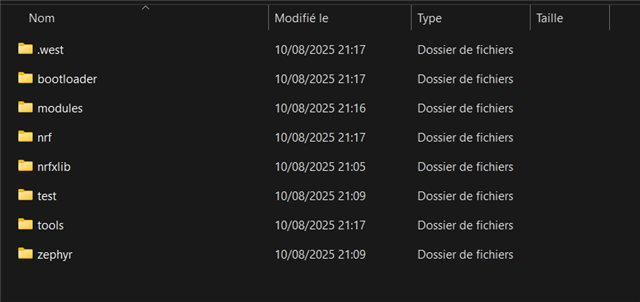
    I do have an ncs folder that installs, but I can't tell if anything is missing:


    Do you think try on another computer could help or do you know a better solution ?

    Kind regards,
    Ulysse

Related