Migrating ble_app_proximity example from SDK 17.1.0 to SDK 3.0.1

I have been using the SDK example ble_app_proximity to flash my demo boards nRF52840 to do some RF PHY testing on Bluetooth advertising.

It was very easy in this example to change the BLE advertising interval as well as the TX transmit power.

It was easy using the SEGGER IDE to re-build the example and flash the board.

Moving to the new SDK 2.x and 3.x, this example ble_app_proximity is no longer part of the nRF SDK.

Is there an equivalent simple example in the SDK 2.0, or SDK3.0 ?  

OS: Windows 10 and 11

HW: nRF52840DK, nRF5340DK

Regards

JM Gayet

Parents
  • Hi Edvin,

    Thank for answering my post.

    At the end I am looking for a basic Bluetooth LE example in the new SDK V3.0.2 from where I can set up the Advertising Interval and the transmit power. I don't need any other features. In the old SDK, I was using the ble_app_proximity example as it was very easy in the Segger IDE to change the Advertising Interval and the Transmit power.

    I am just using my Nordic dev kit nRF52840 and nRF5340 to do some RF PHY testing with my R&S CMW and CMP testers.

    At the end I am only using 2 Nordic app, the direct_test_mode and the ble_app_proximity. 

    The direct_test_mode app is still in the latest SDK 3.0.2 and work fine. 

    But for Advertising test, I need to find a simple app in the SDK 3.0.2.

    Let me know

    Best Regards

    JM Gayet 

Reply
  • Hi Edvin,

    Thank for answering my post.

    At the end I am looking for a basic Bluetooth LE example in the new SDK V3.0.2 from where I can set up the Advertising Interval and the transmit power. I don't need any other features. In the old SDK, I was using the ble_app_proximity example as it was very easy in the Segger IDE to change the Advertising Interval and the Transmit power.

    I am just using my Nordic dev kit nRF52840 and nRF5340 to do some RF PHY testing with my R&S CMW and CMP testers.

    At the end I am only using 2 Nordic app, the direct_test_mode and the ble_app_proximity. 

    The direct_test_mode app is still in the latest SDK 3.0.2 and work fine. 

    But for Advertising test, I need to find a simple app in the SDK 3.0.2.

    Let me know

    Best Regards

    JM Gayet 

Children
  • Hello,

    My go to sample is the peripheral_uart, which is the equivalent to the ble_app_uart example in the old nRF5 SDK.

    Found in: NCS\nrf\samples\bluetooth\peripheral_uart

    The way that advertising interval and transmit power is set up is a bit different in the nRF Connect SDK (NCS). 

    Advertising:

    In this sample, the advertising is started in adv_work_handler() in main.c.

    int err = bt_le_adv_start(BT_LE_ADV_CONN_FAST_2, ad, ARRAY_SIZE(ad), sd, ARRAY_SIZE(sd));

    ad and sd are the arrays containing the advertising data and scan response data. 

    BT_LE_ADV_CONN_FAST_2 is a macro for advertising parameters. It is defined as connectable advertising, using an advertising interval between BT_GAP_ADV_FAST_INT_MIN_2 (100ms) and BT_GAP_ADV_FAST_INT_MAX_2 (150ms). 

    You can adjust these by changing adv_work_handler() from:

    static void adv_work_handler(struct k_work *work)
    {
    	int err = bt_le_adv_start(BT_LE_ADV_CONN_FAST_2, ad, ARRAY_SIZE(ad), sd, ARRAY_SIZE(sd));
    
    	if (err) {
    		LOG_ERR("Advertising failed to start (err %d)", err);
    		return;
    	}
    
    	LOG_INF("Advertising successfully started");
    }

    to:

    static void adv_work_handler(struct k_work *work)
    {
    	struct bt_le_adv_param my_adv_params =
    		BT_LE_ADV_PARAM_INIT(BT_LE_ADV_OPT_CONN,
    				     BT_GAP_ADV_FAST_INT_MIN_2,
    				     BT_GAP_ADV_FAST_INT_MAX_2,
    				     NULL);
    	int err = bt_le_adv_start(&my_adv_params, ad, ARRAY_SIZE(ad), sd, ARRAY_SIZE(sd));
    
    	if (err) {
    		LOG_ERR("Advertising failed to start (err %d)", err);
    		return;
    	}
    
    	LOG_INF("Advertising successfully started");
    }

    And there you can change the parameters individually. Although the declaration of bt_le_adv_param states that the minimum and maximum advertising interval should not be the same value, it does build and run if you do that. 

    Regarding the transmit power, this can be set build time using this Kconfig in your prj.conf file:

    CONFIG_BT_CTLR_TX_PWR_0=y

    You can see the supported values in the file NCS\zephyr\subsys\bluetooth\controller\kconfig. Values like CONFIG_BT_CTLR_TX_PWR_PLUS_4 and BT_CTLR_TX_PWR_MINUS_4 are examples of supported values. It needs to match one of the values from the TXPOWER register of the device you are using:

    https://docs.nordicsemi.com/bundle/ps_nrf52840/page/radio.html#ariaid-title70

    Best regards,

    Edvin

  • Hi Edvin,

    I was able to modify the preipheral_uart example and set the Advertising Interval parameters to 20 ms .. 40 ms.

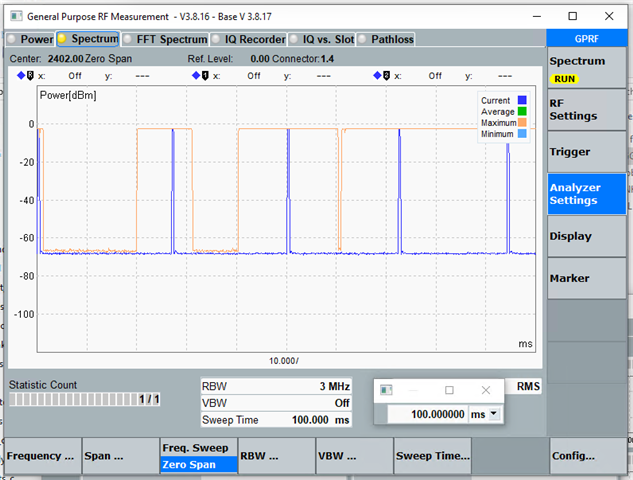
    I can see the DUT Averstising between 20 to 30 ms on the PHY layer which is great.

    I was also able to change the power adding the directive CONFIG_BT_CTLR_TX_PWR_PLUS_4=y in the prj.conf file.

    Thank a lot for your help

    [s: I did receive 2 nRF54L15 DK today. Now I need to find a working SDK for the Direct test Mode example. The build failed as it looks it is missing a file in the SDK V3.0.2. ...

    Regards

    JM Gayet

  • Hello,

    gayetprimo said:
    [s: I did receive 2 nRF54L15 DK today. Now I need to find a working SDK for the Direct test Mode example. The build failed as it looks it is missing a file in the SDK V3.0.2. ...

    What build error did you see? On my side, it builds without any errors or warnings.

    What is the build command that you used?

    Did you test it with NCS v3.1.0 which was released on Thursday?

    (I tested both v3.0.2 and v3.1.0 without issues on my side)

    Best regards,

    Edvin

  • Hi Edvin,

    I found the issue. The build was failing because the path of one file was longer than 250 characters. I did rename the project name and the build went through.

    I was building the dtm project using the latest SDK v3.1.0. After flashing the dtm image to the board, my CMW100 tester is able t control the nRF54l15DK board in Direct Test Mode.

    Therefore, I have one last question regarding the direct_test_mode example.

    Can you find out where I can change the default TX transmit power in the project? 

    I like the board to transmit more than 0 dBm, which is the default transmit power, but +4 dBm.

    As there is no Bluetooth stack in this project I can't use the the directive CONFIG_BT_CTLR_TX_PWR_PLUS_4=y in the prj.conf.

    I know a way to do it using the customize 2wire command but I will prefer a simple way to change in the project the default TX transmit power.


    note: One thing I don't really like on the nRF54L15DK and nRF5340DK is when you plug them on the PC USB port you get 2 COM ports with the nRF54L15 and 3 with the nRF5340 and you never know which port is the valid UART port for the DTM. Details, details...

    Thank for your help

    Regards

    JM Gayet

  • gayetprimo said:
    note: One thing I don't really like on the nRF54L15DK and nRF5340DK is when you plug them on the PC USB port you get 2 COM ports with the nRF54L15 and 3 with the nRF5340 and you never know which port is the valid UART port for the DTM. Details, details...

    Yes, it is a bit annoying. But in fact, they are connected to different UART instances. But the way these COM ports are populated by the OS is no consistent, so I "always" open the wrong COM port on the first try. If you don't remember which port it is, open both, and close the one that doesn't respond.

    gayetprimo said:
    I found the issue. The build was failing because the path of one file was longer than 250 characters. I did rename the project name and the build went through.

    Ah, yes. It is a bit unfortunate that this is a limitation, but the log should say when this occurs. Note that you don't need to move the entire nRF Connect SDK, but you can move the application that you are working on closer to C:\, in order to shorten the path. 

    gayetprimo said:
    I like the board to transmit more than 0 dBm, which is the default transmit power, but +4 dBm.

    If you look in NCS\nrf\samples\bluetooth\direct_test_mode\src\dtm.c, line 452, in static_struct dtm_instance{}:

    dtm_inst = {
    	.state = STATE_UNINITIALIZED,
    	.packet_hdr_plen = NRF_RADIO_PREAMBLE_LENGTH_8BIT,
    	.address = DTM_RADIO_ADDRESS,
    	.timer = NRFX_TIMER_INSTANCE(DEFAULT_TIMER_INSTANCE),
    #if NRF52_ERRATA_172_PRESENT
    	.anomaly_timer = NRFX_TIMER_INSTANCE(ANOMALY_172_TIMER_INSTANCE),
    #endif /* NRF52_ERRATA_172_PRESENT */
    	.radio_mode = NRF_RADIO_MODE_BLE_1MBIT,
    	.txpower = 0,
    #if CONFIG_FEM
    	.fem.tx_power_control = FEM_USE_DEFAULT_TX_POWER_CONTROL,
    #endif
    };

    Line 10 in that snippet is where you can change the default TX power setting. 

    Alternatively, I see that there is an API: dtm_set_txpower() that is defined in the same file. 

    Best regards,

    Edvin

Related