

How to switch SDK version when opening nrf connect command line in vscode
When I click here, it always opens v3.0.2
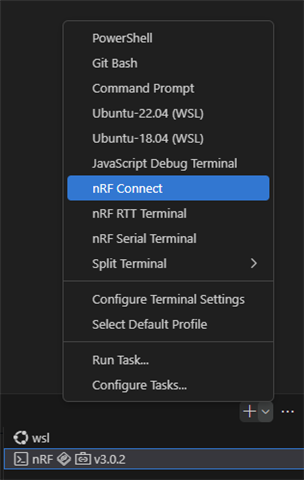
I have three versions installed
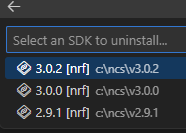
How to switch SDK version when opening nrf connect command line in vscode
When I click here, it always opens v3.0.2
I have three versions installed
Hi,
The nRF terminal should open depending upon which sample you are building.
In case you wish to change the version (use a different on than the sample that you are building), then you should be able to go back in the path using " cd .. " and then cd into the version you wish to. Similar to this:
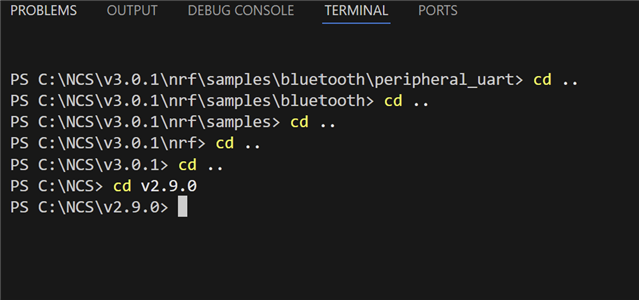
Regards,
Priyanka
I cd to v2.9.1, the log still shows v3.0.2
PS C:\ncs\v2.9.1\zephyr> west build -b nrf52840dk/nrf52840 .\samples\bluetooth\hci_uart\ -d ..\build\hci_uart -p
-- Cache files will be written to: C:/ncs/v3.0.2/zephyr/.cache
-- Zephyr version: 4.0.99 (C:/ncs/v3.0.2/zephyr)
-- Found BOARD.dts: C:/ncs/v3.0.2/zephyr/boards/nordic/nrf52840dk/nrf52840dk_nrf52840.dts
PS C:\ncs\v2.9.1\zephyr> west build -b nrf52840dk/nrf52840 .\samples\bluetooth\hci_uart\ -d ..\build\hci_uart -p
-- west build: making build dir C:\ncs\v2.9.1\build\hci_uart pristine
-- west build: generating a build system
Loading Zephyr module(s) (Zephyr base): sysbuild_default
-- Found Python3: C:/ncs/toolchains/0b393f9e1b/opt/bin/python.exe (found suitable version "3.12.4", minimum required is "3.10") found components: Interpreter
-- Cache files will be written to: C:/ncs/v3.0.2/zephyr/.cache
-- Found west (found suitable version "1.2.0", minimum required is "0.14.0")
-- Board: nrf52840dk, qualifiers: nrf52840
Parsing C:/ncs/v2.9.1/zephyr/share/sysbuild/Kconfig
Loaded configuration 'C:/ncs/v2.9.1/build/hci_uart/_sysbuild/empty.conf'
Merged configuration 'C:/ncs/v2.9.1/build/hci_uart/_sysbuild/empty.conf'
Configuration saved to 'C:/ncs/v2.9.1/build/hci_uart/zephyr/.config'
Kconfig header saved to 'C:/ncs/v2.9.1/build/hci_uart/_sysbuild/autoconf.h'
--
   ******************************
   * Running CMake for hci_uart *
   ******************************

Loading Zephyr default modules (Zephyr base).
-- Application: C:/ncs/v2.9.1/zephyr/samples/bluetooth/hci_uart
-- CMake version: 3.21.0
-- Found Python3: C:/ncs/toolchains/0b393f9e1b/opt/bin/python.exe (found suitable version "3.12.4", minimum required is "3.10") found components: Interpreter
-- Cache files will be written to: C:/ncs/v3.0.2/zephyr/.cache
-- Zephyr version: 4.0.99 (C:/ncs/v3.0.2/zephyr)
-- Found west (found suitable version "1.2.0", minimum required is "0.14.0")
-- Board: nrf52840dk, qualifiers: nrf52840
-- Found host-tools: zephyr 0.17.0 (C:/ncs/toolchains/0b393f9e1b/opt/zephyr-sdk)
-- Found toolchain: zephyr 0.17.0 (C:/ncs/toolchains/0b393f9e1b/opt/zephyr-sdk)
-- Found Dtc: C:/ncs/toolchains/0b393f9e1b/opt/bin/dtc.exe (found suitable version "1.4.7", minimum required is "1.4.6")
-- Found BOARD.dts: C:/ncs/v3.0.2/zephyr/boards/nordic/nrf52840dk/nrf52840dk_nrf52840.dts
-- Found devicetree overlay: C:/ncs/v2.9.1/zephyr/samples/bluetooth/hci_uart/boards/nrf52840dk_nrf52840.overlay
-- Generated zephyr.dts: C:/ncs/v2.9.1/build/hci_uart/hci_uart/zephyr/zephyr.dts
-- Generated pickled edt: C:/ncs/v2.9.1/build/hci_uart/hci_uart/zephyr/edt.pickle
-- Generated zephyr.dts: C:/ncs/v2.9.1/build/hci_uart/hci_uart/zephyr/zephyr.dts
-- Generated devicetree_generated.h: C:/ncs/v2.9.1/build/hci_uart/hci_uart/zephyr/include/generated/zephyr/devicetree_generated.h
-- Including generated dts.cmake file: C:/ncs/v2.9.1/build/hci_uart/hci_uart/zephyr/dts.cmake

warning: BT_CTLR_DTM_HCI (defined at subsys/bluetooth\controller\Kconfig.dtm:14) was assigned the
value 'y' but got the value 'n'. Check these unsatisfied dependencies: BT_CTLR_DTM_HCI_SUPPORT (=n).
See http://docs.zephyrproject.org/latest/kconfig.html#CONFIG_BT_CTLR_DTM_HCI and/or look up
BT_CTLR_DTM_HCI in the menuconfig/guiconfig interface. The Application Development Primer, Setting
Configuration Values, and Kconfig - Tips and Best Practices sections of the manual might be helpful
too.


warning: Deprecated symbol DEPRECATED_UART_NRFX_UARTE_LEGACY_SHIM is enabled.


Parsing C:/ncs/v3.0.2/zephyr/Kconfig
C:/ncs/v2.9.1/zephyr/samples/bluetooth/hci_uart/prj.conf:16: warning: attempt to assign the value 'n' to the undefined symbol BT_TINYCRYPT_ECCLoaded configuration 'C:/ncs/v3.0.2/zephyr/boards/nordic/nrf52840dk/nrf52840dk_nrf52840_defconfig'

Merged configuration 'C:/ncs/v2.9.1/zephyr/samples/bluetooth/hci_uart/prj.conf'
Merged configuration 'C:/ncs/v2.9.1/build/hci_uart/hci_uart/zephyr/.config.sysbuild'


error: Aborting due to Kconfig warnings

CMake Error at C:/ncs/v3.0.2/zephyr/cmake/modules/kconfig.cmake:396 (message):
  command failed with return code: 1
Call Stack (most recent call first):
  C:/ncs/v3.0.2/nrf/cmake/modules/kconfig.cmake:36 (include)
  C:/ncs/v3.0.2/zephyr/cmake/modules/zephyr_default.cmake:133 (include)
  C:/ncs/v3.0.2/zephyr/share/zephyr-package/cmake/ZephyrConfig.cmake:66 (include)
  C:/ncs/v3.0.2/zephyr/share/zephyr-package/cmake/ZephyrConfig.cmake:92 (include_boilerplate)
  CMakeLists.txt:5 (find_package)

-- Configuring incomplete, errors occurred!

CMake Error at cmake/modules/sysbuild_extensions.cmake:514 (message):
  CMake configure failed for Zephyr project: hci_uart

  Location: C:/ncs/v2.9.1/zephyr/samples/bluetooth/hci_uart
Call Stack (most recent call first):
  cmake/modules/sysbuild_images.cmake:20 (ExternalZephyrProject_Cmake)
  cmake/modules/sysbuild_default.cmake:20 (include)
  C:/ncs/v2.9.1/zephyr/share/zephyr-package/cmake/ZephyrConfig.cmake:75 (include)
  C:/ncs/v2.9.1/zephyr/share/zephyr-package/cmake/ZephyrConfig.cmake:92 (include_boilerplate)
  C:/ncs/v2.9.1/zephyr/share/sysbuild-package/cmake/SysbuildConfig.cmake:8 (include)
  template/CMakeLists.txt:10 (find_package)


-- Configuring incomplete, errors occurred!
See also "C:/ncs/v2.9.1/build/hci_uart/CMakeFiles/CMakeOutput.log".
←[91mFATAL ERROR: command exited with status 1: 'C:\ncs\toolchains\0b393f9e1b\opt\bin\cmake.EXE' -DWEST_PYTHON=C:/ncs/toolchains/0b393f9e1b/opt/bin/python.exe '-BC:\ncs\v2.9.1\build\hci_uart' -GNinja -DBOARD=nrf52840dk/nrf52840 '-SC:\ncs\v2.9.1\zephyr\share\sysbuild' '-DAPP_DIR:PATH=C:\ncs\v2.9.1\zephyr\samples\bluetooth\hci_uart'
←[0m
Hi,
Could you tell me how you start creating an application in VSCode?
I guess the issue might be that though you have chosen the SDK version as v2.9.1, your toolchain might still be v3.0.2.
When starting to create an application, make sure that both the SDK and Toolchain are in the same versions.
Please tell me you first steps as to how you being.
-Priyanka
VSCode was originally under v3.0.2 SDK. Later, I continued to download other SDKs and toolchains in VSCode. I don’t know why nRF Connect has always been bound to 3.0.2. Is there a way to switch the version of nRF Connect in VS Code?
Hi,
Please tell me the first steps that you take when building an application. i.e.
Do you select both the SDK and toolchain when building an application?
-Priyanka

