

Hi there!
I'm working through the nrf_cloud_multi_service sample, and have a few questions.
Here is my setup:
- nRF9151DK
- nRF Connect SDK v2.9.0 and corresponding tool chain
- nrf_cloud_multi_service sample (for v2.9.0 of the SDK) with no modifications to any source file. The only modifications I'm doing is to the prj.conf file.
My overarching goal is two fold: (1) incorporate all of the configurations from the overlay_coap.conf and overlay-coap_nrf_provisioning.conf files into a single prj.conf and (2) figure out which configurations need to be turned off in order to get the the lowest power possible in PSM mode between sample readings. I have accomplished (1), and I'm aware of the fact that another overlay, overlay_min_coap.conf could be helpful, but I'd like to retain as much of the core functionality of the sample, and not just turn everything off.
As I begin to turn configurations off, however, I've noticed something strange. Occasionally, even when configurations are set to n, the values get changed in the final build. Here's an example:
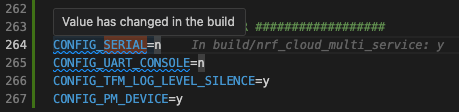
Why does this happen? As you can see, I'm trying to turn off CONFIG_SERIAL, but it just gets reverted to y anyways. There are a few others like this as well.
Here's another example:
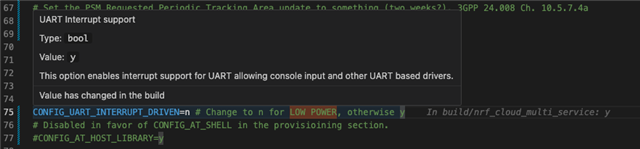
And here is my entire prj.conf. As I mentioned towards the beginning, my overarching goal is to figure out how to get the lowest possible power in PSM mode, while retaining as much of the core functionality of the sample. During my initial testing of the sample with no changes whatsoever (built with the standard prj.conf and two coap overlays recommended in the docs), I was getting around 600uA of current consumption between sensor readings -- definitely much too high for production uses. Do you have any recommendations? I'm a bit suspicious that CONFIG_SERIAL left ON is part of my problem, but would love an FAE's feedback.
Many thanks! - Sage
# For low power testing, CTRL-F for MIN POWER (and follow comment instructions)

# Log level
# For more verbose and detailed log output, set the log level to
# CONFIG_MULTI_SERVICE_LOG_LEVEL_DBG=y instead.
CONFIG_MULTI_SERVICE_LOG_LEVEL_INF=y

# General config
CONFIG_EVENTS=y
CONFIG_PICOLIBC_IO_FLOAT=y
CONFIG_RESET_ON_FATAL_ERROR=y
CONFIG_NCS_SAMPLES_DEFAULTS=y
CONFIG_DK_LIBRARY=y

# LED indication
# Uncomment these to minimize LED state indication when power savings are necessary
# CONFIG_LED_VERBOSE_INDICATION=n
# CONFIG_LED_CONTINUOUS_INDICATION=n

# Or, uncomment this to completely disable LED state indication (MIN POWER)
CONFIG_LED_INDICATION_DISABLED=y

# Improved Logging
# CONFIG_LOG_MODE_DEFERRED allows logging from multiple threads simultaneously without creating
# splintered log entries, at the cost of needing a buffer for storing logs.
CONFIG_LOG_MODE_DEFERRED=y

# CONFIG_LOG_BUFFER_SIZE is the aforementioned buffer. A size of 4096 bytes is useful for debugging
# and prototyping, but is probably more than necessary for production-ready firmware.
CONFIG_LOG_BUFFER_SIZE=4096

# Heap and stacks
# Extended AT host/monitor stack/heap sizes since some nrf_cloud credentials are longer than 1024 bytes.
CONFIG_AT_MONITOR_HEAP_SIZE=2048
CONFIG_AT_HOST_STACK_SIZE=2048
# Extended memory heap size needed both for PGPS and for encoding JSON-based nRF Cloud Device Messages.
CONFIG_HEAP_MEM_POOL_SIZE=19000
CONFIG_SYSTEM_WORKQUEUE_STACK_SIZE=4096
# The default modem shared memory buffer for TX is significantly larger than required.
# RX buffer has to be larger because the sample reads certificates so using default value.
CONFIG_NRF_MODEM_LIB_SHMEM_TX_SIZE=4096

# Enable Networking and Connection Manager.
CONFIG_NETWORKING=y
CONFIG_NET_SOCKETS=y
CONFIG_NET_SOCKETS_OFFLOAD=y
CONFIG_NET_MGMT_EVENT_STACK_SIZE=2048
CONFIG_NET_CONNECTION_MANAGER_MONITOR_STACK_SIZE=1024
CONFIG_MAIN_STACK_SIZE=2048

# Enable LTE Connectivity using Connection Manager
CONFIG_NET_IPV4=y
CONFIG_NET_IPV6=y
CONFIG_NET_IPV6_NBR_CACHE=n
CONFIG_NET_IPV6_MLD=n
CONFIG_NET_CONNECTION_MANAGER=y
CONFIG_NRF_MODEM_LIB_NET_IF=y
CONFIG_NRF_MODEM_LIB_NET_IF_AUTO_DOWN=y
CONFIG_NRF_MODEM_LIB_NET_IF_DOWN_DEFAULT_LTE_DISCONNECT=y

# Enable power savings mode
CONFIG_LTE_PSM_REQ=y
CONFIG_LTE_PSM_REQ_FORMAT_STRING=y
# Set the PSM Requested Active Time to 2 seconds, 3GPP 24.008 Ch. 10.5.7.3
CONFIG_LTE_PSM_REQ_RAT="00000001"
# Set the PSM Requested Periodic Tracking Area update to something (two weeks?), 3GPP 24.008 Ch. 10.5.7.4a
# CONFIG_LTE_PSM_REQ_RPTAU="11000001" # This corresponds to 320 hours
CONFIG_LTE_PSM_REQ_RPTAU="10100010" # 2 minutes (for testing only)

# Modem library
CONFIG_NRF_MODEM_LIB=y

# AT commands interface
CONFIG_UART_INTERRUPT_DRIVEN=n # Change to n for LOW POWER, otherwise y
# Disabled in favor of CONFIG_AT_SHELL in the provisioining section.
#CONFIG_AT_HOST_LIBRARY=y

# Wait for credential installation to be complete before connecting to nRF Cloud
CONFIG_NRF_CLOUD_CHECK_CREDENTIALS=y

# MCUBOOT - Needed by FOTA
CONFIG_BOOTLOADER_MCUBOOT=y
CONFIG_IMG_MANAGER=y
CONFIG_MCUBOOT_IMG_MANAGER=y
CONFIG_STREAM_FLASH_ERASE=y

# Location Services configuration
CONFIG_LOCATION_TRACKING_GNSS=n
CONFIG_LOCATION_TRACKING_CELLULAR=n
CONFIG_LOCATION_TRACKING_WIFI=n
CONFIG_LOCATION_TRACKING=n
CONFIG_LOCATION=y
CONFIG_LOCATION_METHOD_GNSS=y
CONFIG_LOCATION_METHOD_CELLULAR=y
CONFIG_NRF_CLOUD_AGNSS=y
CONFIG_MODEM_INFO=y
CONFIG_MODEM_INFO_ADD_NETWORK=y
CONFIG_NRF_CLOUD_PGPS=y
CONFIG_NRF_CLOUD_PGPS_REPLACEMENT_THRESHOLD=4
CONFIG_NRF_CLOUD_PGPS_REQUEST_UPON_INIT=y

# Date Time lib - Used by PGPS and main application
CONFIG_DATE_TIME=y

# LTE link control - used by PGPS and main application
CONFIG_LTE_LINK_CONTROL=y
CONFIG_LTE_LC_EDRX_MODULE=y
CONFIG_LTE_LC_PSM_MODULE=y

# Settings - used by nRF Cloud library and PGPS
CONFIG_SETTINGS=y
CONFIG_SETTINGS_FCB=y
CONFIG_FCB=y

# Download Client - used by FOTA and PGPS
CONFIG_DOWNLOAD_CLIENT=y
CONFIG_DOWNLOAD_CLIENT_HTTP_FRAG_SIZE_1024=y
CONFIG_DOWNLOAD_CLIENT_STACK_SIZE=4096
CONFIG_DOWNLOAD_CLIENT_BUF_SIZE=2300
CONFIG_DOWNLOAD_CLIENT_MAX_HOSTNAME_SIZE=128

# Flash - Used by FOTA and PGPS
CONFIG_FLASH=y
CONFIG_FLASH_PAGE_LAYOUT=y
CONFIG_FLASH_MAP=y
CONFIG_STREAM_FLASH=y
CONFIG_MPU_ALLOW_FLASH_WRITE=y
CONFIG_PM_EXTERNAL_FLASH_MCUBOOT_SECONDARY=n

# On initial connection to the cloud, add info sections to the shadow
CONFIG_NRF_CLOUD_SEND_DEVICE_STATUS=y
CONFIG_NRF_CLOUD_SEND_DEVICE_STATUS_NETWORK=y
CONFIG_NRF_CLOUD_SEND_DEVICE_STATUS_SIM=y
CONFIG_NRF_CLOUD_SEND_SERVICE_INFO_FOTA=y
CONFIG_NRF_CLOUD_SEND_SERVICE_INFO_UI=y

# This block has all been copied from overlay-coap_nrf_provisioning.conf, so all the configs are in one place
################## Provisioning ##################
# Enable provisioning library/provisioning shell dependencies
CONFIG_MODEM_JWT=y
CONFIG_MODEM_ATTEST_TOKEN=y

# Enable the provisioning library
CONFIG_NRF_PROVISIONING=y
CONFIG_NRF_PROVISIONING_AUTO_INIT=n
CONFIG_NRF_PROVISIONING_COAP=y

# Enable provisioning shell
CONFIG_SHELL=y
CONFIG_NRF_PROVISIONING_SHELL=y

# Adjust shell buffer sizes to handle nRF Cloud certs
CONFIG_SHELL_BACKEND_SERIAL_RX_RING_BUFFER_SIZE=4096
CONFIG_SHELL_CMD_BUFF_SIZE=4096
CONFIG_SHELL_BACKEND_SERIAL_API_INTERRUPT_DRIVEN=y

# Disable AT host and switch to using shell
CONFIG_AT_HOST_LIBRARY=n
CONFIG_AT_SHELL=y
CONFIG_SHELL_WILDCARD=n

# Configure provisioning message formatting
CONFIG_NRF_PROVISIONING_CODEC=y
CONFIG_NRF_PROVISIONING_CBOR=y
CONFIG_ZCBOR=y

# Include provisioning service certificate as part of the binary.
# Used only if none has been provisioned
CONFIG_NRF_PROVISIONING_WITH_CERT=y
CONFIG_NRF_PROVISIONING_ROOT_CA_SEC_TAG=42
CONFIG_NRF_CLOUD_CLIENT_ID_SRC_INTERNAL_UUID=y

# Max provisioning commands per response
CONFIG_NRF_PROVISIONING_CBOR_RECORDS=20

# Set the provisioning interval to 60 seconds.
# This is a very frequent interval. To save power, set this to something approaching 24 hours.
# But note that provisioning may take up to twice as long as this interval, since it
# happens in two steps.
CONFIG_NRF_PROVISIONING_INTERVAL_S=60

# Request spread factor
CONFIG_NRF_PROVISIONING_SPREAD_S=5

# Adjust provisioning and buffer sizes to handle nRF Cloud certs
CONFIG_NRF_PROVISIONING_RX_BUF_SZ=4096
CONFIG_NRF_PROVISIONING_TX_BUF_SZ=4096
CONFIG_NRF_PROVISIONING_CODEC_AT_CMD_LEN=2048
CONFIG_NRF_PROVISIONING_CODEC_RX_SZ_START=2048

# CoAP Client
CONFIG_COAP_EXTENDED_OPTIONS_LEN=y
CONFIG_COAP_CLIENT_THREAD_PRIORITY=0
CONFIG_COAP_CLIENT_BLOCK_SIZE=1024
CONFIG_COAP_CLIENT_MESSAGE_SIZE=1024
CONFIG_COAP_CLIENT_STACK_SIZE=6144
################## End Provisioning ##################

# This block has been taken from overlay_coap.conf, so all the configs are in one place.
################## CoAP ##################
# General config
CONFIG_FPU=y
CONFIG_NEWLIB_LIBC_NANO=n

# Rate of cloud interactions
# These are faster than one normally would use in a low power device.
# This is strictly for demo purposes.
CONFIG_SENSOR_SAMPLE_INTERVAL_SECONDS=120
CONFIG_COAP_FOTA_JOB_CHECK_RATE_MINUTES=2
CONFIG_COAP_SHADOW_CHECK_RATE_SECONDS=120

# Logs
CONFIG_LOG=n #change to n for LOW POWER, otherwise y
CONFIG_NET_LOG=n #change to n for LOW POWER, otherwise y
CONFIG_LOG_PRINTK=n #change to n for LOW POWER, otherwise n
CONFIG_COAP_LOG_LEVEL_INF=n #change to n for LOW POWER, otherwise n
CONFIG_LOCATION_LOG_LEVEL_INF=n #change to n for LOW POWER, otherwise n
CONFIG_NRF_CLOUD_COAP_LOG_LEVEL_INF=n #change to n for LOW POWER, otherwise n

# Modem
CONFIG_MODEM_KEY_MGMT=y
CONFIG_MODEM_INFO_ADD_DEVICE=y
CONFIG_MODEM_INFO_ADD_DATE_TIME=n
CONFIG_MODEM_INFO_ADD_SIM=y
CONFIG_MODEM_INFO_ADD_SIM_ICCID=n
CONFIG_MODEM_INFO_ADD_SIM_IMSI=n

# Network
CONFIG_POSIX_API=y
CONFIG_NET_SOCKETS_TLS_SET_MAX_FRAGMENT_LENGTH=y
CONFIG_NET_SOCKETS_OFFLOAD_PRIORITY=40

# CoAP Client
CONFIG_COAP_CLIENT_MAX_INSTANCES=3
# The extended options length must be increased to perform FOTA and P-GPS downloads over CoAP.
CONFIG_COAP_EXTENDED_OPTIONS_LEN_VALUE=192

# Not compatible with ground-fix
CONFIG_ZCBOR_CANONICAL=n

# nRF Cloud
CONFIG_NRF_CLOUD_MQTT=n
CONFIG_NRF_CLOUD_COAP=y
CONFIG_NRF_CLOUD_ALERT=y
CONFIG_NRF_CLOUD_LOG_DIRECT=y
CONFIG_NRF_CLOUD_LOG_OUTPUT_LEVEL=3
CONFIG_NRF_CLOUD_LOG_LOG_LEVEL_INF=y
CONFIG_NRF_CLOUD_FOTA_POLL=y

# Disable MQTT-specific services; equivalent CoAP versions are used instead.
CONFIG_NRF_CLOUD_FOTA=n
CONFIG_NRF_CLOUD_LOCATION=n

# Location Services configuration
CONFIG_LOCATION_DATA_DETAILS=y

# Sample configuration
CONFIG_APPLICATION_THREAD_STACK_SIZE=4096
CONFIG_TEMP_ALERT_LIMIT=24
################## End CoAP ##################

################# LOW POWER ##################
CONFIG_SERIAL=n
CONFIG_UART_CONSOLE=n
CONFIG_TFM_LOG_LEVEL_SILENCE=y
CONFIG_PM_DEVICE=y

