NRF Printk

I want to use the UART20 serial port to map to other pins for easier PCB layout, but when I use the NRF54L15,

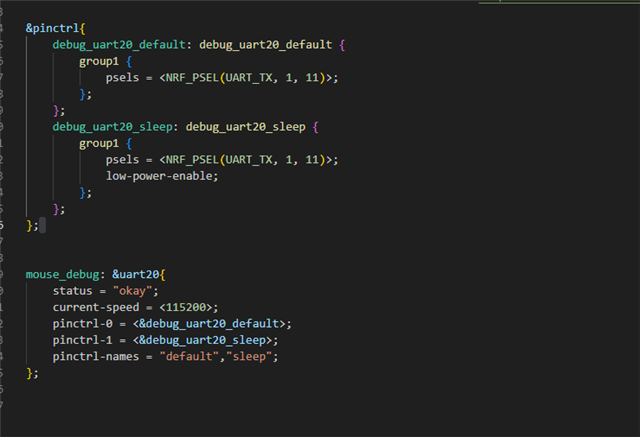
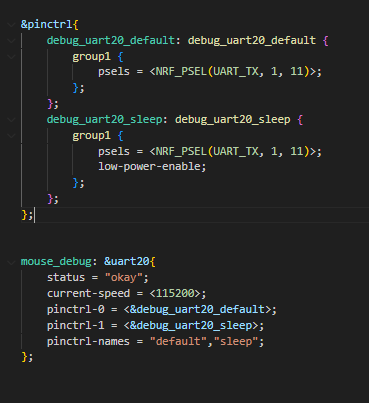
overlay config

debug_uart20_default: debug_uart20_default {
        group1 {
            psels = <NRF_PSEL(UART_TX, 1, 5)>;
        };
    };
	debug_uart20_sleep: debug_uart20_sleep {
        group1 {
            psels = <NRF_PSEL(UART_TX, 1, 5)>;
			low-power-enable;
        };
    };


mouse_debug:&uart20 {
    status = "okay";
    current-speed = <9600>;
    pinctrl-0 = <&debug_uart20_default>;
    pinctrl-1 = <&debug_uart20_sleep>;
    pinctrl-names = "default","sleep";
};


my main code 
 bsp_board_init();
    
    while (1) 
    {
        drv_sensor_init();
        dsadsa = bsp_adc_get_value(ADC_CHANNEL_0);
        printk("volatage : %d mv\n", dsadsa);
        k_msleep(1000);
    }


but  no printk  or printf

What should I do ? 
Or, in other words, only the default P1.04 can be used

Parents Reply

  • There is another issue, which is that when I am using the Bluetooth routine (which is a routine for Bluetooth practice one), the board selected 'compact' without any error, but when I selected 'Nordic Soc', it reported an error, and the error that kept happening was' Clock '. I have been following Nordic's AI to solve this problem, but it has not been resolved

Children
  • Hi,

    Apologies for the delay. I was held up with an internal case.

    Could you tell me which sample you are trying so that I can try to reproduce the issue here at my end?

    -Priyanka

  •  Can the TX pin of this UART be set arbitrarily? Last time, I randomly set the CLK pin of SPI and found that there was no clock, but MOSI, MISO, and CS. Later, I discovered that CLK must be set on a pin with the CLK suffix to have a clock.

    So the main issue is what are the requirements for the TX setting of UART20, and whether it only needs to be the P1 port that is not used. ?

    Sometimes I want to create an Overlay, but I don't know why VSCode doesn't pop up the overlay file. I just copy the overlay that I successfully created before. If I encounter the problem of not being able to create an overlay and need to manually create it, what should be the naming convention?

  • LinJunXuan said:
    what are the requirements for the TX setting of UART20, and whether it only needs to be the P1 port that is not used. ?

    Yes, UART20 TX must be mapped to an unused P1 pin.

    LinJunXuan said:
    If I encounter the problem of not being able to create an overlay and need to manually create it, what should be the naming convention?

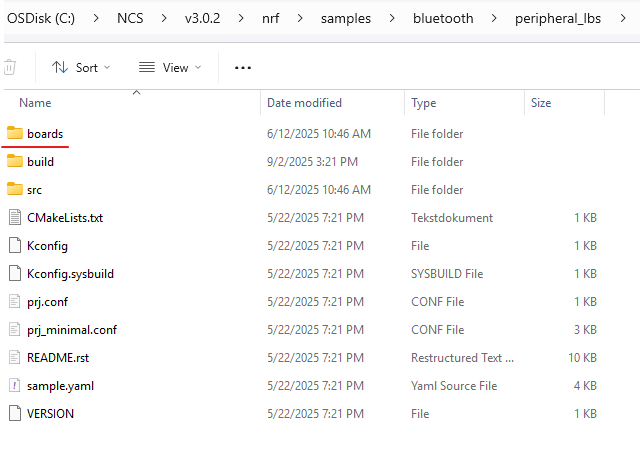
    You need to name it nrf54l15dk\nrf54l15\cpuapp.overlay and place it in a folder called boards in you project file.

    -Priyanka

  • nrf54l15dk_nrf54l15_cpuapp.overlay   ?

    Will the overlay built directly in the future be placed in the boards folder according to the boards we configured? Assuming I am currently in NS
    nrf54l15dk_nrf54l15_cpuapp_ns.overlay?

  • No, the build folder will as usual be placed in your project folder itself, but the overlays need to be placed in a separate "boards" file in your project folder. Similar to this:

    LinJunXuan said:
    Assuming I am currently in NS
    nrf54l15dk_nrf54l15_cpuapp_ns.overlay?

    Yes that's right. 

    -Priyanka

Related