Can't capture any packets (Zigbee)

Hello,

I have been trying to get my brand new nRF52840 Dongle working as an 802.15.4/Zigbee sniffer, but I am not able to capture any packets, even though the interface is detected and responsive. Here are the details of what I have done and tested:

Setup & Steps Taken

Interface Detection

When running from the terminal:

./nrf802154_sniffer.py --extcap-interfaces
extcap {version=0.8.0}{help=https://github.com/NordicSemiconductor/nRF-Sniffer-for-802.15.4}{display=nRF Sniffer for 802.15.4}
interface {value=/dev/cu.usbmodem11201}{display=nRF Sniffer for 802.15.4}
control {number=6}{type=button}{role=logger}{display=Log}{tooltip=Show capture log}

Wireshark behavior:

  • When running Wireshark with sudo (as mentioned in GitHub issue #68), the interface appears, and I can start a capture.

  • Without sudo, the interface does not appear in Wireshark.

pySerial detection:

/usr/bin/python3 -m serial

--- Available ports:
--- 1: /dev/cu.Bluetooth-Incoming-Port 'n/a'
--- 2: /dev/cu.debug-console 'n/a'
--- 3: /dev/cu.usbmodem11201 'nRF 802154 Sniffer'

When I send the 'channel' command to /dev/cu.usbmodem11201, it correctly returns the last configured channel (e.g., 11). When I send the 'receive' command no packets caputerd.

Networks Tested

  • Zigbee2MQTT network on channel 11

  • Philips Hue network on channel 15

  • I am certain these channel settings are correct.

  • No packets are captured on either network.

Traffic Verification

  • I have triggered heavy traffic on both networks (turning lights on/off, pressing buttons on temperature sensors, toggling power switches, etc.).

  • Zigbee2MQTT logs show that devices are reporting as expected.

Other Information

  • The sniffer is not in bootloader mode (LED blinks slowly green when idle, blinks faster when capture starts).

  • Tested on:

    • macOS 15.5 (24F74)

    • Windows 11 Pro

  • On both OSes:

    • The interface is detected

    • I can communicate with it via pySerial

    • But no packets are ever captured

  • Wireshark version: 4.4.8 (v4.4.8-0-g0d289c003bfb)

  • Tried reconnecting/replugging the dongle multiple times on both OSes.

  • Same result every time: interface visible, capture starts, but no packets arrive.

Question
Given that:

  • The firmware and extcap script match (v0.8.0)

  • The interface is detected and responds to commands

  • The dongle’s LED activity changes when capturing

  • Traffic is definitely present on the selected channel

…what could prevent the sniffer from actually receiving any 802.15.4 packets? Is there any known issue with v0.8.0 on the nRF52840 Dongle in promiscuous mode, or any additional configuration needed?

Thanks in advance for any guidance.

Parents
  • Hello,

    Sorry, I don't understand whether the sniffer was actually working as intended when you were using the wireshark (with sudo)?

    When you started this, did you see a popup asking you what channel you wanted to start the sniffer on? 

    Best regards,

    Edvin

  • Hi,

    The sniffer never had worked for me. Not in Wireshark, not with the Serial program in NRF Desktop.

    When using Wireshark, I indeed got a popup to select the channel. I've tried 11 and 15 (both are valid for different Zigbee networks around me).

    I've also tried to eliminate a problem in my Wireshark-setup by using the Serial Program of NRF Desktop. I've set the channel with the channel command and checked if it was correctly set by entering the channel command again. After that I've entered the "receive" command. But again no packages appear even I have forced some traffic.

    So I think there are 2 options:

    - The Dongle I've received has a broken radio chip (because the RSSI Viewer also didn't work)

    - The firmware isn't working anymore.

    I placed my bets on the first option and request a RMA for the dondle. I'll expect to have a new Dongle by the end of next week. I'll update this topic when I have the new results.

    Thanks,

    Sander

  • Just for sanity testing, can you send me the hex file you are using for the dongle? And how do you program the hex file onto the dongle?

    Best regards,

    Edvin

  • I've downloaded the firmware from:
    https://github.com/NordicSemiconductor/nRF-Sniffer-for-802.15.4 

    And flashed this file via de NRF Connect for Desktop application. Push te button to activate the bootloader, red led is flashing and add the file en write to the Dongle

    nrf802154_sniffer_dongle.hex

    Thanks again,

    Sander

  • That is strange. My sniffer .hex file:

    nrf802154_sniffer_nrf52840dongle.hex

    is 346kB, while yours is only 155kB. I re-downloaded it just now, to make sure I had the latest version.

    Did you, perhaps, download an older version of the sniffer? If so, can you please try the latest version (or the attached file)?

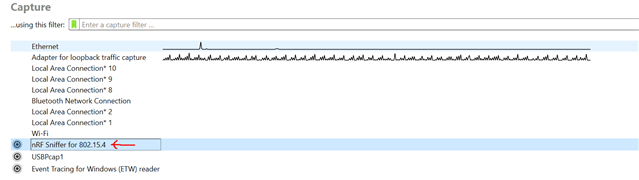
    When I flashed your file, it didn't show in Wireshark, but when flashed with the nrf802154_sniffer_nrf52840dongle.hex from github, it shows in WireShark as this:

    Best regards,

    Edvin

  • Sorry my bad,.

    I tried a lot of things to debug my problem before I posted on devzone. I indeed also tried the nrf802154_sniffer_nrf52840dongle.hex (346kB) firmware. That indeed showed up on Wireshark as mentioned in my opening post, but gives no packages.

    With nrf802154_sniffer_nrf52840dongle.hex flashed I can connect to the dongle with the Serial Terminal app (from NRF Connect for Desktop) en run the commands channel, receive. But no packages are shown in either Wireshark of the terminal.

    Kind regards,

    Sander

  • I see. Can you try to program the attached hex file to the dongle:

    test_file.hex

    It should turn on the green LED when it starts. If you then take your phone, and uses the app nRF Connect for iOS/Android, start scanning, and see if you can find the device advertising as "Nordic_Blinky", and press "connect". When you connect, the green LED should turn off, and the red should turn on.

    Let me know if that works or not.

    Best regards,

    Edvin

Reply
  • I see. Can you try to program the attached hex file to the dongle:

    test_file.hex

    It should turn on the green LED when it starts. If you then take your phone, and uses the app nRF Connect for iOS/Android, start scanning, and see if you can find the device advertising as "Nordic_Blinky", and press "connect". When you connect, the green LED should turn off, and the red should turn on.

    Let me know if that works or not.

    Best regards,

    Edvin

Children
Related