I2C Configuration Issue in nrf5340 audio dk

Hi Team,

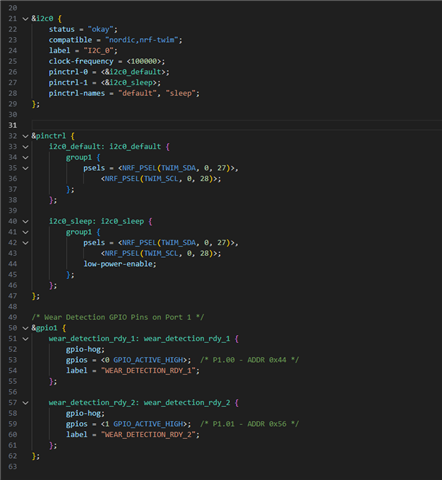
I have configured I2C0 for reading data and sending iqs323 and iqs7211a. i have configured overlay file according pin conjuration which is below.

Pin configuration:

SCL - P0.26

SDA - P0.25

RDY(0x44) - P1.00

RDY(0x56) - P1.01

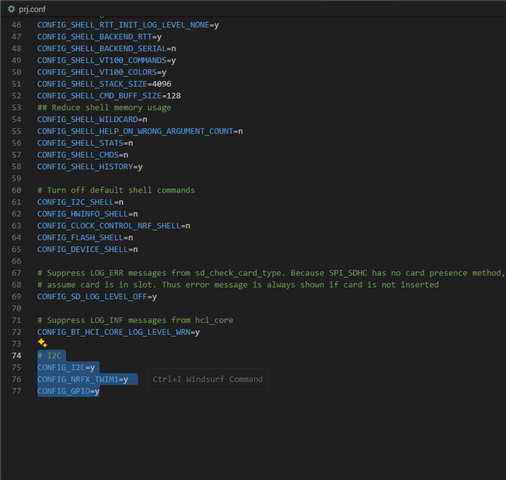
i have enabled below in config file.

# I2C
CONFIG_I2C=y
CONFIG_NRFX_TWIM1=y
CONFIG_GPIO=y

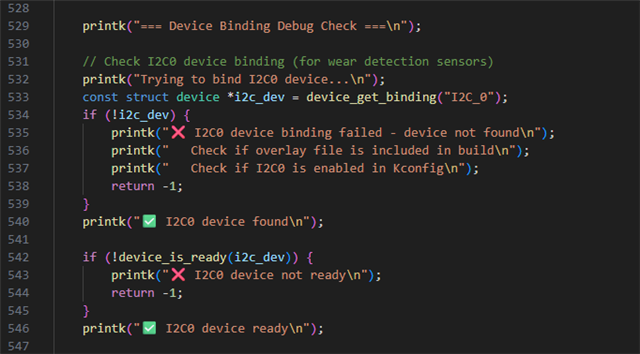
after this i was checking binding in main file but is showing that binding failed.
below is main file screenshort to check binding. so, it is always fail satisfy if and condition and showing binding fail.

Below is overlay file configuration.

below is config file configuration

i have done changes in existing code of nrf5340 audio code sample. i have not changed anything except this.
kindly guide to configuration of I2C.
Regards, 
Dhruvish Patel
Parents
  • When selecting an instance for i2c, make sure that instance has not been used before. For example, do not select i2c3 if uart3 is already in use in your project. Try selecting i2c2 for the nRF5340 Audio DK.

    Try something like this in the overlay:

    &i2c2 {
        status = "okay";
        pinctrl-0 = <&i2c2_default>;
        pinctrl-names = "default";
        clock-frequency = <I2C_BITRATE_STANDARD>;
    
        iqs323: iqs323@44 {
            compatible = "i2c-device";
            reg = <0x44>;
            label = "IQS323";
        };
    
        iqs7211a: iqs7211a@56 {
            compatible = "i2c-device";
            reg = <0x56>;
            label = "IQS7211A";
        };
    };
    
    &pinctrl {
        i2c2_default: i2c2_default {
            group1 {
                psels = <NRF_PSEL(TWIM_SCL, 0, 26)>,
                        <NRF_PSEL(TWIM_SDA, 0, 25)>;
            };
            
        };
    };

    Add pinctrl for sleep as well, as seen in this exercise.
  • hi  ,

    I have done same device tree configuration in nrf5340 audio firmware.so it is always throwing binding error. 
    same this i am doing for i2c1 it is working fine.

    FYI, i am using nrf5340 audio FW and using Nordic 5340 audio dK kit.

    Kindly help on this issue.

    Regards,

    Dhruvish Patel

  • Would you be able to share the output logs from when the binding error occurs (use Insert->Code in DevZone)? Could you please also share the overlay? Is nrf5340_audio the application you are using? Which nRF Connect SDK is it?

    Have you enabled the config for TWIM number two?

    CONFIG_NRFX_TWIM2=y
  • &i2c2 {
    	status = "okay";
    
    	/* Azoteq IQS323: touch/wear detection */
    	iqs323: iqs323@44 {
    		compatible = "azoteq,iqs323";
    		reg = <0x44>;
    		enable-gpios = <&gpio0 12 GPIO_ACTIVE_LOW>; /* P0.12 - RDY pin */
    		status = "okay";
    	};
    
    	/* Azoteq IQS7211E: touch/slider */
    	iqs7211e: iqs7211e@56 {
    		compatible = "azoteq,iqs7211e";
    		reg = <0x56>;
    		enable-gpios = <&gpio0 13 GPIO_ACTIVE_LOW>; /* P0.13 - RDY pin */
    		status = "okay";
    	};
    };

Reply
  • &i2c2 {
    	status = "okay";
    
    	/* Azoteq IQS323: touch/wear detection */
    	iqs323: iqs323@44 {
    		compatible = "azoteq,iqs323";
    		reg = <0x44>;
    		enable-gpios = <&gpio0 12 GPIO_ACTIVE_LOW>; /* P0.12 - RDY pin */
    		status = "okay";
    	};
    
    	/* Azoteq IQS7211E: touch/slider */
    	iqs7211e: iqs7211e@56 {
    		compatible = "azoteq,iqs7211e";
    		reg = <0x56>;
    		enable-gpios = <&gpio0 13 GPIO_ACTIVE_LOW>; /* P0.13 - RDY pin */
    		status = "okay";
    	};
    };

Children
No Data
Related