Issue with eSIM on nRF9151 Board

Dear nrf team,

We are facing an issue with the eSIM on our nRF9151 board. The SIM 1.8V pin on the nRF9151 is not supplying 1.8V. We have checked this using a multimeter.

We tried using the commands AT+CFUN=0, AT+CFUN=1, and other AT commands, but the eSIM is still not working. We are using a Twilio MFF2 eSIM.

For testing, we used two nRF9151 boards. On both boards, we soldered and tested an ST4 eSIM, which worked properly. However, after soldering the Twilio eSIM on one board, it is not working and is not being detected.

We have verified the soldering and pin connections, but the problem remains. Could you please provide us with a proper solution to this issue?

Best regards,
Rahul Chavda

  • Hello,

    can you please provide application log and modem trace?

  • Hello,

    I am working with an nRF9151 board and trying to read SIM/eSIM information.

    Steps followed:

    • Used nRF Programmer → Erased all

    • Opened Board Configuration → selected eSIM and 3V3

    • Flashed quick start program

    • Sent CLI commands:

      AT OK AT+CPIN? <response> AT%XICCID <response>
    • With the onboard eSIM, I can successfully retrieve the ICCID for st4 esim .

    Issue:
    When I attach another eSIM twilio , I get the following errors:

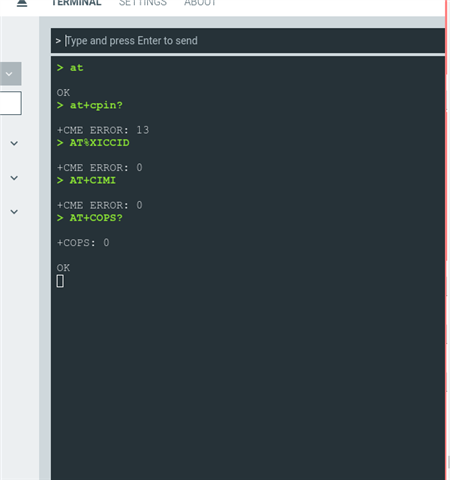
    AT OK AT+CPIN? +CME ERROR: 13 AT%XICCID +CME ERROR: 0

    Could you please clarify what +CME ERROR: 13 means in this context and provide guidance on how to resolve this issue?

    Thanks and regards,
    Rahul 

  • Hello,

    We are testing after desoldering the eSIM and following the same steps, but neither the eSIM nor the physical SIM is working. We are not able to measure 1.8V on the SIM interface.

    For your reference, we have attached a video showing the issue.

    We also tested the following AT commands, but none of them worked:

    AT+CPIN? failed: +CME ERROR AT+CIMI failed: +CME ERROR: 13 AT%XICCID failed: +CME ERROR: 0 AT+CPINR="..." failed: +CME ERROR: 0

    Additionally, we tried:

    AT+CFUN=0 AT+CFUN=1

    but we did not observe any voltage spike on the SIM interface.

    Kindly check the attached video and advise us on how to resolve this issue.

    Thanks and regards,
    Rahul chavda


  • Rahul Chavda said:
    Could you please clarify what +CME ERROR: 13 means in this context and provide guidance on how to resolve this issue?

    We need to check the modem trace to know what causes the error. So please do as I said and provide modem trace and application log.

    Also, when you say nRF9151 board, do you mean DK or custom board?

  • We are using the nRF9151 DK board for testing. Kindly check the attached video and AT command log screenshot for your reference.

    During testing, we observed that neither the eSIM nor the physical SIM is working, and no 1.8V is present on the SIM interface. We also tried several AT commands, but they all failed with errors.

    Could you please review the attached materials and advise us on how to resolve this issue?


Related