Adding demo bootloader for nrf54L15

I do step-by-step elements from https://academy.nordicsemi.com/courses/nrf-connect-sdk-intermediate/lessons/lesson-9-bootloaders-and-dfu-fota/topic/exercise-5-fota-over-bluetooth-low-energy/

Using LBS sample, NCS 3.1.0, toolchain 3.1.0 and finally  No configure step for 'mcuboot', as mention in sysbuild.conf have only this

SB_CONFIG_BOOTLOADER_MCUBOOT=y

in prj.conf

CONFIG_NCS_SAMPLES_DEFAULTS=y

CONFIG_BT=y
CONFIG_BT_PERIPHERAL=y
CONFIG_BT_DEVICE_NAME="Nordic_LBS"

# Enable the LBS service
CONFIG_BT_LBS=y
CONFIG_BT_LBS_POLL_BUTTON=y
CONFIG_DK_LIBRARY=y

CONFIG_SYSTEM_WORKQUEUE_STACK_SIZE=2048

CONFIG_NCS_SAMPLE_MCUMGR_BT_OTA_DFU=y

Not sure what goes wrong (and feel that documentation changes too fast ... too many versions in a short time)

Parents Reply
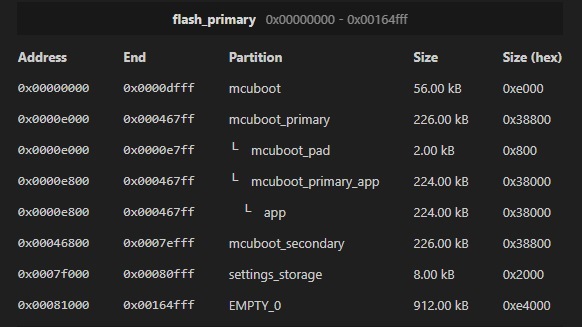
  • OK, now I'm deal with pm_static.yml and for test-generated thing which could fit on L10, but have some question

    1) On L15 "have" magic from dtsi set to 0x165000 for maximum size of app if config was generated automatically. I see this number in zephyr\dts\vendor\nordic\nrf54l15.dtsi but for cpuflpr and my app is for configuration cpuapp (and PM manager do not allow me to build smaller region) For L05 I see in dts 0x75800 but If I create app without bootloader in partition.yml I've got 0x7d000 (so full 512). Could you explain ?

    2) Now (without soft device) there is no common BT stack ? Because simple app is huge and have more than 220kb, so with dual bank, there is no possibility to use mcuboot (any option for single, like in older way ?) Without very hard optimization (maybe should go back to nrf52 ...). Is there any way to use a single bank ?

    BTW. VSCode with plugin is very messy, when I change something in pm_static.yml and this fail I could not run a pristine build, sometimes open close of VS helps but in most cases new build helps (but not always appear in VS - you need to open and reopen...)

Children
Related