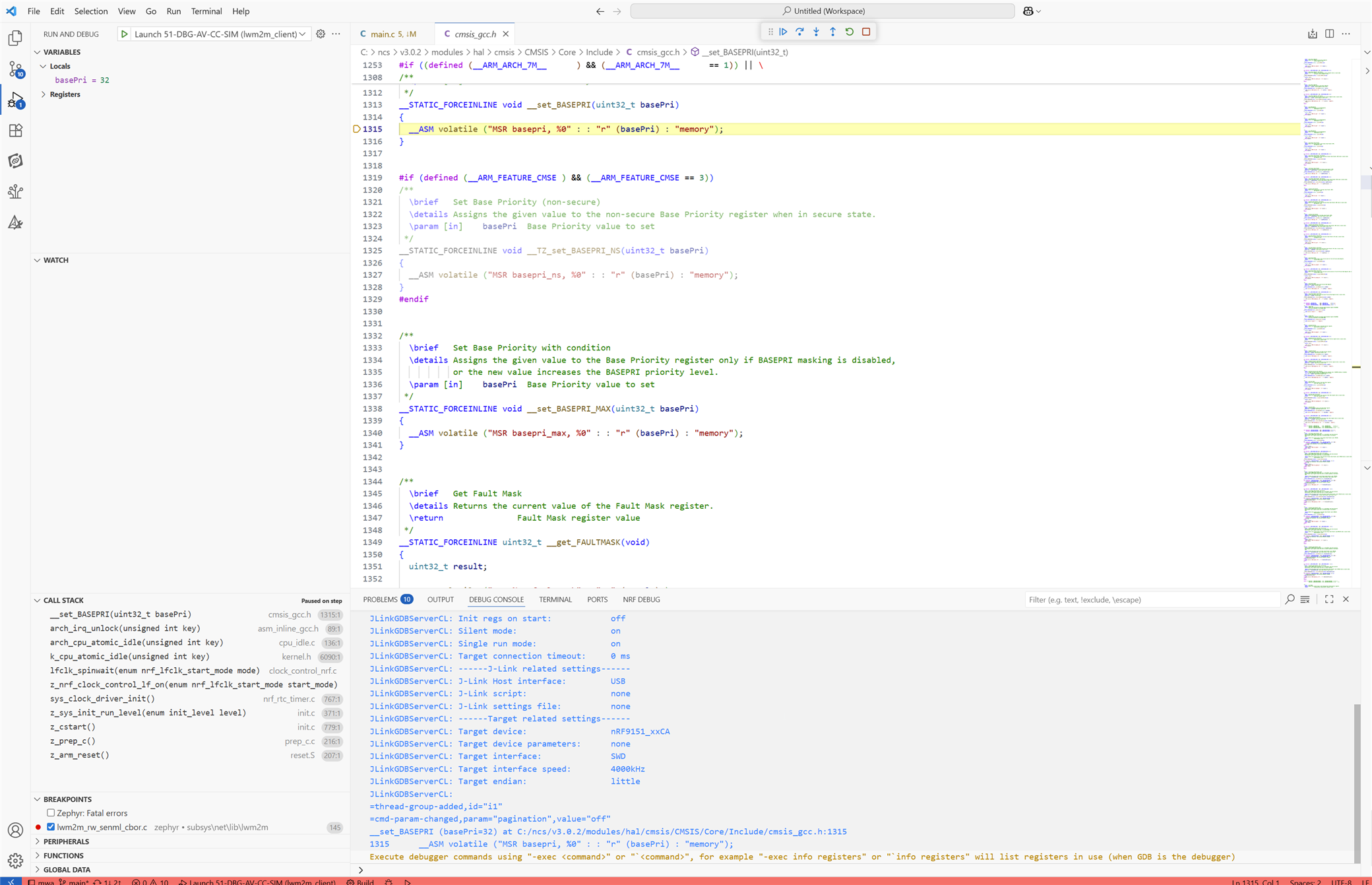
The same config I was working with the past months and could still debug yesterday morning is not working correctly since this morning. Mostly when I start a debug session its not starting at main of the lwm2m_client sample as before but at
__STATIC_FORCEINLINE void __set_BASEPRI(uint32_t basePri) cmsis_gcc.h and the app is not working. When I build and flash the exact same config its working fine what I can see in the Seggers RTTViewer. When I load the same zephyr.elf file in Ozone, its just working fine a starting at main() and I can step through.
Whats happening here?
What I treid the past 6 wasted hours:
* created new config: worked 1x then same issue, seems like config settings I do are lost randomly after building, closing configuration window and reopen it
* restarted VSCode: rarely I got a working debug session, mostly not
* close application, open application: same issue
* updated plugins: after nrf connect from 2025-08-21 was installed, all behaved even worse then before
* removed VSCode and deleted all local settings I could find on the Windows 11 PC
* Installed VSCode from Windows 11 App Store
* installed NRF Connect Pack
* created new NRF application from sample - blinky nrf9151ns - build/debug - starts at main()
* opened my existing application I develop the past months (lwm2m_client sample from SDK 3.0.1), build existing configuration, flash - working, debug - halts in cmsis_gcc, not working
* open zephyr.elf in Ozone, flash and debug - starts in main(), single step works just fine.
Whats happening here?
What I treid the past 6 wasted hours:
* created new config: worked 1x then same issue, seems like config settings I do are lost randomly after building, closing configuration window and reopen it
* restarted VSCode: rarely I got a working debug session, mostly not
* close application, open application: same issue
* updated plugins: after nrf connect from 2025-08-21 was installed, all behaved even worse then before
* removed VSCode and deleted all local settings I could find on the Windows 11 PC
* Installed VSCode from Windows 11 App Store
* installed NRF Connect Pack
* created new NRF application from sample - blinky nrf9151ns - build/debug - starts at main()
* opened my existing application I develop the past months (lwm2m_client sample from SDK 3.0.1), build existing configuration, flash - working, debug - halts in cmsis_gcc, not working
* open zephyr.elf in Ozone, flash and debug - starts in main(), single step works just fine.