

After the update to extension version 2025.8.654, the extension can no longer find the nRF SDK in my west workspace in the build configuration. If I revert to extension v2025.4.106., then the build configure shows nRF Connect SDK v3.1.0 as the SDK as expected.
I am using a west workspace with the following folder structure
ZephyrTemplate/
    - Code/
        - .west/config
        - external/
            - bootloader
            - modules
            - nrf
            - nrfxlib
            - test
            - tools
            - zephyr
        - hw_support/boards
        - applications
            - appA
                - west.yml
                - CMakeLists.txt
                - Kconfig
                - Kconfig.sysbuild
                - prj.conf
                -sysbuild.conf
                - src/
                    - main.c
                - sysbuild/
                    - mcuboot.conf
                    - mcuboot.overlay
            - appB
The appA west.yml looks like this:
manifest:
  self:
    path: Code
  remotes:
    - name: nrf
      url-base: https://github.com/nrfconnect
    - name: ds
      url-base: https://github.com/My-Company/
  projects:
    - name: sdk-nrf
      remote: nrf
      path: nrf
      revision: v3.1.0
      import:
        path-prefix: external
      clone-depth: 1
    - name: MyCompany-ZephyrModules-board_baselines
      remote: ds
      path: hw_support
      revision: v0.1.1
      clone-depth: 1
The .west/config file look like:
[manifest]
path = applications/appA
file = west.yml

[zephyr]
base = external/zephyr
The nRF connect extension is configured to set the board root to ${ZEPHYR_BASE}../../hw_support.
Using the nRF connect extension, I open appA as an existing application and run west update.
When I add the build configuration, instead of finding nRF Connect SDK v3.1.0 in the ZephyrTemplate/external folder, it sets the SDK to 3rd Party v1.0.0.
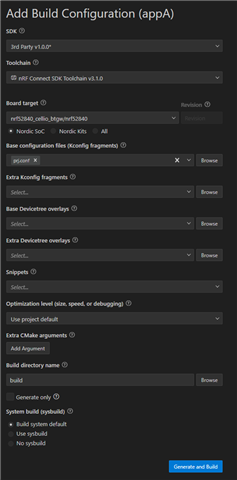
It is still able to configure and build. However the extension does not recognize that is built successfully and requires a pristine build. When I click the button to do a pristine build, I get the error "Failed to determine build parameters".
Interestingly, if I revert the extension version with the build directory still present, the extension correctly detects the build configuration.
What do I need to do in the v2025.8.654 extension update to get the extension to find the nRF connect SDK in the west workspace?
