

Hello:
I was using VS Code normally.
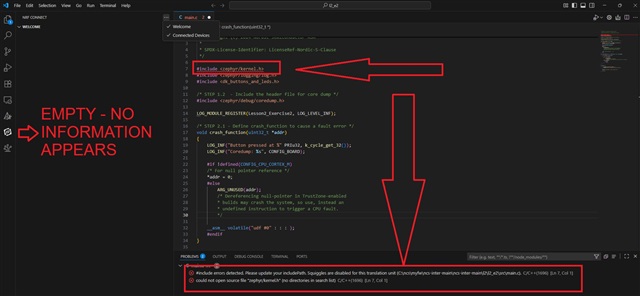
Suddenly, I opened a folder and received the screen below when selecting nRF Connect.
Note that no information appears.
Line 7 of the program is highlighted, and there are two errors in Problems.
They are:
#include errors detected. Please update your includePath. Squiggles are disabled for this translation unit (C:\myfw\ncs-inter-main\ncs-inter-main\l2\l2_e2\src\main.c).
[{
"resource": "/c:/myfw/ncs-inter-main/ncs-inter-main/l2/l2_e2/src/main.c",
"owner": "C/C++: IntelliSense",
"code": "1696",
"severity": 8,
"message": "could not open source file \"zephyr/kernel.h\" (no directories in search list)",
"source": "C/C++",
"startLineNumber": 7,
"startColumn": 1,
"endLineNumber": 7,
"endColumn": 27,
"origin": "extHost1"
I uninstalled VS Code and installed it again and the problem persists..
I'm taking the nRF Connect SDK Intermediate course.
All the programs for this course and the nRF Connect SDK Fundamentals course are stored in the c:/myfw directory.
I completed all the exercises in the nRF Connect SDK Fundamentals course, as well as exercises l1_e1,l1_2 and l2_1, and had no problems.
Please help me to resolve the problem.
WINDOWS 11
#
# Copyright (c) 2024 Nordic Semiconductor
#
# SPDX-License-Identifier: LicenseRef-Nordic-5-Clause
#

cmake_minimum_required(VERSION 3.20.0)
find_package(Zephyr REQUIRED HINTS $ENV{ZEPHYR_BASE})
project(nrf_connect_sdk_intermediate)

target_sources(app PRIVATE src/main.c)

add_compile_options(-Wno-main)
Regards
Luiz Miranda
