Issue with programming multiple nRF52840 boards – J-Link DLL error after first programming in Programmer v4.6.2

Hello,

I am experiencing a recurring issue when programming multiple nRF52840 boards using the nRF Programmer.

  • Problem description:
    When programming the first board, everything works fine.
    However, when I try to program the second and subsequent boards, after performing Reset and Erase & Write, I always get the following error:

13:04:07.646 Failed "loading core information for application core". Error: code: 1, description: Generic, message: Batch task core-info failed, Device error: Failed to read from memory address 0x10000130: Failed to write DebugPort register 0x08: Unknown Error in J-Link DLL (error code = -1) 13:04:07.663 Error: Failed with exit code 1. One or more batch tasks failed: * 801050888: Device error: Failed to read from memory address 0x10000130: Failed to write DebugPort register 0x08: Unknown Error in J-Link DLL (error code = -1)

If I press reset and run Erase & Write again, the programming works successfully.
Then on the next board, the same error appears again, and I need to repeat the reset/erase cycle.

  • Additional information:
    This issue only started appearing with the current version of the software.
    In the previous version of nRF Programmer, I did not have this problem.

Could you please help me understand what is causing this error and how to fix it?

Thank you in advance.

  • Hi Tomasz, 

    Thanks!

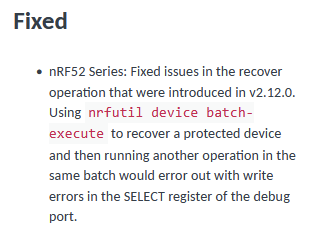
    The issue is related to a known issue with nrfutil device v2.12.3 (from v2.12.0-v2.12.3) which was fixed in v2.12.5: 

     (from nrfutil device changelog)

    As you can see this is an issue when using nrfutil device batch-execute, which is why you don't see it when using your batch script. 

    The developers for the Programmer application are aware of this now. You can expect this issue to be fixed when the Programmer application is updated to use nrfutil device version >= v2.12.5. I'm not able to share a timeline for this update. Your Regional Sales Manager may be able to provide some more information for you if you're interested. 

    In the mean time I hope that the command line programming is working well for you. As a side note, you don't have to stay with nrfutil device v2.12.3 when using the command line. You could update to the latest version, or the specified version for the nRF Connect SDK version you are working with. See the Required tools table in Requirements reference and change the version to your SDK version under the header. 

    Tthank you for reporting this and for providing the needed information for us to find out the source for the issue in Programmer. 

    Best regards,

    Maria

  • Hi Maria,


    Thank you — I really appreciate that you are making such great devices and software :)

    Best regards
    Tomasz

Related