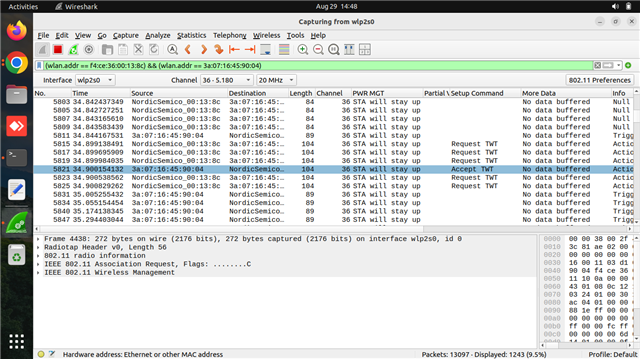
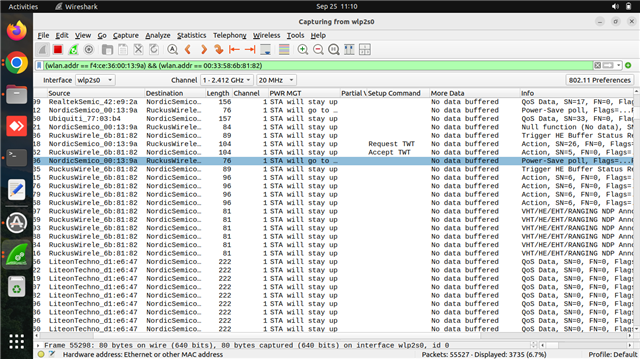
The client does not enter sleep mode as expected.

We are using the Nordic Semiconductor nRF7002-DK. In this board, both PS-Poll and No-PS-Poll power-saving modes are working as expected. However, when running in TWT (Target Wake Time) power mode using the following command:-wifi twt setup 0 0 2 2 0 1 1 1 1000 60000, the client does not enter sleep mode as expected. Can you help us to enter the device into sleep mode.
Applications Versions: 
  1. nRF connection Desktop v5.2.0
  2. Toolchain Manager v1.6.0
  3. Visual studio cade v2.9.2
  4. Windows 11 pro Platform
Parents
  • Hi,

    What access point are you using? It could be that the access point does not support TWT.

    Can you share device logs when enabling TWT? You can also try the Wi-Fi TWT sample.

    Best regards,
    Marte

  • Hi,

    We are currently using a FreeBox Access Point, which supports TWT (Target Wake Time) power save mode. In the packet capture, we can see both the TWT Request and Accept frames. However, the client is still not entering power save mode.

    TWT enabling logs:-

    uart:~$ wifi twt setup 0 0 2 2 0 1 1 1 2000 60000
    TWT operation TWT setup with dg: 2, flow_id: 2 requested
    TWT response: TWT accept
    == TWT negotiated parameters ==
    TWT Dialog token: 2
    TWT flow ID: 1
    TWT negotiation type: TWT individual negotiation
    TWT responder: true
    TWT implicit: true
    TWT announce: true
    TWT trigger: true
    TWT wake interval: 2048 us
    TWT interval: 60000 us

    For your reference Pcap screenshot attached below.

    Thanks & regards,

    Naveen P

  • Hi Naveen,

    The ifdef for CONFIG_SCHEDULED_TX should not have been included in the previous function, so I apologize for that.
    Please try this instead:

    static void wifi_mgmt_event_handler(struct net_mgmt_event_callback *cb,
    				     uint32_t mgmt_event, struct net_if *iface)
    {
    	switch (mgmt_event) {
    	case NET_EVENT_WIFI_CONNECT_RESULT:
    		handle_wifi_connect_result(cb);
    		break;
    	case NET_EVENT_WIFI_DISCONNECT_RESULT:
    		handle_wifi_disconnect_result(cb);
    		break;
    	case NET_EVENT_WIFI_TWT:
    		handle_wifi_twt_event(cb);
    		break;
    	case NET_EVENT_WIFI_TWT_SLEEP_STATE: {
    		int *twt_state;
    
    		twt_state = (int *)(cb->info);
    		LOG_INF("TWT sleep state: %s", *twt_state ? "awake" : "sleeping" );
    		if (*twt_state == WIFI_TWT_STATE_SLEEP) {
    			traffic_gen_pause(&tg_config);
    		} else if (*twt_state == WIFI_TWT_STATE_AWAKE)  {
    			traffic_gen_resume(&tg_config);
    		} else {
    			LOG_INF("UNKNOWN TWT STATE %d", *twt_state);
    		}
    	}
    		break;
    	default:
    		break;
    	}
    }

    You can also remove the traffic_gen_pause() and traffic_gen_resume() functions. The most important part is to log the sleep state:

    static void wifi_mgmt_event_handler(struct net_mgmt_event_callback *cb,
    				     uint32_t mgmt_event, struct net_if *iface)
    {
    	switch (mgmt_event) {
    	case NET_EVENT_WIFI_CONNECT_RESULT:
    		handle_wifi_connect_result(cb);
    		break;
    	case NET_EVENT_WIFI_DISCONNECT_RESULT:
    		handle_wifi_disconnect_result(cb);
    		break;
    	case NET_EVENT_WIFI_TWT:
    		handle_wifi_twt_event(cb);
    		break;
    	case NET_EVENT_WIFI_TWT_SLEEP_STATE: {
    		int *twt_state;
    
    		twt_state = (int *)(cb->info);
    		LOG_INF("TWT sleep state: %s", *twt_state ? "awake" : "sleeping" );
    	}
    		break;
    	default:
    		break;
    	}
    }

    Best regards,
    Marte

  • Hi Marte,

    As you advised, we made the same changes in the script, but when we tried to flash, it failed with an error. Please find the attached logs for your reference.

    FAILED: CMakeFiles/app.dir/src/main.c.obj
    C:\ncs\toolchains\b620d30767\opt\zephyr-sdk\arm-zephyr-eabi\bin\arm-zephyr-eabi-gcc.exe -DKERNEL -DK_HEAP_MEM_POOL_SIZE=213024 -DMBEDTLS_CONFIG_FILE=\"nrf-config.h\" -DMBEDTLS_PSA_CRYPTO_CONFIG_FILE=\"nrf-psa-crypto-config.h\" -DMBEDTLS_PSA_CRYPTO_USER_CONFIG_FILE=\"nrf-psa-crypto-user-config.h\" -DNRF52_ERRATA_215_ENABLE_WORKAROUND=0 -DNRF5340_XXAA_APPLICATION -DNRF53_ERRATA_159_ENABLE_WORKAROUND=0 -DNRF53_ERRATA_43_ENABLE_WORKAROUND=0 -DNRF70_ANT_GAIN_2G=0 -DNRF70_ANT_GAIN_5G_BAND1=0 -DNRF70_ANT_GAIN_5G_BAND2=0 -DNRF70_ANT_GAIN_5G_BAND3=0 -DNRF70_BAND_2G_LOWER_EDGE_BACKOFF_DSSS=0 -DNRF70_BAND_2G_LOWER_EDGE_BACKOFF_HE=0 -DNRF70_BAND_2G_LOWER_EDGE_BACKOFF_HT=0 -DNRF70_BAND_2G_UPPER_EDGE_BACKOFF_DSSS=0 -DNRF70_BAND_2G_UPPER_EDGE_BACKOFF_HE=0 -DNRF70_BAND_2G_UPPER_EDGE_BACKOFF_HT=0 -DNRF70_BAND_UNII_1_LOWER_EDGE_BACKOFF_HE=0 -DNRF70_BAND_UNII_1_LOWER_EDGE_BACKOFF_HT=0 -DNRF70_BAND_UNII_1_UPPER_EDGE_BACKOFF_HE=0 -DNRF70_BAND_UNII_1_UPPER_EDGE_BACKOFF_HT=0 -DNRF70_BAND_UNII_2A_LOWER_EDGE_BACKOFF_HE=0 -DNRF70_BAND_UNII_2A_LOWER_EDGE_BACKOFF_HT=0 -DNRF70_BAND_UNII_2A_UPPER_EDGE_BACKOFF_HE=0 -DNRF70_BAND_UNII_2A_UPPER_EDGE_BACKOFF_HT=0 -DNRF70_BAND_UNII_2C_LOWER_EDGE_BACKOFF_HE=0 -DNRF70_BAND_UNII_2C_LOWER_EDGE_BACKOFF_HT=0 -DNRF70_BAND_UNII_2C_UPPER_EDGE_BACKOFF_HE=0 -DNRF70_BAND_UNII_2C_UPPER_EDGE_BACKOFF_HT=0 -DNRF70_BAND_UNII_3_LOWER_EDGE_BACKOFF_HE=0 -DNRF70_BAND_UNII_3_LOWER_EDGE_BACKOFF_HT=0 -DNRF70_BAND_UNII_3_UPPER_EDGE_BACKOFF_HE=0 -DNRF70_BAND_UNII_3_UPPER_EDGE_BACKOFF_HT=0 -DNRF70_BAND_UNII_4_LOWER_EDGE_BACKOFF_HE=0 -DNRF70_BAND_UNII_4_LOWER_EDGE_BACKOFF_HT=0 -DNRF70_BAND_UNII_4_UPPER_EDGE_BACKOFF_HE=0 -DNRF70_BAND_UNII_4_UPPER_EDGE_BACKOFF_HT=0 -DNRF70_DATA_TX -DNRF70_LOG_VERBOSE -DNRF70_MAX_TX_PENDING_QLEN=18 -DNRF70_MAX_TX_TOKENS=10 -DNRF70_PCB_LOSS_2G=0 -DNRF70_PCB_LOSS_5G_BAND1=0 -DNRF70_PCB_LOSS_5G_BAND2=0 -DNRF70_PCB_LOSS_5G_BAND3=0 -DNRF70_REG_DOMAIN=00 -DNRF70_RPU_PS_IDLE_TIMEOUT_MS=10 -DNRF70_RX_MAX_DATA_SIZE=1600 -DNRF70_RX_NUM_BUFS=48 -DNRF70_STA_MODE -DNRF70_SYSTEM_MODE -DNRF70_TCP_IP_CHECKSUM_OFFLOAD -DNRF_SKIP_FICR_NS_COPY_TO_RAM -DNRF_WIFI_AP_DEAD_DETECT_TIMEOUT=20 -DNRF_WIFI_IFACE_MTU=1500 -DNRF_WIFI_LOW_POWER -DNRF_WIFI_MGMT_BUFF_OFFLOAD -DNRF_WIFI_PS_INT_PS=y -DNRF_WIFI_RPU_RECOVERY -DNRF_WIFI_RPU_RECOVERY_PS_ACTIVE_TIMEOUT_MS=50000 -DPICOLIBC_LONG_LONG_PRINTF_SCANF -DUSE_PARTITION_MANAGER=1 -D__LINUX_ERRNO_EXTENSIONS__ -D__PROGRAM_START -D__ZEPHYR__=1 -IC:/ncs/v2.9.2/zephyr/subsys/net/ip -IC:/ncs/v2.9.2/nrf/samples/wifi/twt/modules/traffic_gen/inc -IC:/ncs/v2.9.2/nrf/samples/wifi/twt/build/twt/zephyr/include/generated/zephyr -IC:/ncs/v2.9.2/zephyr/include -IC:/ncs/v2.9.2/nrf/samples/wifi/twt/build/twt/zephyr/include/generated -IC:/ncs/v2.9.2/zephyr/soc/nordic -IC:/ncs/v2.9.2/zephyr/include/zephyr/posix -IC:/ncs/v2.9.2/zephyr/soc/nordic/nrf53/. -IC:/ncs/v2.9.2/zephyr/soc/nordic/common/. -IC:/ncs/v2.9.2/zephyr/subsys/net/l2 -IC:/ncs/v2.9.2/zephyr/drivers/wifi/nrf_wifi/inc -IC:/ncs/v2.9.2/nrf/include -IC:/ncs/v2.9.2/nrf/samples/wifi/twt/build/twt/zephyr/misc/generated -IC:/ncs/v2.9.2/modules/lib/hostap/port/mbedtls -IC:/ncs/v2.9.2/nrf/tests/include -IC:/ncs/v2.9.2/modules/hal/cmsis/CMSIS/Core/Include -IC:/ncs/v2.9.2/zephyr/modules/cmsis/. -IC:/ncs/v2.9.2/modules/hal/nordic/nrfx -IC:/ncs/v2.9.2/modules/hal/nordic/nrfx/drivers/include -IC:/ncs/v2.9.2/modules/hal/nordic/nrfx/mdk -IC:/ncs/v2.9.2/zephyr/modules/hal_nordic/nrfx/. -IC:/ncs/v2.9.2/zephyr/modules/hostap/src -IC:/ncs/v2.9.2/modules/lib/hostap -IC:/ncs/v2.9.2/modules/lib/hostap/wpa_supplicant -IC:/ncs/v2.9.2/modules/lib/hostap/src -IC:/ncs/v2.9.2/modules/lib/hostap/src/common -IC:/ncs/v2.9.2/modules/lib/hostap/src/eap_common -IC:/ncs/v2.9.2/modules/lib/hostap/src/eap_server -IC:/ncs/v2.9.2/modules/lib/hostap/src/radius -IC:/ncs/v2.9.2/modules/lib/hostap/src/crypto -IC:/ncs/v2.9.2/modules/lib/hostap/src/ap -IC:/ncs/v2.9.2/modules/lib/hostap/src/drivers -IC:/ncs/v2.9.2/modules/lib/hostap/src/rsn_supp -IC:/ncs/v2.9.2/nrf/samples/wifi/twt/build/twt/generated/library_nrf_security_psa -IC:/ncs/v2.9.2/nrf/subsys/nrf_security/include -IC:/ncs/v2.9.2/nrf/subsys/nrf_security/src/threading/include -IC:/ncs/v2.9.2/nrf/subsys/nrf_security/src/utils -IC:/ncs/v2.9.2/modules/crypto/oberon-psa-crypto/oberon/drivers -IC:/ncs/v2.9.2/modules/crypto/oberon-psa-crypto/include -IC:/ncs/v2.9.2/modules/crypto/oberon-psa-crypto/library -IC:/ncs/v2.9.2/modules/crypto/mbedtls/library -IC:/ncs/v2.9.2/modules/crypto/mbedtls/include -IC:/ncs/v2.9.2/modules/crypto/mbedtls/include/library -IC:/ncs/v2.9.2/nrfxlib/crypto/nrf_oberon/include -IC:/ncs/v2.9.2/nrfxlib/crypto/nrf_oberon/include/mbedtls -IC:/ncs/v2.9.2/zephyr/modules/nrf_wifi/os -IC:/ncs/v2.9.2/zephyr/modules/nrf_wifi/os/../bus -IC:/ncs/v2.9.2/modules/lib/nrf_wifi/utils/inc -IC:/ncs/v2.9.2/modules/lib/nrf_wifi/os_if/inc -IC:/ncs/v2.9.2/modules/lib/nrf_wifi/bus_if/bus/qspi/inc -IC:/ncs/v2.9.2/modules/lib/nrf_wifi/bus_if/bal/inc -IC:/ncs/v2.9.2/modules/lib/nrf_wifi/fw_if/umac_if/inc -IC:/ncs/v2.9.2/modules/lib/nrf_wifi/fw_load/mips/fw/inc -IC:/ncs/v2.9.2/modules/lib/nrf_wifi/hw_if/hal/inc -IC:/ncs/v2.9.2/modules/lib/nrf_wifi/hw_if/hal/inc/fw -IC:/ncs/v2.9.2/modules/lib/nrf_wifi/fw_if/umac_if/inc/fw -IC:/ncs/v2.9.2/modules/lib/nrf_wifi/fw_if/umac_if/inc/default -isystem C:/ncs/v2.9.2/zephyr/lib/libc/common/include -isystem C:/ncs/v2.9.2/nrfxlib/crypto/nrf_cc312_platform/include -Os -DNDEBUG -fno-strict-aliasing -Os -imacros C:/ncs/v2.9.2/nrf/samples/wifi/twt/build/twt/zephyr/include/generated/zephyr/autoconf.h -fno-printf-return-value -fno-common -g -gdwarf-4 -fdiagnostics-color=always -mcpu=cortex-m33 -mthumb -mabi=aapcs -mfp16-format=ieee -mtp=soft --sysroot=C:/ncs/toolchains/b620d30767/opt/zephyr-sdk/arm-zephyr-eabi/arm-zephyr-eabi -imacros C:/ncs/v2.9.2/zephyr/include/zephyr/toolchain/zephyr_stdint.h -Wall -Wformat -Wformat-security -Wno-format-zero-length -Wdouble-promotion -Wno-pointer-sign -Wpointer-arith -Wexpansion-to-defined -Wno-unused-but-set-variable -Werror=implicit-int -fno-pic -fno-pie -fno-asynchronous-unwind-tables -ftls-model=local-exec -fno-reorder-functions --param=min-pagesize=0 -fno-defer-pop -fmacro-prefix-map=C:/ncs/v2.9.2/nrf/samples/wifi/twt=CMAKE_SOURCE_DIR -fmacro-prefix-map=C:/ncs/v2.9.2/zephyr=ZEPHYR_BASE -fmacro-prefix-map=C:/ncs/v2.9.2=WEST_TOPDIR -ffunction-sections -fdata-sections -specs=picolibc.specs -D_POSIX_THREADS -std=c99 -MD -MT CMakeFiles/app.dir/src/main.c.obj -MF CMakeFiles\app.dir\src\main.c.obj.d -o CMakeFiles/app.dir/src/main.c.obj -c C:/ncs/v2.9.2/nrf/samples/wifi/twt/src/main.c
    C:/ncs/v2.9.2/nrf/samples/wifi/twt/src/main.c: In function 'main':
    C:/ncs/v2.9.2/nrf/samples/wifi/twt/src/main.c:426:25: warning: implicit declaration of function 'traffic_gen_init'; did you mean 'traffic_gen_stop'? [-Wimplicit-function-declaration]
    426 | traffic_gen_init(&tg_config);
    | ^~~~~~~~~~~~~~~~
    | traffic_gen_stop
    C:/ncs/v2.9.2/nrf/samples/wifi/twt/src/main.c:428:29: error: void value not ignored as it ought to be
    428 | ret = traffic_gen_start(&tg_config);
    | ^
    C:/ncs/v2.9.2/nrf/samples/wifi/twt/src/main.c:434:31: warning: implicit declaration of function 'traffic_gen_wait_for_report' [-Wimplicit-function-declaration]
    434 | ret = traffic_gen_wait_for_report(&tg_config);
    | ^~~~~~~~~~~~~~~~~~~~~~~~~~~
    C:/ncs/v2.9.2/nrf/samples/wifi/twt/src/main.c:439:25: warning: implicit declaration of function 'traffic_gen_get_report'; did you mean 'traffic_gen_start'? [-Wimplicit-function-declaration]
    439 | traffic_gen_get_report(&tg_config);
    | ^~~~~~~~~~~~~~~~~~~~~~
    | traffic_gen_start
    [244/457] Building C object zephyr/subsys/net/ip/CMakeFiles/subsys__net__ip.dir/tcp.c.obj
    ninja: build stopped: subcommand failed.
    FAILED: _sysbuild/sysbuild/images/twt-prefix/src/twt-stamp/twt-build C:/ncs/v2.9.2/nrf/samples/wifi/twt/build/_sysbuild/sysbuild/images/twt-prefix/src/twt-stamp/twt-build
    cmd.exe /C "cd /D C:\ncs\v2.9.2\nrf\samples\wifi\twt\build\twt && C:\ncs\toolchains\b620d30767\opt\bin\cmake.exe --build ."
    ninja: build stopped: subcommand failed.
    FATAL ERROR: command exited with status 1: 'C:\ncs\toolchains\b620d30767\opt\bin\cmake.EXE' --build C:/ncs/v2.9.2/nrf/samples/wifi/twt/build

    Thanks & Regards,

    Naveen P

  • Hi Mate,

    As per your advice, we made the same changes in the script, and the flash build completed successfully. However, we are still not seeing the expected logs. After enabling TWT power save, the client only sends PS-Poll frames.

    The following command was used:

     wifi twt setup 0 0 1 0 0 0 1 1 10000 1000000 100
    Please find the attached PCaps for your reference.

    https://drive.google.com/file/d/1H2-U1TbJMtUYYoJxIF3my1jbIpdYBWpn/view?usp=sharing

    Thanks & Regards,

    Naveen P

  • Hi Marte,

    Please respond. We are waiting for your reply.

Reply Children
  • Hi Merta,

    I tried with another AP as well, but we are still facing the same issue I mentioned earlier.

    Please find the attached the client-side logs and screenshot for your reference.

    uart:~$ wifi status
    Status: successful
    ==================
    State: COMPLETED
    Interface Mode: STATION
    Link Mode: WIFI 6 (802.11ax/HE)
    SSID: TWT
    BSSID: 00:33:58:6B:81:82
    Band: 2.4GHz
    Channel: 1
    Security: WPA2-PSK
    MFP: Optional
    RSSI: -40
    Beacon Interval: 100
    DTIM: 1
    TWT: Supported
    Current PHY rate : 1000

    uart:~$ wifi twt setup 0 0 1 0 0 0 1 1 10000 1000000 100
    TWT operation TWT setup with dg: 1, flow_id: 0 requested
    TWT response: TWT accept
    == TWT negotiated parameters ==
    TWT Dialog token: 1
    TWT flow ID: 1
    TWT negotiation type: TWT individual negotiation
    TWT responder: true
    TWT implicit: true
    TWT announce: true
    TWT trigger: false
    TWT wake interval: 9984 us
    TWT interval: 1000000 us

    Thanks & Regards,

    Naveen P

  • Hi,

    Naveen Pyda said:
    However, we are still not seeing the expected logs.

    Was this with the Wi-Fi TWT sample or the Wi-Fi shell sample?

    Naveen Pyda said:
    I tried with another AP as well, but we are still facing the same issue I mentioned earlier.

    Please provide the details of the AP you tested with. Additionally, make sure that TWT is enabled in the AP settings.

    I have attached a version of the TWT sample without the traffic generator and TWT teardown. Can you test this and send the logs?

    Please also share which version of the nRF7002 DK you are using. The version is the line under "PCA10143" on the sticker on the DK.

    Best regards,
    Marte

    twt.zip

  • Hi Marte,

    As you mentioned, the details of the AP are: Ruckus-R770, SSID: TWT, Password: naveen123. The AP supports TWT power save.

    As you advised, we made the same changes in ncs/v2.9.2/nrf/samples/wifi/twt/src/main.c, but we are not receiving any logs from the client side. I had previously shared screenshots and logs for this issue.

    As you advised, we followed the steps to collect the logs, but we are still not able to see the logs as expected.Please find the attached screenshot for your reference.

    The version of the nRF7002 DK is 1.0.2. 

    We will try the twt.zip. If we find any solution or face any issue, I will let you know.

    Thanks & Regards,

    Naveen P

Related