Matter Test Harness: tests hang or fail to commission (rPI5 + nRF52840 RCP, NCS 3.0.2)

Hi,

I’m having trouble getting the Matter Test Harness to run.

Environment

  1. rPi 5 set up per Matter Test-Harness User Manual.pdf (using project-chip/certification-tool at v2.13+summer2025).

  2. nRF52840 Dongle as the RCP.

  3. NCS 3.0.2 Door Lock sample (no modifications).

  4. Test Harness project configured with:


{
  "config": {
    "test_parameters": null,
    "network": {
      "wifi": {
        "ssid": "testharness",
        "password": "wifi-password"
      },
      "thread": {
        "rcp_serial_path": "/dev/ttyACM0",
        "rcp_baudrate": 115200,
        "on_mesh_prefix": "fd11:22::/64",
        "network_interface": "eth0",
        "dataset": {
          "channel": "15",
          "panid": "0x1234",
          "extpanid": "1111111122222222",
          "networkkey": "00112233445566778899aabbccddeeff",
          "networkname": "DEMO"
        },
        "otbr_docker_image": null
      }
    },
    "dut_config": {
      "discriminator": "3840",
      "setup_code": "20202021",
      "pairing_mode": "ble-thread",
      "chip_timeout": null,
      "chip_use_paa_certs": false,
      "trace_log": true,
      "enhanced_setup_flow": null
    }
  },
  "pics": {
    "clusters": {
      "Basic Information Cluster Test Plan": {
        "name": "Basic Information Cluster Test Plan",
        "items": {
          "BINFO.S": {
            "number": "BINFO.S",
            "enabled": true
          },
          "BINFO.S.A0000": {
            "number": "BINFO.S.A0000",
            "enabled": true
          },
          "BINFO.S.A0001": {
            "number": "BINFO.S.A0001",
            "enabled": true
          },
          "BINFO.S.A0002": {
            "number": "BINFO.S.A0002",
            "enabled": true
          },
          "BINFO.S.A0003": {
            "number": "BINFO.S.A0003",
            "enabled": true
          },
          "BINFO.S.A0004": {
            "number": "BINFO.S.A0004",
            "enabled": true
          },
          "BINFO.S.A0005": {
            "number": "BINFO.S.A0005",
            "enabled": true
          },
          "BINFO.S.A0006": {
            "number": "BINFO.S.A0006",
            "enabled": true
          },
          "BINFO.S.A0007": {
            "number": "BINFO.S.A0007",
            "enabled": true
          },
          "BINFO.S.A0008": {
            "number": "BINFO.S.A0008",
            "enabled": true
          },
          "BINFO.S.A0009": {
            "number": "BINFO.S.A0009",
            "enabled": true
          },
          "BINFO.S.A000a": {
            "number": "BINFO.S.A000a",
            "enabled": true
          },
          "BINFO.S.A000b": {
            "number": "BINFO.S.A000b",
            "enabled": false
          },
          "BINFO.S.A000c": {
            "number": "BINFO.S.A000c",
            "enabled": false
          },
          "BINFO.S.A000d": {
            "number": "BINFO.S.A000d",
            "enabled": false
          },
          "BINFO.S.A000e": {
            "number": "BINFO.S.A000e",
            "enabled": false
          },
          "BINFO.S.A000f": {
            "number": "BINFO.S.A000f",
            "enabled": true
          },
          "BINFO.S.A0010": {
            "number": "BINFO.S.A0010",
            "enabled": false
          },
          "BINFO.S.A0011": {
            "number": "BINFO.S.A0011",
            "enabled": false
          },
          "BINFO.S.A0012": {
            "number": "BINFO.S.A0012",
            "enabled": true
          },
          "BINFO.S.A0013": {
            "number": "BINFO.S.A0013",
            "enabled": true
          },
          "BINFO.S.A0014": {
            "number": "BINFO.S.A0014",
            "enabled": false
          },
          "BINFO.S.A0015": {
            "number": "BINFO.S.A0015",
            "enabled": true
          },
          "BINFO.S.A0016": {
            "number": "BINFO.S.A0016",
            "enabled": true
          },
          "BINFO.S.A0017": {
            "number": "BINFO.S.A0017",
            "enabled": false
          },
          "BINFO.S.E00": {
            "number": "BINFO.S.E00",
            "enabled": true
          },
          "BINFO.S.E01": {
            "number": "BINFO.S.E01",
            "enabled": false
          },
          "BINFO.S.E02": {
            "number": "BINFO.S.E02",
            "enabled": false
          },
          "BINFO.S.E03": {
            "number": "BINFO.S.E03",
            "enabled": false
          },
          "BINFO.C.A0005": {
            "number": "BINFO.C.A0005",
            "enabled": false
          }
        }
      }
    }
  }
}


Issue

  • When I start a test, the UI often gets stuck in a loading loop, or the run fails at commissioning.


UI_Test_Run_2025_09_01_15_09_08.log

Could someone advise what might be wrong or what to check next?

Thanks,

Lukasz

Parents Reply Children
  • First of all, could you move to the older version of Test Harness, because v2.13+summer2025 is supposed to be used for Matter 1.4.2. In NCS 3.0.2 we didn't support this Matter version - I think that for NCS 3.0.2 we supported 1.4.1 version (for more on this see here).

    Secondly, it would be great if you could provide logs from the DUT and the docker backend on RaspberryPI (`docker logs backed-certification-tool` - or similar name), Please run test one by one, because I am not 100% if the test case clean correctly between the test cases.

    try to set in project configuration (test_parameters)

      "paa-trust-store-path": "/paa-root-certs",

        "endpoint": 0,

        "thread-dataset-hex": <dataset created by the border router e.g 0e080000000000010000000300001235060004001fffe00208831b059bf104bb290708fdc236ce16c9a66c0510d5ef4a006abafeaeeceeb9bc37b5e0bb030f4f70656e5468726561642d3862613901028ba90410dfce17fd02fa4a24cdde9aad02fc21d40c0402a0f7f8",

        "timeout": 1000000,

        "payload": "<qr-code payload>",

        "bool-arg": "use_pase_only:false",

    Regards,

    Elfving

    EDIT: It is worth checking if you've also maybe ended with the same problem as this guy here.

  •   Sorry for the long time of inactivity on that issue. Now I'm back and focused on solving that issue. I've done what you have asked for:
    1. Downgraded TH to version v2.12+spring2025.
    2. I've configured only one test case.
    3. I've set up test_parameters with the above hint.
    4. I've used matter lock sample from NCS 3.0.2 as reference on nRF52840DK

    Please verify the logs and give more hints on what can be wrong in my setup.

    35:07: 
    uart:~$ *** Booting My Application v3.0.2-89ba1294ac9b ***
    *** Using nRF Connect SDK v3.0.2-89ba1294ac9b ***
    *** Using Zephyr OS v4.0.99-f791c49f492c ***
    I: 39 [DL]BLE address: C3:FA:2D:4F:15:61
    I: No users indexes stored
    I: No stored indexes for credential of type: 1
    I: 55 [DL]CHIP task running
    I: Init CHIP stack
    I: 61 [DL]OpenThread started: OK
    I: 64 [DL]Setting OpenThread device type to SLEEPY END DEVICE
    I: 71 [SVR]Subscription persistence not supported
    I: 75 [SVR]Server initializing...
    I: 78 [TS]Last Known Good Time: 2023-10-14T01:16:48
    I: 84 [DMG]AccessControl: initializing
    I: 87 [DMG]Examples::AccessControlDelegate::Init
    I: 91 [DMG]AccessControl: setting
    I: 94 [DMG]DefaultAclStorage: initializing
    I: 98 [DMG]DefaultAclStorage: 0 entries loaded
    E: 102 [IN]IPV6_PKTINFO failed: 109
    I: 110 [ZCL]Using ZAP configuration...
    I: 115 [DMG]AccessControlCluster: initializing
    I: 120 [ZCL]Initiating Admin Commissioning cluster.
    I: 124 [ZCL]Door Lock server initialized
    I: 128 [ZCL]Door Lock cluster initialized at endpoint #1
    I: 133 [ZCL]0xc0a3e ep 1 clus 0x0000_0101 attr 0x0000_0013 not supported
    E: 140 [ZCL]Failed to set DoorLock number of RFID users: 86
    I: 145 [DIS]Updating services using commissioning mode 0
    E: 150 [DIS]Failed to remove advertised services: 3
    E: 154 [DIS]Failed to finalize service update: 3
    I: 159 [IN]CASE Server enabling CASE session setups
    I: 164 [SVR]Joining Multicast groups
    I: 167 [SVR]Server Listening...
    I: 170 [DL]Device Configuration:
    I: 173 [DL]  Serial Number: 11223344556677889900
    I: 177 [DL]  Vendor Id: 65521 (0xFFF1)
    I: 181 [DL]  Product Id: 32774 (0x8006)
    I: 184 [DL]  Product Name: not-specified
    I: 188 [DL]  Hardware Version: 0
    I: 191 [DL]  Setup Pin Code (0 for UNKNOWN/ERROR): 20202021
    I: 196 [DL]  Setup Discriminator (0xFFFF for UNKNOWN/ERROR): 3840 (0xF00)
    I: 202 [DL]  Manufacturing Date: 2022-01-01
    I: 206 [DL]  Device Type: 65535 (0xFFFF)
    I: 210 [SVR]SetupQRCode: [MT:8IXS142C00KA0648G00]
    I: 214 [SVR]Copy/paste the below URL in a browser to see the QR Code:
    I: 221 [SVR]https://project-chip.github.io/connectedhomeip/qrcode.html?data=MT%3A8IXS142C00KA0648G00
    I: 229 [SVR]Manual pairing code: [34970112332]
    E: 234 [DL]Long dispatch time: 176 ms, for event type 2
    35:52: I: 44352 [DIS]Updating services using commissioning mode 1
    E: 44357 [DIS]Failed to remove advertised services: 3
    I: 44362 [DIS]Advertise commission parameter vendorID=65521 productID=32774 discriminator=3840/15 cm=1 cp=0
    E: 44372 [DIS]Failed to advertise commissionable node: 3
    E: 44377 [DIS]Failed to finalize service update: 3
    I: 44383 [DL]CHIPoBLE advertising started
    I: 44387 [DL]NFC Tag emulation started
    36:22: I: 74387 [DL]CHIPoBLE advertising mode changed to slow
    I: 74394 [DL]CHIPoBLE advertising started
    6683.otbr.txtbackend.txt

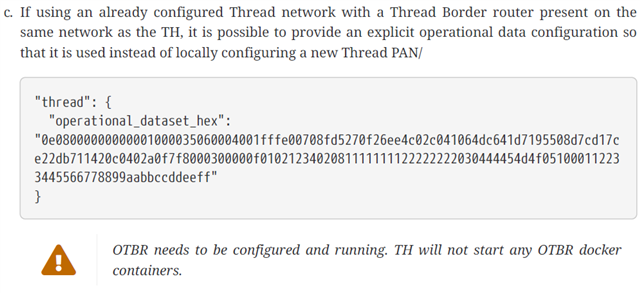
  •   I’ve got the setup working, but only by running OTBR on a separate Raspberry Pi.
    With the Test Harness (TH) configuration where OTBR runs in Docker on the same host, there appear to be networking/visibility issues between containers: the container with chip-tool doesn’t see traffic from the OTBR container. Commissioning starts but times out right after the DUT connects to OTBR.

    I observed the same behavior when running the nRF Matter Lock sample (SDK 3.1.0) with TH v2.13 + Summer 2025 with connected nRF Dongle as RCP.

    Using 9.1.3.b solved issue with communication to DUT. 

  • Hi,

    I've one more issue. I cannot commission device with custom DAC and PAA. I've placed PAA certificate in /var/paa-root-certs directory and setup chip_use_paa_certs flag to True. All according to chapter 9.1.4 in TH documentation. Commissioning fails just after receiving all attestation data by chip-tool in docker container.

    I've been able to commission that device to standalone chip-tool with connected paa path by --paa-trust-store-path /home/matter/paa.

Related