Beware that this post is related to an SDK in maintenance mode
More Info: Consider nRF Connect SDK for new designs

Challenges Migrating from nRF5 SDK 17 to nRF Connect Bare Metal SDK for nRF54 Integration

We are working to add support for the new nRF54 chips using the nRF Connect Bare Metal SDK within our existing mono-repo, which currently supports multiple product generations using the nRF5 SDK (versions 15 and 17).

Our expectation was that the Bare Metal SDK would integrate smoothly into our codebase, similar to our current setup, allowing us to support nRF54-based products with minimal changes. However, after exploring the new SDK, we’ve encountered significant challenges that make integration more complex than anticipated.

Here are the main issues we’re facing:

  1. Toolchain and Configuration Differences: The new SDK relies on a completely different toolchain, including tools like Zephyr West for building and Kconfig for SDK configurations. This is a major shift from the nRF5 SDK workflow. Additionally, memory partitioning now requires Device Tree overlays, which adds complexity to our setup.
  2. Bootloader Limitations: The MCUboot bootloader in the Bare Metal SDK lacks BLE transport support, which we heavily rely on as a fallback mechanism in all our current products. This is a critical feature for us, and its absence poses a significant roadblock.
  3. Library and API Changes: There are numerous library updates, such as the replacement of app_timer with bm_timer, among others. These changes necessitate widespread code modifications across our codebase.

Our mono-repo approach has worked well for maintaining consistency across product lines, but integrating the nRF Connect Bare Metal SDK in a similar manner seems challenging due to these differences. We're aiming to adopt the nRF54 chips with minimal effort, but the current migration path looks like it will require substantial time and resources.

Any advice or suggestions would be greatly appreciated!

Parents
  • Hello, and thank you for your feedback!

    Yes, there are differences between the NCS Bare Metal (NCS BM) and the old nRF5 SDK, such as the toolchain and some library changes. And it does depend on some Zephyr features, such as the devicetree. But this is only limited to the partitions, and doesn't require you to use it for enabling peripherals, like you do in the "full" nRF Connect SDK. 

    I do see your concern with it being difficult to have a shared codebase for both the nRF5SDK and NCS BM. But the idea is that it should be fairly simple to port an application from nRF5 SDK to NCS BM. While I agree it is probably a bit more work than a normal nRF5 SDK port job, it will be far easier in the future to port applications between different nRF54L targets, and any future devices that will be supported in NCS BM. It would simply be a change of the target board. That is one of the big advantages with NCS and NCS BM.

    As for DFU. Actually, the bootloader in NCS BM is not dependent on the application to perform BLE transfers. In fact, it is not even dependent on the softdevice. It has it's own, small, BLE stack. So you can, like you could in the old nRF5 SDK, update the softdevice and application, without dual bank. It is still a bit rough around the edges, but I believe you will have the same capabilities that you did in the nRF5 SDK. 

    Currently, there is only one softdevice, but you can test it by updating to the same softdevice, as described in the application.

    Best regards,

    Edvin

  • As for DFU. Actually, the bootloader in NCS BM is not dependent on the application to perform BLE transfers. In fact, it is not even dependent on the softdevice. It has it's own, small, BLE stack. So you can, like you could in the old nRF5 SDK, update the softdevice and application, without dual bank. It is still a bit rough around the edges, but I believe you will have the same capabilities that you did in the nRF5 SDK. 

    This is encouraging, as it aligns with our need for bootloader-level BLE DFU, similar to what we use in nRF5 SDK. However, I’m a bit confused because the Nordic documentation states that MCUboot does not include transport support (such as BLE) in NCS BM, unlike the nRF5 SDK bootloader. Specifically, the migration guide here notes: "A major difference is that the nRF5 bootloader included the transport (such as BLE, UART), whereas MCUboot does not."

    Could you please clarify how BLE DFU is implemented in the NCS BM bootloader? If MCUboot indeed supports BLE transport with its own stack, could you share a link to relevant documentation, a sample project, or a guide that demonstrates how to set this up for nRF54? We’re particularly interested in achieving bootloader-level BLE DFU without relying on application-layer solutions like mcumgr, as we do in nRF5 SDK. Any examples or steps to test this functionality (e.g., updating the SoftDevice and application) would be greatly appreciated.

  • Sorry, what I wrote about DFU in my previous reply was incorrect.

    The bootloader in NCS BM does use the same bluetooth stack as the application, but seeing as it is a standalone hex file, you can update the application without doing it via the application. That means the bootloader can use the softdevice, and hence, you don't need dual bank, which allows for a larger application footprint. 

    Ligo George said:
    We’re particularly interested in achieving bootloader-level BLE DFU without relying on application-layer solutions like mcumgr

    So this is what we currently have in NCS BM, and it is very similar to the nRF5 SDK's bootloader. There are some differences, but from a user perspective it will feel similar. To go a bit more in depth, the bootloader, which is based on mcuboot used in NCS, is now only responsible for validating the images, and start the correct image: Application or Firmware Loader. 

    The Firmware Loader handles transport of new DFU images. It uses the softdevice to receive the new image. The new image can either contain a new application, or it can contain a softdevice image.

    The application image is quite simple, as it contains the new application, and it will just place it directly in it's target destination.

    A SoftDevice image is a bit more complex. It is as simple as the application to update for the users, as it is a signed binary file, but it contains the softdevice itself, a new Firmware Loader (compatible with the new SoftDevice, and an installer.

    Since the softdevice image is placed in the application's RRAM (NVME), when it is transferred and booted up, it will start the installer, which will delete the old Firmware Loader and the old Softdevice. Then it will move the new Firmware Loader and the new SoftDevice to the correct addresses, before it will delete itself. After this, you have the new softdevice and firmware loader, and it will enter DFU mode again, ready to receive a new application, which is compatible with the new SoftDevice.

    I hope that makes things a bit clear, and I want to underline that what I said in the previous reply about it having it's own small BLE stack is incorrect.

    You can read about the new bootloader and DFU, and the different components of the bootloader here:

    Application Update

    SoftDevice and Firmware Loader update

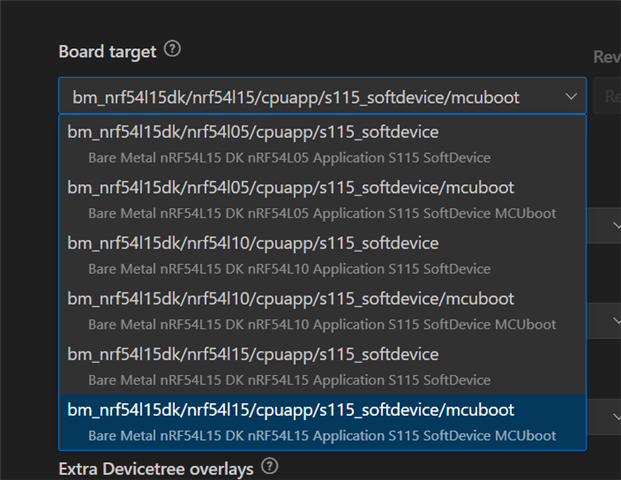
    To test this, please see the "building and running". You can skip all the theory above it, as it explains how to create your own board files for a custom board. This is already done for the DK, so just build for the board named bm_nrf54l15dk/nrf54l15/cpuapp/s115_softdevice/mcuboot

    And follow the instructions. The bootloader will be built and flashed when you flash this application project (you still need to flash the softdevice separately). The images will also be generated when you build, so to test, change something in the application (add a line of logging), and build it again. In the build folder you will find the zephyr.signed.bin, which contains the application image, and the installer_softdevice_firmware_loader.bin, which contains the new softdevice, firmware loader, and installer image. 

    We currently only have one softdevice, so there is really no good ways of testing this, but you can transfer the installer_softdevice_firmware_loader.bin, and it will replace the "old" softdevice and firmware loader with the "new" one.

    Best regards,

    Edvin

  • This documentation was also just released (since my last reply).

    https://docs.nordicsemi.com/bundle/nrf-bm-latest/page/migration/nrf5_bm_migration_5.html#dfu

    It explains the differences between the old (nRF5 SDK) bootloader and the new (NCS BM) bootloader. 

Reply Children
Related