

I am trying to implemented a mechanism for authenticated debug on NRF52840 on NCS 2.5.
My understanding from the product specification is that DAP protection is enabled until both UICR.APPROTECT is 0x5A and NRF_APPROTECT.DISABLE is 0x5A.
I modified the zephyr and nordic_hal to disable the code that alters the value of NRF_APPROTECT in systemInit().
While my changes are working as expected, I have discovered that somehow the nrfjprog tool is able to overcome the DAP access protection.
After reset, I have UICR.APPROTECT == 0x5A and NRF_APPROTECT.DISABLE = 0. At first after a reset the debug access port is disabled but then nrfjprog is able to overcome the protection and read memory and DAP is enabled.
>nrfutil device device-info
serial_number: 000504300626
        deviceFamily: NRF52_FAMILY
        deviceVersion: NRF52840_xxAA_REV3
        jlinkObFirmwareVersion: J-Link Ultra V4 compiled Sep 22 2022 15:00:10

C:\Users\antho>nrfutil device protection-get
serial_number: 000504300626
        core: Application
        access status: Debug access is currently disabled (status value: All)


>nrfjprog --memrd 0x40000000 --log
[error] [ Worker] - Access protection is enabled, can't read device version.
[error] [ Client] - Encountered error -90: Command read_device_info executed for 14 milliseconds with result -90
[error] [ Client] - Encountered error -90: Command read_memory_descriptors executed for 11 milliseconds with result -90
[error] [ Worker] - Can't read memory descriptors, ap-protection is enabled.
0x40000000: 00000000                              |....|

>nrfjprog --memrd 0x40000000 --log
0x40000000: 00000000                              |....|

>nrfjprog --memrd 0x40000558 --log
0x40000558: 0000005A                              |Z...|

>nrfjprog --memrd 0x10001208 --log
0x10001208: 0000005A                              |Z...|

>nrfutil device protection-get
serial_number: 000504300626
        core: Application
        access status: Debug access is enabled (status value: None)
According to the product specification (see attached diagram) the debug port should be "Closed" until the firmware writes the APPROTECT.DISABLE with SwDisable (0x5A) .
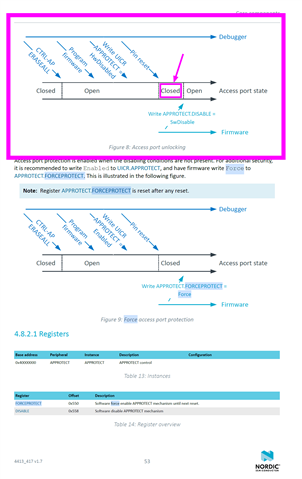
How does nrfjprog manage to disable the access protection when the debug access port is disabled?
For additional detail. I noticed in the ozone debugger, I'm able to reset and halt and the NRF_APPROTECT->DISABLE has value 0x5A.
This environment does have mcuboot bootloader, is it possible the mcuboot is enabling access?
Is it possible to implement a mode on NRF52840 where the debug access port remains locked until enabled by firmware command?

