How to assign UART to different pins

If I understand correctly, you can pretty much assign any pin to any peripheral. I've been using a modded central uart project on a dev board but on this other board I'm using, I don't have access to the same pins. I think the pins are assigned in the dtsi file as follows:

&pinctrl {
uart0_default: uart0_default {
group1 {
psels = <NRF_PSEL(UART_TX, 0, 6)>,
<NRF_PSEL(UART_RTS, 0, 5)>;
};
group2 {
psels = <NRF_PSEL(UART_RX, 0, 8)>,
<NRF_PSEL(UART_CTS, 0, 7)>;
bias-pull-up;
};
};
Looks right as I am connected to P0.06 and P0.08 for the UART.
On the one hand you'd think, yeah, just mod this, but this is in
the ncs/zephyr directory so I'm assuming you don't want to mod this.
Again as far as I understand (but might not be right) you need to have some sort of other overlay file?
Is that right? If so (well, even if not), how exactly do you do this
and what exactly what I put in whatever place I need it? What if I needed to us, say P0.09
and P0.10?
Thanks.
Parents
  • Hello,

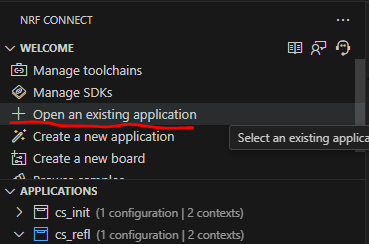
    You are correct. It is recommended to leave everything in the SDK untouched. I prefer to, whenever I want to modify anything in a sample, even, to copy it outside the SDK and then run it from there. Copy the sample folder to a custom location, then clidk "Open an existing application" in VS Code:

    So to your actual question. You are on the right track. You should use an overlay file. There are a couple of different ways to do this. The most common way is to create a file with the board name that you are building for, such as:

    nrf52840dk_nrf52840.overlay

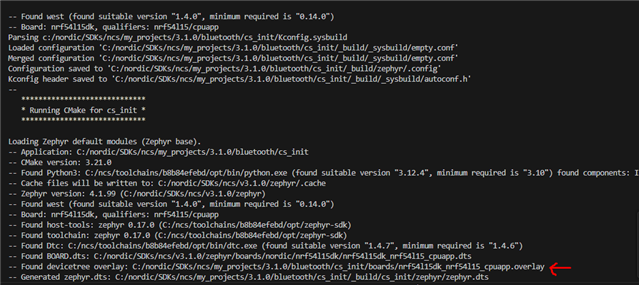
    if this is present in your application folder, or in a folder called "boards" that is present in your application folder (the same folder as the CMakeLists.txt), then the compiler should pick it up (you can verify it from the build log):

    So in this file, you can specify everything you want to behave different from the default dts/dtsi files. So everything you want to change, you copy that block from the dts(i) file, paste it in your overlay file, and modify it there, such as:

    &pinctrl {
    	uart0_default: uart0_default {
    		group1 {
    			psels = <NRF_PSEL(UART_TX, 0, 09)>,
    				<NRF_PSEL(UART_RTS, 0, 11)>;
    		};
    
    		group2 {
    			psels = <NRF_PSEL(UART_RX, 0, 10)>,
    				<NRF_PSEL(UART_CTS, 0, 12)>;
    			bias-pull-up;
    		};
    	};
    
    	uart0_sleep: uart0_sleep {
    		group1 {
    			psels = <NRF_PSEL(UART_TX, 0, 09)>,
    				<NRF_PSEL(UART_RX, 0, 10)>,
    				<NRF_PSEL(UART_RTS, 0, 11)>,
    				<NRF_PSEL(UART_CTS, 0, 12)>;
    			low-power-enable;
    		};
    	};

    NB: You would want to change the uart0_sleep as well as uart0_default

    NBNB: pin P0.09 and P0.10 are by default the NFC pins on the nRF52840. This needs to be disabled to make them work as normal GPIOs. For this, please see this ticket:
    Can the NFC port be disabled and used as GPIO?

    Best regards,

    Edvin

  • Hi, finally back on this again. Thanks for the reply. 

    An awful lot I'm still failing to grasp. 

    So, in no particular order:

    1. What is this uart sleep all about? 

    2. That link about disabling P0.09 etc, I could not follow. There was something about meerkats, but what the actual solution is I do not get. 

    3. Where is this arcane syntax explained? Let's take this for example:

    uart0_default: uart0_default {
            group1 {
                psels = <NRF_PSEL(UART_TX, 0, 09)>,
                    <NRF_PSEL(UART_RTS, 0, 11)>;
            };

    a, Why is uart0_default repeated after a colon? 

    b. what is the "group" thing all about? 

    c. What does psels mean? 

    Having trawled through loads of other people asking similar questions I am completely failing to compile with simple GPIO reassignments for LED driving. I can change the dts file and it works fine, but the overlay file, not a chance. I've tried a zillion different combinations. 

    My app.overlay file which was already in the project and seems to be used according to the check above you mentioned:

    / {
    chosen {
    nordic,nus-uart = &uart0;
    };
    gpioCustom {
    green_led_pin: green_led_pin {
    gpios = <&gpio1 10 GPIO_ACTIVE_LOW>;
    label = "green_led_pin";
    };
    };

    aliases{
    grn_led_pin = &green_led_pin;
    };
    };
    In main.c
    #define LED_GREEN_NODE DT_ALIAS(grn_led_pin)
    static const struct gpio_dt_spec green_led = GPIO_DT_SPEC_GET(LED_GREEN_NODE, gpios);
    I am down to one error after loads of combinations of things:
    [{
        "resource": "/home/robertw/Software/Nordic/custom_service/central_uart/src/main.c",
        "owner": "C/C++: IntelliSense",
        "code": "20",
        "severity": 8,
        "message": "identifier \"__device_dts_ord_DT_N_ALIAS_grn_led_pin_P_gpios_IDX_0_PH_ORD\" is undefined",
        "source": "C/C++",
        "startLineNumber": 55,
        "startColumn": 46,
        "endLineNumber": 55,
        "endColumn": 62
    }]
    Or, more succinctly:
    __device_dts_ord_DT_N_ALIAS_grn_led_pin_P_gpios_IDX_0_PH_ORD\" is undefined
    What do I need to do here please?
    It shouldn't be this difficult
    to toggle a pin. :-(

  • Hi and thanks for that. After eventually fixing a few overlay file issues from your suggestion I am still getting exactly the same problems. 

    2313.central_uart.zip

    Hopefully this zip will help. Line 55 in main.c has that same 

    __device_dts_ord_DT_N_ALIAS_grn_led_pin_P_gpios_IDX_0_PH_ORD\" is undefined

    Issue

    Thanks!

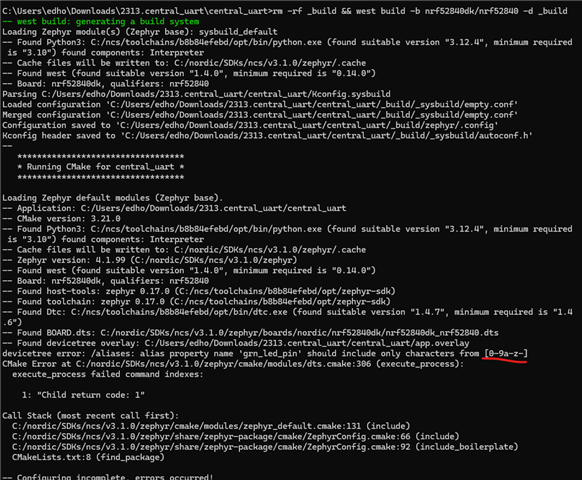
  • What NCS version are you using? I tried building it in v3.1.0, and it gave me this error, not the one that you saw:

    When I changed the app.overlay:

    /*
     * Copyright (c) 2023 Nordic Semiconductor ASA
     *
     * SPDX-License-Identifier: LicenseRef-Nordic-5-Clause
     */
    
    / {
    	 chosen 
    	 {
    		 nordic,nus-uart = &uart0;
    	 };
    	 leds 
    	 {
    		compatible = "gpio-leds";
    
            green_led_pin: green_led_pin 
    		{
                gpios = <&gpio1 10 GPIO_ACTIVE_LOW>;
                label = "green_led_pin";
            };
    		
    
    	};
    
    	aliases 
    	{
    		grn-led-pin = &green_led_pin;
    		led0 = &led0;
    	};
    
    };


    only on line 27, changing:

    grn_led_pin = &green_led_pin;

    to

    grn-led-pin = &green_led_pin;

    And then it built fine. (some warnings regarding arguement types).

    If you don't see what I am seeing, please let me know what NCS version you are using, and what your build command/build configuration is.

    Best regards,

    Edvin

  • Hi,

    OK, that does work, thank, you, but what on earth is that all about? I have used underscore in C for decades and never come across an issue with it before. Why can you not use underscores here? 

    The other thing that makes no sense here is that grn-led-pin  isn't actually used anywhere, so that is that all about? What is the point of the alias? 

  • I agree that this is a bit confusing. The DeviceTree language is different from C. You can read about the syntax documentation here, and it is also discussed on DevAcademy.

    And yes, it is confusing that you can't use underscore there, but when you translate it into C, to reference it, all "-" are translated to "_". 

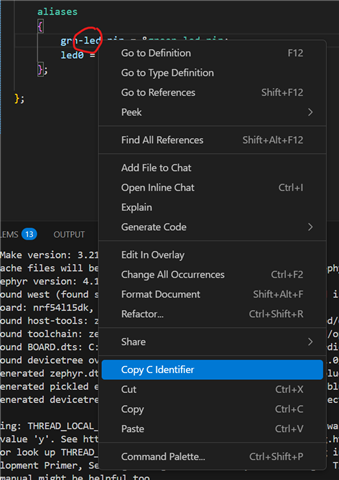
    One neat trick is, if you are using the nRF Connect for VS Code extension, you can right click elements in the devicetree files (.dts/.dtsi/.overlay), and select "Copy C Identifier". 

    It is a bit sensitive to what you right click, but e.g. if I copy the grn-led-pin:

    This is what is copied into the clipboard:

    DT_PROP(DT_PATH(aliases), grn_led_pin)

    which you can use in your C-files.

    Best regards,

    Edvin

  • OK, next question, what about input pins. I've spent another day trying to get this working. 

    I've added this to the overlay file.

    buttons
    {
    compatible = "gpio-keys";
    sel_sw_pin: sel_sw_pin
    {
    gpios = <&gpio0 29 (GPIO_PULL_UP | GPIO_ACTIVE_LOW)>;
    label = "sel_sw_pin";
    };
    };

    This is now the alias section

    aliases
    {
    grn-led-pin = &green_led_pin;
    led0 = &led0;

    blue-led-pin = &blue_led_pin;
    led1 = &led1;

    red-led-pin = &red_led_pin;
    led2 = &led2;

    sel-sw-pin = &sel_sw_pin;

    };

    But I get an error on the second line below:

    #define SWITCH_NODE DT_ALIAS(sel_sw_pin)
    static const struct gpio_dt_spec user_switch = GPIO_DT_SPEC_GET(SWITCH_NODE, gpios);

    With this familiar friend:

    message": "identifier \"__device_dts_ord_DT_N_ALIAS_sel_sw_pin_P_gpios_IDX_0_PH_ORD\" is undefined",

    It clearly is defined. :-(


    Also, I've tried adding this to the overlay:

    &uicr
    {
    nfct-pins-as-gpios;
    };

    And I get these errors:

    CMake Error at cmake/modules/sysbuild_extensions.cmake:514 (message):
      CMake configure failed for Zephyr project: central_uart

      Location: /home/robertw/Software/Nordic/custom_service/central_uart
    Call Stack (most recent call first):
      cmake/modules/sysbuild_images.cmake:20 (ExternalZephyrProject_Cmake)
      cmake/modules/sysbuild_default.cmake:20 (include)
      /home/robertw/ncs/v2.8.0/zephyr/share/zephyr-package/cmake/ZephyrConfig.cmake:75 (include)
      /home/robertw/ncs/v2.8.0/zephyr/share/zephyr-package/cmake/ZephyrConfig.cmake:92 (include_boilerplate)
      /home/robertw/ncs/v2.8.0/zephyr/share/sysbuild-package/cmake/SysbuildConfig.cmake:8 (include)
      template/CMakeLists.txt:10 (find_package)

    If I remove that and add this:

    &pinctrl {
    uart0_default: uart0_default {
    group1 {
    psels = <NRF_PSEL(UART_TX, 0, 10)>,
    <NRF_PSEL(UART_RTS, 0, 13)>;
    };
    group2 {
    psels = <NRF_PSEL(UART_RX, 0, 09)>,
    <NRF_PSEL(UART_CTS, 0, 15)>;
    bias-pull-up;
    };
    };
    };
    I get these errors:

      Location: /home/robertw/Software/Nordic/custom_service/central_uart
    Call Stack (most recent call first):
      cmake/modules/sysbuild_images.cmake:20 (ExternalZephyrProject_Cmake)
      cmake/modules/sysbuild_default.cmake:20 (include)
      /home/robertw/ncs/v2.8.0/zephyr/share/zephyr-package/cmake/ZephyrConfig.cmake:75 (include)
      /home/robertw/ncs/v2.8.0/zephyr/share/zephyr-package/cmake/ZephyrConfig.cmake:92 (include_boilerplate)
      /home/robertw/ncs/v2.8.0/zephyr/share/sysbuild-package/cmake/SysbuildConfig.cmake:8 (include)
      template/CMakeLists.txt:10 (find_package)

    It tells me look at CMakeOutput.log

    But that has the hilariously unhelpful:

    The system is: Linux - 6.6.105-desktop-1.mga9 - x86_64

    Line and nothing else in it. :-(


Reply
  • OK, next question, what about input pins. I've spent another day trying to get this working. 

    I've added this to the overlay file.

    buttons
    {
    compatible = "gpio-keys";
    sel_sw_pin: sel_sw_pin
    {
    gpios = <&gpio0 29 (GPIO_PULL_UP | GPIO_ACTIVE_LOW)>;
    label = "sel_sw_pin";
    };
    };

    This is now the alias section

    aliases
    {
    grn-led-pin = &green_led_pin;
    led0 = &led0;

    blue-led-pin = &blue_led_pin;
    led1 = &led1;

    red-led-pin = &red_led_pin;
    led2 = &led2;

    sel-sw-pin = &sel_sw_pin;

    };

    But I get an error on the second line below:

    #define SWITCH_NODE DT_ALIAS(sel_sw_pin)
    static const struct gpio_dt_spec user_switch = GPIO_DT_SPEC_GET(SWITCH_NODE, gpios);

    With this familiar friend:

    message": "identifier \"__device_dts_ord_DT_N_ALIAS_sel_sw_pin_P_gpios_IDX_0_PH_ORD\" is undefined",

    It clearly is defined. :-(


    Also, I've tried adding this to the overlay:

    &uicr
    {
    nfct-pins-as-gpios;
    };

    And I get these errors:

    CMake Error at cmake/modules/sysbuild_extensions.cmake:514 (message):
      CMake configure failed for Zephyr project: central_uart

      Location: /home/robertw/Software/Nordic/custom_service/central_uart
    Call Stack (most recent call first):
      cmake/modules/sysbuild_images.cmake:20 (ExternalZephyrProject_Cmake)
      cmake/modules/sysbuild_default.cmake:20 (include)
      /home/robertw/ncs/v2.8.0/zephyr/share/zephyr-package/cmake/ZephyrConfig.cmake:75 (include)
      /home/robertw/ncs/v2.8.0/zephyr/share/zephyr-package/cmake/ZephyrConfig.cmake:92 (include_boilerplate)
      /home/robertw/ncs/v2.8.0/zephyr/share/sysbuild-package/cmake/SysbuildConfig.cmake:8 (include)
      template/CMakeLists.txt:10 (find_package)

    If I remove that and add this:

    &pinctrl {
    uart0_default: uart0_default {
    group1 {
    psels = <NRF_PSEL(UART_TX, 0, 10)>,
    <NRF_PSEL(UART_RTS, 0, 13)>;
    };
    group2 {
    psels = <NRF_PSEL(UART_RX, 0, 09)>,
    <NRF_PSEL(UART_CTS, 0, 15)>;
    bias-pull-up;
    };
    };
    };
    I get these errors:

      Location: /home/robertw/Software/Nordic/custom_service/central_uart
    Call Stack (most recent call first):
      cmake/modules/sysbuild_images.cmake:20 (ExternalZephyrProject_Cmake)
      cmake/modules/sysbuild_default.cmake:20 (include)
      /home/robertw/ncs/v2.8.0/zephyr/share/zephyr-package/cmake/ZephyrConfig.cmake:75 (include)
      /home/robertw/ncs/v2.8.0/zephyr/share/zephyr-package/cmake/ZephyrConfig.cmake:92 (include_boilerplate)
      /home/robertw/ncs/v2.8.0/zephyr/share/sysbuild-package/cmake/SysbuildConfig.cmake:8 (include)
      template/CMakeLists.txt:10 (find_package)

    It tells me look at CMakeOutput.log

    But that has the hilariously unhelpful:

    The system is: Linux - 6.6.105-desktop-1.mga9 - x86_64

    Line and nothing else in it. :-(


Children
  • Can you please upload your application, and state clearly what pins you want to use, and I can try to have a look?

    Also, when you are pasting code snippets, it is easier to read (indentation is much better) if you use "insert"->"Code" here in DevZone.

    BR,
    Edvin

  • central_uart_11_11.zip

    File attached.
    I have a switch on Port 0 29.
    UART Out is on P 0 10,
    UART in is on P0 09

    RTS 0 13
    CTS 0 15

    Although I am pretty sure we won't use those last two flow control pins and do NOT want to use them to start with.

    Point taken on the formatting

  • Hello,

    FYI, I just looked through some of the warnings, such as this one:

    This snippet:

    	get_mac_addr(read_mac_addr);
    	if ((SCAN_FOR_NAME == scan_type) || (true == check_blank_addr(read_mac_addr)))
    	{
    		err = bt_scan_filter_add(BT_SCAN_FILTER_TYPE_NAME, DEVICE_NAME);
    		filter_type = SCAN_FOR_NAME;
    		new_pairing = true;
    	}
    	else if (SCAN_FOR_ADDR == scan_type)
    	{						
    		addr.type = BT_ADDR_LE_RANDOM;
    		for (i=0; i<BT_ADDR_LE_STR_LEN; i++)
    			addr.a.val[i] = read_mac_addr[i];	
    		err = bt_scan_filter_add(BT_SCAN_FILTER_TYPE_ADDR, &addr);	
    		filter_type = SCAN_FOR_ADDR;			
    	}

    BT_ADDR_LE_STR_LEN = 30, and the add.a.val[i] ony have 6 elements, so you risk corrupting your RAM when writing outside the initial 6 elements in the array. You should definitiely look into this. Use "i < BT_ADDR_SIZE" instead of "BT_ADDR_LE_STR_LEN".

    Please see the attached projec.t I modified the app.overlay, added the sleep configuration for the UART, and also added the "&uicr", which is needed to be able to use the NFC pins as normal GPIOs.

    I also added a small function (test_overlay_function()) in main.c, just to check that everything is working. 

    Note that if you are testing on a DK, the NFC pins (P0.09 and P0.10) is not routed out to the pin header without moving some 0R resistors. That should be fine if you have a custom board.

    5086.ccust_uart.zip

    Best regards,

    Edvin

  • Many thanks, will read through more thoroughly it and give it a go. 

    In the meantime, after a quick scan, one question: what is the situation with the input pin on P0 29 please? There doesn't seem to be anything for the issue where it was claiming: 

    message": "identifier \"__device_dts_ord_DT_N_ALIAS_sel_sw_pin_P_gpios_IDX_0_PH_ORD\" is undefined",


    Thanks again. 

  • Oh, sorry. I just went with what I saw in the app.overlay.

    The idea is that you copy the parts that you want to change from the board files, paste it in your app.overlay, and change it in the app.overlay.

    I added it in the app.overlay of this project (as well as some minor, non important changes in my test_overlay_function() in main.c):

    ccust_uart2.zip

    Best regards,

    Edvin

Related